OnlyFans Account Hacked? What To Do Now
If you’re reading this with that sinking feeling in your stomach, take a breath. Most creators lose the most money and privacy in the first hour after an acc...
If you’re reading this with that sinking feeling in your stomach, take a breath. Most creators lose the most money and privacy in the first hour after an account takeover, not because they did anything “wrong”, but because panic leads to rushed moves.
This guide is a calm, practical incident-response plan for creators: what to do in the first 15 minutes, what to document, how to contact support, how to protect payouts, and how to reduce the odds it happens again.
First: confirm it’s actually a hack (not a glitch)
Before you start changing everything, check for signals that your account access or settings truly changed.
Common signs of an OnlyFans account takeover:
- You can’t log in and your password “suddenly” doesn’t work.
- Your email or phone on the account looks different.
- Payout details changed (bank, payout method, payout email).
- Fans say they received weird links, “meetup” messages, or aggressive PPV pushes that do not sound like you.
- You see posts, mass messages, or price changes you didn’t make.
Also possible (and less scary) explanations:
- Your email account got locked, so password resets are not reaching you.
- You’re logged into an old device with a cached session, but your “real” credentials are fine.
- You typed the password into a phishing site and now someone is trying to log in.
If you see any payout change, new messages you didn’t send, or your email changed, treat it as a real incident.
The first 15 minutes: contain the damage (do this in order)
Your goal is to stop the attacker from:
- Keeping access
- Changing payout info
- Scamming fans in your name
- Exporting your content
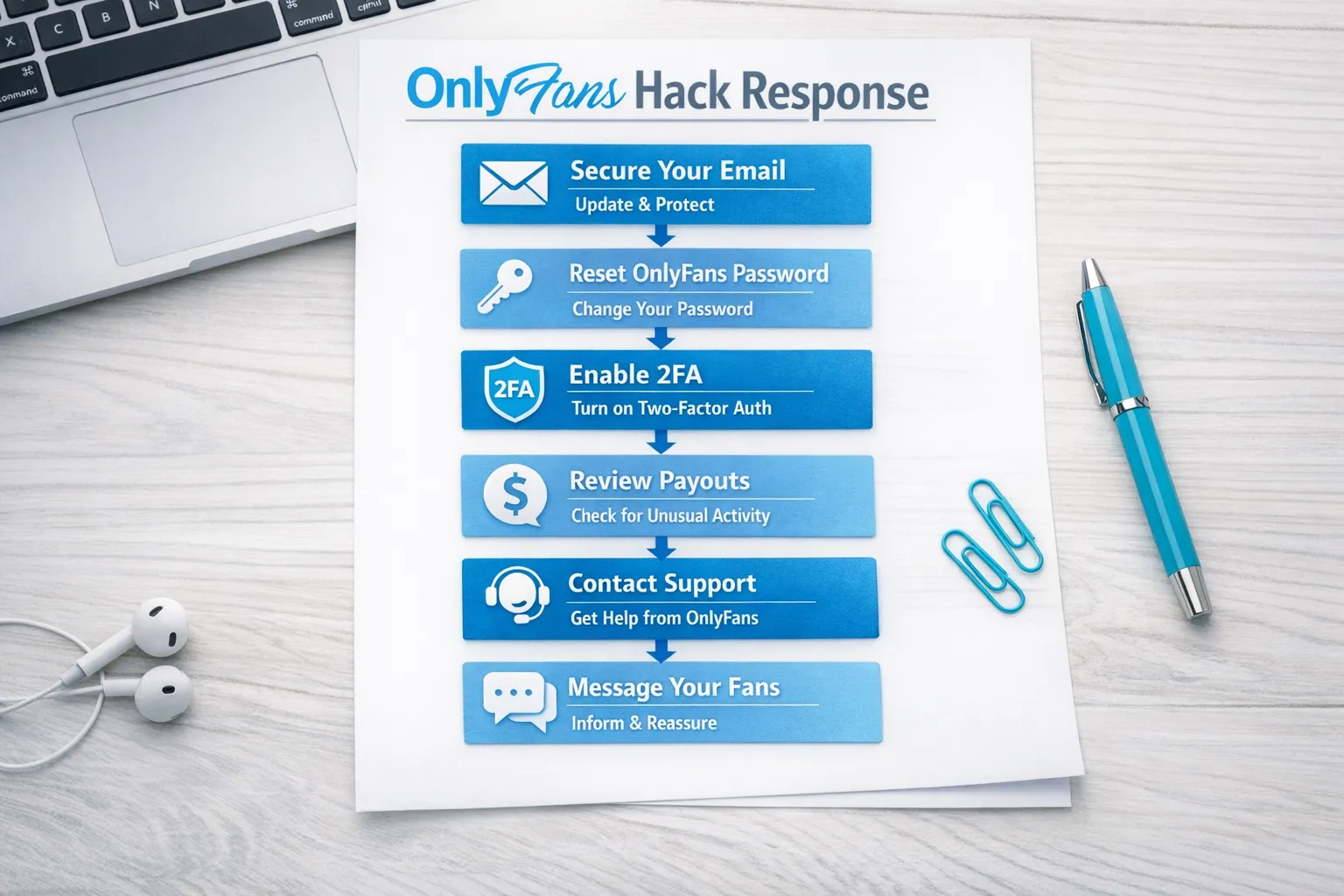
15-minute containment checklist
- Secure your email first (the email connected to OnlyFans). Change the email password, turn on 2FA, and check login activity. If they control your email, they control your resets.
- Reset your OnlyFans password (from a clean device). Use a brand-new password you have never used anywhere else.
- Turn on 2FA on OnlyFans if it is available in your settings. Prefer an authenticator app over SMS when possible.
- Log out other sessions/devices if you have that option in your account settings.
- Check payout settings immediately and screenshot what you see.
- Check your profile basics (subscription price, bio links, pinned posts) for changes.
- Stop clicking any “support” links in DMs. Go directly to the official site and official Help/Support pages.
If you can still access your account, do not spend the first 15 minutes messaging fans. Lock down access and payouts first.
If you’re locked out: what to do (and what to send support)
If you can’t log in at all, your best move is a clean, documented recovery request.
Step 1: secure your email anyway
Even if you cannot access OnlyFans, secure the email that was used for the account.
- Change email password
- Turn on 2FA
- Review “security” or “recent activity” pages
- Check forwarding rules (attackers sometimes auto-forward resets)
Step 2: contact OnlyFans support through official channels
Policies and support workflows can change, so use the official Help/Support area inside the platform or the official OnlyFans support pages.
When you contact support, include clear proof and a tight timeline.
Copy/paste: hacked account support message template
Subject: Account takeover, urgent access and payout security
Message:
Hi Support,
My OnlyFans creator account appears to be compromised. I’m unable to access my account (or: I regained access but settings were changed).
What changed (list all that apply):
- Password changed without my permission
- Email/phone changed
- Payout details changed
- Unauthorized messages/posts were sent
Time noticed: [date + time + time zone]
I can verify ownership with:
- Original email address used on the account: [your email]
- Username/profile link: [your username]
- Approximate last payout date/amount (if you know it): [optional]
- Screenshots of suspicious activity: [attach]
Please help me:
- Restore account access and revert any unauthorized email/phone changes
- Secure payout settings and prevent unauthorized payouts
- Review recent logins/devices and remove unauthorized access
Thank you, [Your name]
Keep it factual and short. Support teams respond better to clear checklists than long emotional messages (even though your feelings are completely valid).
Protect your payouts: assume the attacker is after money
Account hacks on creator platforms often have one of two goals:
- Change payout details to steal your next withdrawal
- Use your account to scam fans through DMs
What to check in payout settings
Look specifically for anything that could redirect money:
- Bank account or payout method details
- Any payout email address (if applicable)
- Any “pending” payout requests you didn’t initiate
If you see a change you didn’t authorize, document it with screenshots and report it to support immediately.
If your bank details were exposed or changed
Contact your bank or payment provider. Ask what they recommend for suspected account fraud and whether any extra monitoring or restrictions are needed.
This is educational, not legal or financial advice. Bank procedures and consumer protections vary by country and can change.
Protect your fans: stop the “message scam” fast (without causing chaos)
If the attacker is DM-ing your subs, they may:
- Push “payment off-platform”
- Send malicious links
- Promise meetups
- Try to extract personal info
Once you have access back, send one simple message that protects your audience and your brand.
Copy/paste: calm message to subscribers
Hey love, quick safety note: my account had a security issue today and I’m fixing it.
If you received any strange links or requests that don’t sound like me, please ignore them and don’t click anything.
I’ll be back to normal shortly. Thank you for being patient and for looking out for me.
You can also pin a short version of this to your profile temporarily.
Content safety: minimize leaks after a hack
A hack increases the risk of:
- Your vault being scraped
- Old PPVs being redistributed
- Your promo content being reposted with your links replaced
What you can do right now:
- Change passwords everywhere you reused them (email, social accounts, cloud storage).
- Add watermarks to future content (it will not stop leaks, but it helps prove ownership and speeds takedowns).
- Start a simple leak log: URL, date found, what content, screenshots, status.
If leak protection is a constant worry, this is one area where professional support can be worth it. Lookstars explicitly lists monitoring plus DMCA takedowns as part of its creator support (learn more about the agency approach in the broader safety context of OnlyFans scams and how creators get robbed).
Why creators get hacked (so you can fix the real cause)
Most takeovers come from a few predictable paths:
- Password reuse (one old data breach, then everything falls)
- Phishing (fake “OnlyFans support” pages, fake brand deals)
- Weak email security (no 2FA, compromised recovery phone)
- Shared access gone wrong (ex, “manager”, chatter, or friend)
A hack is often an email security problem first, and an OnlyFans problem second.
Post-incident hardening: your “never again” setup (60 minutes)
Here’s a practical security setup you can do in one sitting.
The creator security stack (simple, realistic)
- Use a password manager and create unique passwords
- Turn on 2FA for:
- OnlyFans
- Instagram/X/TikTok/Reddit
- Cloud storage (Google Drive, iCloud)
- Create a dedicated “creator email” that you do not use anywhere else
- Review account recovery methods (old phone numbers, old emails)
- Remove unnecessary logged-in devices
Quick table: threat, impact, best fix
| Threat | What it can cost you | Best prevention move |
|---|---|---|
| Password reuse | Total account takeover | Unique passwords via a manager |
| Phishing links | Stolen login, stolen payouts | Never log in from links, type the URL yourself |
| Weak email security | Lost resets, lockouts | Email 2FA + recovery review |
| Shared account access | “Inside job” changes to payouts | Clear access rules, revoke access on exit |
| Public identity overlap | Doxxing risk | Separate usernames, privacy-first promo |
If anonymity is part of your safety plan, you’ll also like How to secretly promote your OnlyFans (without friends or family finding out). A lot of “hacks” are really identity leaks plus social engineering.
If someone else had access (agency, manager, chatter): what to do
This is delicate, but important. If you ever shared login access, treat the incident like both a security problem and an operations problem.
Immediate steps
- Revoke access first (password + 2FA reset)
- Export and save your business-critical info (posting plan, VIP notes, pricing notes)
- Document who had access and when
Decision framework: who should have access going forward?
If you want to keep outsourcing, your safest path is working with a team that:
- Has clear, written processes
- Is transparent about who is chatting and what they’re allowed to say
- Uses privacy protection as a standard, not an upsell
If you are currently deciding between staying solo or bringing in help, this breakdown helps you choose based on your real bottleneck (traffic, conversion, or retention): Working with an agency vs running OnlyFans alone.
If you suspect the “help” you hired was the problem, also review these OnlyFans agency red flags before you give anyone access again.
What not to do (even if you’re scared)
These mistakes can make recovery slower:
- Don’t post your legal name, ID, or private screenshots publicly to “prove” you were hacked.
- Don’t pay someone on Telegram or Instagram who claims they can “hack it back.” That is almost always a scam.
- Don’t move fans to random off-platform payment links in a panic.
- Don’t ignore the email account. It is usually the root of the takeover.
Frequently Asked Questions
How long does it take to recover a hacked OnlyFans account? It depends on whether you still control your email, what settings were changed, and support response time. Focus on containment first, then provide support with clean documentation.
Should I tell my subscribers my account was hacked? If fans may have received suspicious DMs or links, yes, a short calm message protects them and protects your reputation. Keep details minimal.
Can a hacker steal my next payout? If they change payout settings or initiate payout requests, that’s a risk. Check payout settings early, document changes, and contact support fast.
Is 2FA enough to prevent this forever? 2FA helps a lot, but it’s not magic. If your email recovery methods are weak, or you fall for phishing, you can still get compromised.
What if I shared my login with a chatter or manager? Reset passwords, enable 2FA, and revoke sessions immediately. Then review your outsourcing setup. If you want chat help without full access, read OnlyFans agency vs chatter services.
Does leak protection remove everything instantly? No service can promise that. Takedowns and monitoring reduce harm and speed removals, but the internet is messy. The realistic goal is faster detection, more removals, and less spread over time.
Want help securing and running your account without burning out?
If your OnlyFans account being hacked made you realize you need a more professional, privacy-first setup, Lookstars can help you stabilize and scale without upfront costs or long-term lock-ins. Their support focuses on the parts creators tend to struggle with most: marketing and fan growth, 24/7 fan chatting, posting strategy, and leak protection.
You can learn more about how Lookstars works at lookstarsagency.com and apply when you’re ready. No pressure, just make sure you protect your email, your payouts, and your peace first.



Ready to transform your career?
Join hundreds of creators already earning six figures with Lookstars Agency.
Share this article
Best OnlyFans Agency
Europe's Leading OnlyFans Management Agency.

100% Free Ebook
Get our guide and unlock the secrets to OnlyFans success.
100% Free Ebook
Get our guide and unlock the secrets to OnlyFans success.
Free Revenue Calculator & Profile Analyzer
Try them for freeContinue reading...

Am I Attractive Enough for an OnlyFans Agency? The Answer

Can You Ever Fully Delete Your OnlyFans Content? The Reality
