Can You Ever Fully Delete Your OnlyFans Content? The Reality
If you are thinking, “I’ll just delete everything and it’ll be gone,” you deserve a clear, honest answer. . . You can delete your content from your OnlyFans ...
If you are thinking, “I’ll just delete everything and it’ll be gone,” you deserve a clear, honest answer.
You can delete your content from your OnlyFans profile, and you can delete (or deactivate) your OnlyFans account, but you cannot fully control what other people have already saved, copied, screenshot, screen-recorded, or reposted. That is not you failing, it is how the internet works.
This guide breaks down what “deleting” can realistically mean, what parts you can actually clean up, and a practical plan to reduce your footprint as much as possible.
The reality: “Deleted from OnlyFans” is not the same as “erased from the internet”
When creators ask if they can fully delete OnlyFans content, they are usually asking about three different things:
- Platform removal: Your posts, messages, and media no longer appear on your OnlyFans page.
- Subscriber access removal: Past subscribers can no longer view content they previously had access to.
- Internet removal: Copies posted elsewhere (leak sites, forums, social DMs, cloud folders) disappear too.
Only the first one is fully in your control.
The second and third depend on factors you do not control, like what a subscriber did while they had access, and where a copy traveled afterward.
Why content can still exist after you “delete”
Even if a platform removes a file from your profile, a copy may still exist because:
- A fan took screenshots.
- A fan used screen recording.
- A fan reposted to a forum, group chat, or leak site.
- Someone mirrored it to cloud storage.
- Search engines or third-party sites cached a page (less common for paywalled pages, but common for promo pages and link hubs).
This is also why creators who never “got leaked” sometimes discover old teasers on random accounts years later.
What you can realistically achieve (and what you can’t)
Here is a simple framework I give creators who feel anxious and want certainty.
| Goal | What’s realistic | What’s not realistic |
|---|---|---|
| Remove content from your OnlyFans page | Yes, you can delete posts and media you control | None |
| Stop future access | Yes, by pausing, paywalling, deleting, and tightening privacy settings | You cannot undo what already happened |
| Reduce leaks and reposts | Yes, with monitoring and takedowns | You cannot guarantee “zero copies” |
| Make it hard to find | Yes, with privacy, SEO cleanup, and consistent takedown work | You cannot force the entire internet to forget |
If your mental goal is “I want a 100% guarantee,” please be gentle with yourself: that is an understandable desire, but it is not a promise any honest person can make.
The biggest misconception: “If I delete my account, my content disappears everywhere”
Deleting your account can remove your profile from the platform, but it does not retroactively delete what other people captured.
If you are deciding between “pause” vs “delete,” ask yourself this:
- Are you leaving because you want boundaries and relief right now? A pause plus privacy tightening might give you breathing room.
- Are you leaving because the risk feels unacceptable long-term? Deleting can still make sense, even if it is not a perfect eraser.
- Are you leaving because of a leak or a doxxing scare? You may need a cleanup plan either way.
If your situation involves harassment, stalking, or real-world safety concerns, consider getting professional support (legal and personal safety) immediately.
A practical “privacy-first” cleanup plan (minimize the footprint)
This is the part that actually helps: the goal is not perfection, it is reduction.
Step 1: Stop new spread first (before you start deleting)
Before you delete anything, reduce the chance of new copying.
- Turn off auto-renew promotions or new promos you planned.
- Consider temporarily limiting posting.
- Tighten privacy settings you already have access to, like region controls and safety features.
Lookstars also helps creators set up privacy controls like country blocking and security setup, especially for creators who are worried about local discovery. (If you want more privacy tactics, see our guide on promoting anonymously.)
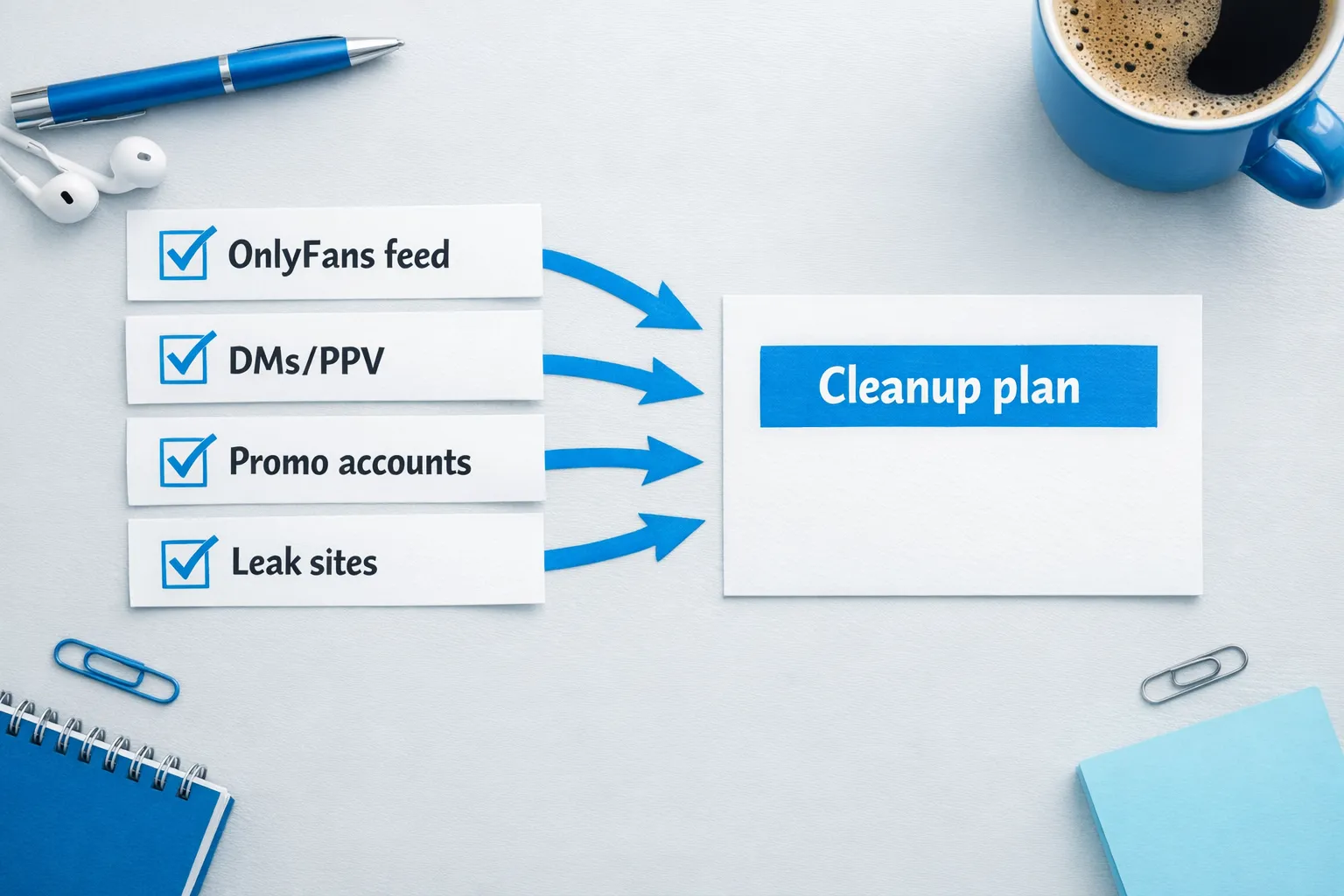
Step 2: Inventory what exists (you cannot clean what you can’t list)
Make a quick inventory so you know what you are trying to remove.
- Your OnlyFans feed posts
- PPV messages (mass and 1:1)
- Custom content deliveries
- Your promo content on X, Reddit, Instagram, TikTok, link-in-bio pages
- Any known leak URLs (even if it is only 1)
If you are overwhelmed, start with promo first. Promo is usually the most searchable.
Step 3: Remove from your own surfaces (fast wins)
This is where you get immediate control back.
- Delete or archive your promo posts that contain recognizable images.
- Remove your link hub and old tracking links.
- Change profile images and banners that are easily reverse-image searched.
- If you used the same username across platforms, consider a cleanup (or a full rebrand).
This is also where “friends and family finding out” risk usually lives, not inside OnlyFans itself.
Step 4: Takedowns (the part that takes persistence)
If your content is already posted elsewhere, you are in takedown territory.
Important note: This is educational, not legal advice. Policies and laws can change. Verify with official sources or a professional.
Your main options typically include:
- DMCA takedowns to hosting providers and sites that reposted your copyrighted content.
- Search engine removals that can de-index results in some cases (this does not always remove the content from the source, it can reduce discoverability).
- Platform reporting (social apps, forums, adult sites) using their reporting tools.
For official references, you can review OnlyFans’ own documentation and policies in their Terms of Service and help resources (policies can change, so always check current docs).
Lookstars supports creators with content leak protection (monitoring plus DMCA takedowns), because the hardest part is not sending one notice, it is staying consistent and organized when copies pop up again.
Step 5: Decide whether to pause, delete content, or delete the account
Here is a decision guide that is honest about tradeoffs.
| Option | Best for | Tradeoffs to consider |
|---|---|---|
| Pause and tighten privacy | Creators who need a break but may return | Content still exists, and past risk factors may still exist |
| Delete specific posts and media | Creators who want to reduce what is live now | It does not touch copies outside your profile |
| Full account deletion | Creators who want a clear exit point | It is not a magic eraser for leaks, and you still may want takedowns |
If you worked with an agency, chatter, or manager, your deletion decision should also include access hygiene (more on that below).
“Before you delete” checklist (so you don’t create new problems)
Deleting in a panic can lead to mistakes that are hard to fix later.
Use this checklist first:
- Confirm you received any payouts you are expecting.
- Save business records you may need for taxes (income summaries, expense logs, invoices for contractors). For bookkeeping habits, see OnlyFans Taxes: Weekly Habit to Stay Organized.
- Backup any content you might want to keep privately (only if it is safe for you to keep it).
- Update passwords and enable strong account security on connected emails and social accounts.
- Remove third-party access (team members, tools, old devices).
If you feel conflicted, it can help to set a 72-hour “cool-off” rule: lock things down first, then delete once you feel steady.
If you used an agency, manager, or chatter: do this before you exit
This is a trust and security issue, not drama.
- Confirm who has login access and remove it cleanly.
- Change passwords and enable two-factor authentication where possible.
- Get clarity on content ownership, storage, and who has copies.
- Ask for written confirmation that access has been revoked.
If you are currently evaluating help, read OnlyFans Agency vs Chatter Services: What’s Better? and our safety guide on common agency scams.
A copy-paste takedown template (use carefully)
Again, educational only, not legal advice.
You can adapt this when contacting a website host, forum admin, or platform abuse team:
Subject: Copyright removal request
Message: Hello,
I am the copyright owner of the content at the following URL(s):
- [paste URL]
This content was posted without my permission. I request that you remove or disable access to it.
My contact email is: [email]
Thank you, [Your name or legal name, depending on what the platform requires]
Tip: keep a simple spreadsheet of URLs, dates, and outcomes. Takedowns are often a volume and consistency game.
What to do if your face is in the content (and you’re scared)
If your face is visible, your focus should be “reduce discoverability,” not “erase the past overnight.” That usually means:
- Remove recognizable promo images first.
- Replace profile photos on public platforms.
- Avoid re-uploading the same images anywhere else.
- Consider switching to a no-face strategy if you continue in adult content.
If you are staying on the platform but changing your approach, this guide can help: How to Make Money on OnlyFans without Showing Your Face.
Frequently Asked Questions
Can you ever fully delete your OnlyFans content? You can delete content from your OnlyFans page, but you cannot guarantee deletion of copies that subscribers captured or reposted elsewhere.
If I delete my OnlyFans account, can subscribers still see my old content? Deleting your account can remove your page from the platform, but it cannot undo screenshots or screen recordings subscribers may have saved.
Can leak sites be forced to remove my content? Sometimes, yes, through reports and DMCA-style takedown requests, but results vary by site and jurisdiction. This is educational, not legal advice.
Will deleting my promo posts help? Yes. Promo posts are often the easiest entry point for discovery (reverse image search, username search, repost accounts). Cleaning promo can reduce future exposure.
Is “content leak protection” actually worth it? It can be, if you have consistent earnings or high privacy risk and you want ongoing monitoring plus takedowns. It is less helpful if your content never spread beyond your own private account and you are not searchable elsewhere.
What if I’m too overwhelmed to handle this alone? Start with the fastest wins (privacy settings and promo cleanup), then get support for the takedown process. If you want help with leak monitoring and privacy setup, a management team can handle the operational load.
Want help reducing your footprint (without guessing)?
If you are dealing with leaks, impersonators, or privacy anxiety, you do not have to handle it alone.
Lookstars is an OnlyFans management agency that supports creators with content leak protection (monitoring plus DMCA takedowns), privacy setup (including country blocking and security setup), and account operations so you can focus on your life and content boundaries.
You can learn what working together looks like in our honest breakdown, Lookstars Agency Review: Pros, Cons & Tradeoffs, or apply directly at Lookstars.



Ready to transform your career?
Join hundreds of creators already earning six figures with Lookstars Agency.
Share this article
Best OnlyFans Agency
Europe's Leading OnlyFans Management Agency.

100% Free Ebook
Get our guide and unlock the secrets to OnlyFans success.
100% Free Ebook
Get our guide and unlock the secrets to OnlyFans success.
Free Revenue Calculator & Profile Analyzer
Try them for freeContinue reading...

Am I Attractive Enough for an OnlyFans Agency? The Answer

What To Do If a Fan Threatens You On OnlyFans: Full Step-by-step Guide