No-Show Prevention for Paid Live Sessions
Paid live sessions can be one of the fastest ways to create high-ticket income on OnlyFans, but they come with one very specific stressor: the no-show. . . I...
Paid live sessions can be one of the fastest ways to create high-ticket income on OnlyFans, but they come with one very specific stressor: the no-show.
If you’ve ever cleared your schedule, got ready, turned down other plans, and then… nothing, you already know how expensive (and emotionally draining) that “maybe” can be.
This guide is a practical, creator-friendly system for no-show prevention for paid live sessions. It’s not about blaming fans. It’s about building a booking flow that makes showing up the easiest option, and protects you when they don’t.
Note: This is educational, not legal or tax advice. Policies can change, verify anything platform-specific in official docs before you implement it.
First, a key clarity about OnlyFans live
On OnlyFans, a livestream is for your subscribers (paid or free, depending on how your page is set up and who has access). In other words, it’s not a “private live” the way a 1:1 cam call is on other platforms.
That matters because many “no-shows” are really expectation mismatches:
- The fan thinks it will be 1:1, then realizes it’s a subscriber livestream and disappears.
- You think it will be 1:1, prepare like it’s 1:1, and then get stressed when they do not arrive.
So your system needs to do two things at once:
- Make it crystal clear what they are buying (access, time, and experience).
- Protect your time even though the live itself is for all eligible subscribers.
Why paid live no-shows happen (and why it’s not always “flaky buyers”)
Before you build rules, it helps to understand what you’re designing around. Most no-shows fall into a few patterns:
- Time zone confusion (especially with international fans, or daylight savings changes).
- Impulse buying (they were turned on, tipped/paid, then lost interest later).
- Friction + anxiety (they’re nervous, embarrassed, hiding from a partner, or afraid of being “seen” online).
- Bad logistics (they don’t know where to join, their app won’t load, they forgot their password).
- Power testing (some people treat creators like “on call” entertainment and see what they can get away with).
Your goal is to reduce the first four and filter out the last one.
Step 1: Choose a live format that naturally reduces no-shows
Not all “paid live” offers carry the same risk. Here’s a simple decision framework to pick what fits your audience and your stress tolerance.
| Live offer type | How it works on OnlyFans | No-show risk | Best for | Main drawback |
|---|---|---|---|---|
| Ticketed live stream | You set a time, promote it, eligible subscribers join live | Lower (group momentum) | Growth + community + tips | Less personalized |
| Subscriber live + VIP upsell | Live is for subscribers, VIPs pay for extra attention during the live | Low to medium | Consistent income without relying on one person | Requires confident moderation |
| Scheduled “featured fan” segment | You schedule a time, the live is for subscribers, but you plan a dedicated segment for a specific fan who pays | Medium | High spenders who want a spotlight moment | Still relies on one fan showing up |
| Small-group VIP live | Limited spots, higher price, more intimacy, still a subscriber live format | Medium | Mid/high spenders, safer than relying on one person | More coordination |
If you’ve been structuring your offer like a 1:1 private call, the quickest stabilization move is usually shifting toward ticketed or VIP small-group framing. You can still make it feel personal, but you are no longer dependent on one person being online.
If you need help setting up a more professional live stream structure (equipment, pricing, promotion), pair this article with Lookstars’ guide: How to Stream on OnlyFans Live Like a Pro.
Step 2: Pre-qualify before you ever build your live around one fan
A time slot is inventory. Treat it like it.
Pre-qualification does two things:
- It makes the buyer “invest” mentally before paying.
- It catches logistical issues early (time zone, expectations, boundaries).
The 4-question pre-qualifier (copy/paste)
Use this when someone asks for a “private live” or something that sounds like 1:1.
Message template:
“Yesss we can do a live 😇 Quick details so I set it up right:
- What time zone are you in?
- Do you want it sweet and teasing, or more intense?
- How long do you want the live vibe to be, 10 min or 20 min?
- Just to confirm, this will be a subscriber livestream on my OnlyFans (not a 1:1 private call). You want a VIP focus during it?”
Why this works: it moves them from “fantasy” into “booking behavior” while removing the most common misunderstanding (thinking it’s private).
Add one boundary question (only if you need it)
If you offer specific styles (no face, no name, no certain requests), add:
“Any hard limits you want me to respect? I’m big on boundaries and keeping it comfy for both of us.”
This reduces awkwardness during the live and prevents “surprise expectations” that lead to ghosting.
Step 3: Use a payment structure that protects you (without scaring good buyers)
No-show prevention is mostly payment design.
You do not need to be harsh. You need to be clear.
Common payment approaches (and when to use each)
| Payment approach | What you tell the fan | Best for | Risk |
|---|---|---|---|
| Full prepay to reserve a VIP focus | “Payment reserves your VIP focus during the live.” | Most creators, most situations | Some fans push back |
| Pay at start only | “Tip when we begin and I’ll focus on you.” | Returning, trusted whales | Highest no-show risk |
| Prepay + clear reschedule rules | “If you miss the live, I can roll your VIP focus to the next one once.” | Good balance for loyal fans | Requires enforcement |
Important: Different platforms have different tools and rules around paid lives, tips, and paid messages. Keep your structure inside what your platform supports, and avoid promising “deposits” or mechanisms you can’t reliably enforce.
A simple, creator-safe policy that works in real life
If you want something that feels fair and professional:
- VIP focus is confirmed with full payment.
- One free rollover if they message you before start time (you move their VIP focus to your next scheduled live).
- If they ghost, you treat it as paid access and reserved attention, and you offer an optional paid alternative like a custom clip or PPV.
You’re not punishing them. You’re pricing your time and attention.
If you want to improve how you sell paid offers inside DMs (without sounding cold), you’ll also like: How to Sell Content on OnlyFans: A Step-by-Step Guide.
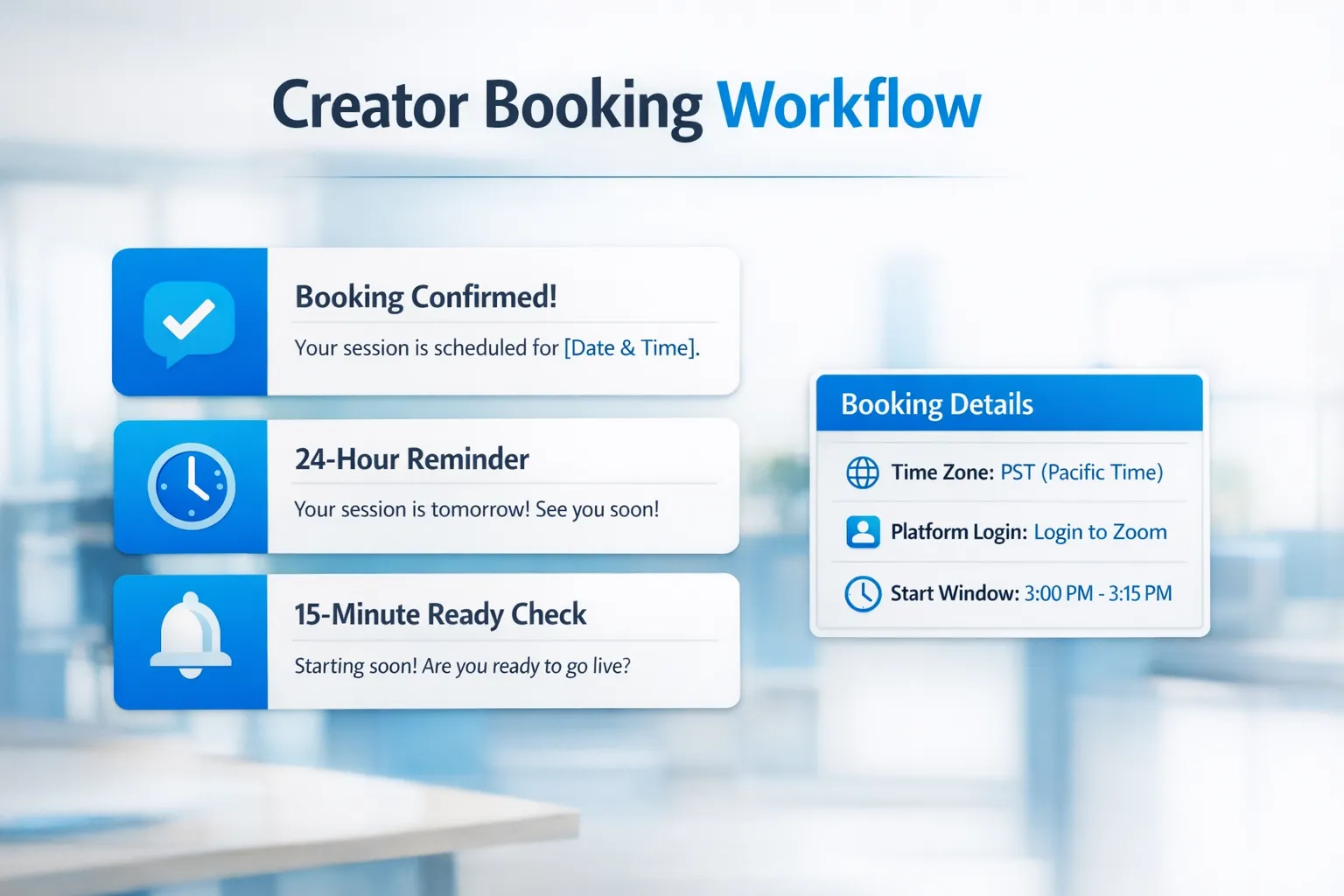
Step 4: Run a “3-touch” confirmation sequence (this is where no-shows die)
Most creators do one reminder. High show-up rates usually come from a short sequence that feels sexy, not administrative.
Here’s the system:
- Touch #1: After payment (immediate confirmation)
- Touch #2: 24 hours before (or same day if it’s soon)
- Touch #3: 15 minutes before (final check-in)
Touch #1: Immediately after payment
“Perfect, you’re locked in 💕 I’m going live on [DAY] at [TIME] [TIME ZONE].
It’s a subscriber livestream, and I’ll give you VIP focus during it. I’ll message you 15 min before so you do not miss it. What vibe are you craving, sweet tease or dirty talk? 😇”
This does three jobs: confirms details, sets expectation of reminders, and starts the mental foreplay.
Touch #2: The day before (or morning of)
“Just confirming for tomorrow babe: [DAY] [TIME] [TZ]. Reply ‘YES’ so I know you’re still good 😘”
If they don’t reply, you’re seeing risk early, and you can stop emotionally committing.
Touch #3: 15 minutes before
“I’m about to go live 😇 You still joining in 15? Reply ‘READY’ so I know to save your VIP focus.”
This message is the final filter. If they don’t answer, you still go live if you planned to, but you stop centering the session around them.
Step 5: Reduce friction with one “how to join” card
Some no-shows are literally tech stress.
Make it idiot-proof and calm.
Send a short “how to join” message right after payment:
“Quick note so it’s smooth:
- Make sure your app is updated
- Be logged in 5 min early
- If your Wi‑Fi is shaky, switch to data
- When I go live, you’ll see it inside OnlyFans, tap to join
- If anything glitches, message me here and I’ll guide you”
You can also screenshot a simple checklist graphic and reuse it every time.
Step 6: Add a “show-up incentive” that doesn’t destroy your pricing
The incentive should reward attendance, not discount your worth.
Good options:
- Live-only bonus: “If you’re on time, I’ll add a little extra at the end 😇”
- After-show drop: “Anyone who shows up gets the replay teaser pic.” (Only if you’re comfortable selling replays.)
- VIP fast-track: “If you’re on time, you get priority VIP focus next week.”
Avoid incentives that train lateness, like “it’s fine, we’ll just start whenever.” That’s how you end up on-call.
Step 7: Build a no-show “salvage plan” so your time still gets monetized
Even with a strong system, no-shows will still happen sometimes. What matters is what you do next.
Set a waiting window you can live with
Pick one, then stick to it:
- 5 minutes for low-stress days
- 10 minutes as a standard
- 15 minutes for top spenders only
Tell them upfront in a soft way:
“I’ll hold your VIP focus for 10 minutes after I start, just so I can keep my schedule tight 💕”
When they don’t show, send a calm “close-out” message
“Hey love, I didn’t hear back so I’m going to stop holding your VIP focus for tonight.
If you want, I can roll it over once to my next live if you message me with 24h notice. If you’re still in the mood tonight, I can also send you a private PPV instead 😇”
This keeps you classy, protects your boundary, and still offers a revenue path.
If your DMs are a major part of your upsell flow (and most live buyers start in DMs), it’s worth tightening your messaging funnel too. This guide helps: OnlyFans Sexting Guide: Better Sexting With Your Subscribers.
Step 8: Track your no-show pattern like a business (not like a personal rejection)
No-shows feel personal, but they’re usually a systems problem.
Track a few metrics monthly:
- Booked VIP focuses
- Lives scheduled
- VIP focuses completed (fan present)
- Rollovers requested
- No-shows (no message)
- Top no-show sources (time zone, new fan vs returning fan, platform source)
If you promote paid lives off-platform, tracking is how you learn where the serious buyers come from. Lookstars explains how in: OnlyFans Tracking Links Guide.
A quick “who this is for / not for” reality check
This system is for you if:
- You’re doing (or planning) paid lives and you want them to feel predictable.
- You’re tired of being overly flexible and then resentful.
- You want to keep a sexy vibe while still running your page professionally.
- You want paid live income without pretending the stream is private.
This might not be for you if:
- You genuinely prefer spontaneous lives with zero scheduling.
- You hate rules and feel they kill your vibe (in that case, lean into ticketed lives instead of VIP booking).
When no-shows are a sign you’ve outgrown doing it solo
If you’re getting consistent buyers but losing money to scheduling chaos, slow replies, or inconsistent reminders, that’s often an operations issue, not a content issue.
This is one reason creators work with an OnlyFans management agency. A good team can help with:
- Booking logistics and reminder sequences
- 24/7 DM coverage so buyers don’t cool off
- Monetization alternatives when a live plan falls through
Just be selective. The wrong agency makes everything worse. Read this before you sign anything: 6 Red Flags to Watch Out for Before Signing with an OnlyFans Agency.
If you want help building a paid live system that feels premium (and doesn’t make you feel on-call), you can learn more about Lookstars at Lookstars Agency and apply when you’re ready.
Meta description: Prevent no-shows for paid live sessions on OnlyFans with a simple booking, reminder, and VIP focus system that protects your time and income.

Ready to transform your career?
Join hundreds of creators already earning six figures with Lookstars Agency.
Share this article
Best OnlyFans Agency
Europe's Leading OnlyFans Management Agency.
100% Free Ebook
Get our guide and unlock the secrets to OnlyFans success.
100% Free Ebook
Get our guide and unlock the secrets to OnlyFans success.
Free Revenue Calculator & Profile Analyzer
Try them for freeContinue reading...
Am I Attractive Enough for an OnlyFans Agency? The Answer
Can You Ever Fully Delete Your OnlyFans Content? The Reality