My Bank Froze My Account After OnlyFans Payout: Timeline & Fix
If your bank froze your account right after an OnlyFans payout, it feels personal, but it’s usually a compliance workflow, not a moral judgment. . . Banks an...

If your bank froze your account right after an OnlyFans payout, it feels personal, but it’s usually a compliance workflow, not a moral judgment.
Banks and fintechs routinely flag “new or unusual” incoming payments for fraud and AML (anti money laundering) reviews. Adult-industry income can add extra friction because some institutions treat it as “high risk.” The annoying part is that the bank often will not tell you exactly what triggered the freeze, and in some cases they are not allowed to.
Below is a realistic “what happens next” timeline, plus the most effective fixes creators use to get access back and prevent it from happening again.
Note: This article is educational, not legal, tax, or financial advice. Bank policies and laws can change, verify with your bank or a professional.
First: what “frozen” actually means (so you troubleshoot the right thing)
Creators say “my account is frozen,” but banks freeze accounts in a few different ways.
- Card/ATM declines only: your debit card stops working, but online banking still loads.
- Outgoing payments blocked: you can log in, but transfers, Zelle, wires, bill pay, or ACH withdrawals fail.
- Full account restriction: you cannot move funds in or out, sometimes you cannot log in.
- Account closure: the bank ends the relationship and holds funds until they mail a check or complete internal processing.
Your goal in the first hour is to identify which one you’re dealing with because the fix and timeline differ.
A realistic timeline: what usually happens after a freeze
There’s no universal schedule, but most freezes follow a pattern.
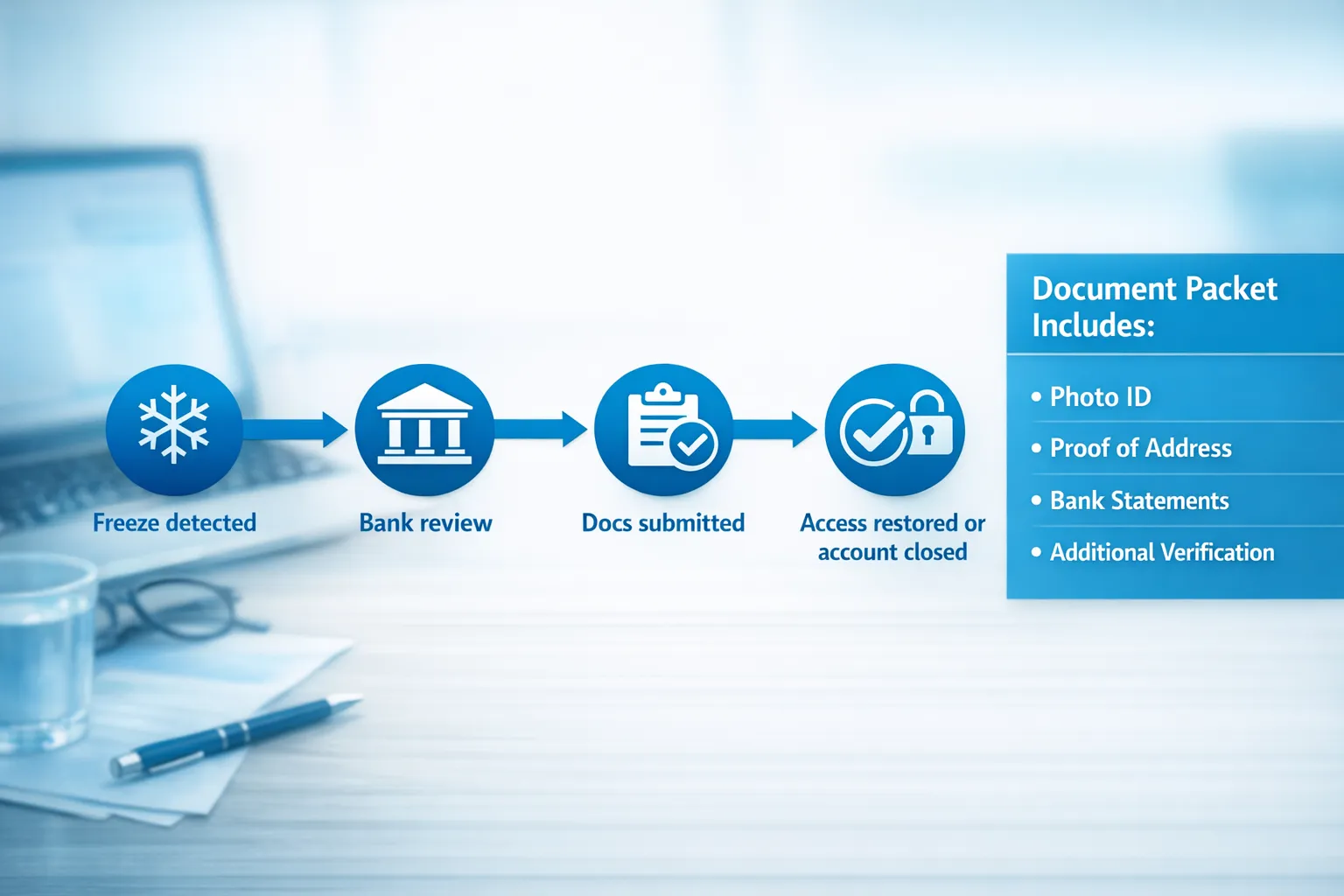
The first 0 to 24 hours
- You notice a declined card, failed transfer, or “account restricted” message.
- The bank’s frontline support may say “security review” or “risk team review.”
- They may request documents immediately, or they may refuse to say anything beyond “wait.”
1 to 7 business days
This is the most common window for an internal review to finish if the bank simply needs:
- identity verification (KYC refresh)
- clarification of income source
- confirmation you authorized the transaction
1 to 4+ weeks (and sometimes closure)
Longer timelines are more likely if:
- the bank closes your account instead of reinstating it
- you’re using a fintech app that routes through partner banks
- the bank suspects fraud, account takeover, or money laundering patterns
Also important: if a bank files a suspicious activity report, they typically cannot tell you. FinCEN explains SAR confidentiality and reporting rules in its guidance (banks generally do not disclose SARs) via the Financial Crimes Enforcement Network (FinCEN).
Why OnlyFans payouts trigger freezes (the most common causes)
It’s rarely “because it’s OnlyFans” in a simple way. It’s more often the combination of adult-industry risk plus a pattern that looks abnormal to automated systems.
| Likely trigger | What it looks like on your side | What usually fixes it fastest |
|---|---|---|
| Name mismatch (payout name vs bank account name) | Payout hits then account gets restricted, bank asks for identity proof | Update payout profile to match legal name, provide ID + payout statements |
| First large inbound payment on a newer account | You recently opened the account, then a bigger-than-usual deposit arrives | Provide proof of income source, keep payout cadence consistent |
| Rapid movement of funds (deposit in, money out immediately) | Deposit lands, you transfer most of it out same day, then restriction | Slow down transfers, keep buffer, explain business cash flow |
| High dispute/chargeback environment assumptions | Bank labels your activity “higher risk” and may close the account | Sometimes you cannot override, you may need a different bank |
| Fintech “false positive” risk rules | App support is vague, you get templated responses | Escalate, file complaint if needed, move to a bank with clearer policies |
| Documentation gaps (no recordkeeping) | Bank asks “what is this income?” and you don’t have clean PDFs | Prepare a simple doc packet (below) and send it calmly |
The 48-hour fix plan (do this in order)
When you’re stressed, it’s tempting to try five things at once. That often makes the risk model more suspicious.
Step 1: Stop “panic transactions” for 24 hours
Do not spam transfers, do not attempt multiple ATM withdrawals, and do not open three new banking apps and start moving money around immediately.
That behavior can look like fraud or account takeover.
Step 2: Gather a clean “proof of funds” packet
Think like a compliance analyst who has never heard of you. You want to make their job easy.
Here’s a creator-friendly packet that works in most countries:
- Government ID (the same one you used for payouts)
- Proof of address (utility bill, lease, bank statement)
- Screenshots or PDFs of:
- OnlyFans payout confirmations
- your payout history showing consistency
- any payout settings page that shows your legal name
- A simple one-page explanation letter (template below)
- Optional but helpful:
- your bookkeeping export showing the deposit categorized as income
- a 1099 or year-end statement if you have one (US-specific)
If you don’t have a bookkeeping habit yet, start here: OnlyFans Taxes: Weekly Habit to Stay Organized.
Step 3: Call the bank and ask the right questions (script included)
Your first call is not to “argue.” It’s to figure out which team owns the decision and what they need.
Ask:
- “Is my account restricted, or closed?”
- “Is the restriction temporary pending verification?”
- “What documents can I submit to verify the source of funds?”
- “Where do I send them, and what is the case number?”
- “Can you escalate to the fraud or risk team?”
Copy/paste phone script
“Hi, my name is ___ . My account shows a restriction after an incoming payout. I’m the account holder and I can verify my identity. Can you confirm whether the account is restricted or closed, and what documentation you need from me to verify the source of funds and restore access?”
If they push you off:
“I understand you may not be able to share details. I’m not asking for internal notes, I’m asking what steps I can take to verify identity and the legitimacy of the deposit, and how long reviews typically take.”
Step 4: Submit documents once, clearly, and follow up on a schedule
Send one PDF bundle. Label it like:
ID.pdfProof_of_Address.pdfOnlyFans_Payouts_Last_90_Days.pdfExplanation_Letter.pdf
Then follow up every 2 to 3 business days, not every 2 hours.
Step 5: If they close your account, shift to “funds retrieval mode”
If the bank says they are ending the relationship, focus on:
- When and how you get your money (check mailed, transfer out, timeline)
- Getting the closure in writing (email or letter)
- Updating your payout method on OnlyFans as soon as you have a safe alternative
Don’t beg the frontline rep to “make an exception.” Many closures are final.
A simple explanation letter template (keep it boring on purpose)
Banks respond best to neutral, businesslike language.
Subject: Source of funds verification
“I am the account holder of account ending _____. The recent deposit(s) are income from my online content subscription business. I receive payouts from a third-party platform that processes customer payments and sends creator earnings.
I can confirm the transactions are authorized. Attached are my identity documents, proof of address, and payout statements showing the source and history of these payments.
Please let me know if you require any additional documentation to remove the restriction.
Sincerely, Full legal name Phone number Email”
Use your legal name. Keep it short.
If this keeps happening: set up a “payout stability” system
Even if you get unfrozen, you want to reduce the chance of a repeat.
Use a two-account structure (clean, explainable money flow)
Many creators do better with:
- Receiving account: only for platform payouts
- Operating account: bills, rent, transfers, subscriptions
Move money on a predictable schedule (for example, once weekly) instead of constantly.
Keep a buffer so you’re not forced into risky behavior
A freeze becomes a crisis when you have $0 elsewhere. Even a small buffer reduces panic transfers and missed bills.
Make your payout cadence predictable
Risk models love consistency.
- Avoid changing payout methods repeatedly.
- Avoid sudden big spikes without documentation ready.
- If you have a huge month (a viral week, a big PPV drop), export statements immediately.
Consider a business entity, but don’t expect it to “solve banking”
Forming an LLC can help you separate business and personal finances, and it can make bookkeeping cleaner, but it does not guarantee privacy or bank approval.
If you’re considering it, read: LLC for OnlyFans: When It Makes Sense.
When you should escalate (US-specific options)
If you’re stuck in an endless loop and your funds are being held with no clear process, escalation can help.
- Ask for a supervisor and a written timeline.
- If the institution is regulated in the US, you can submit a complaint to the Consumer Financial Protection Bureau (CFPB).
A CFPB complaint does not guarantee a reversal, but it often forces a clearer response.
Preventing freezes without sacrificing privacy
A lot of creators are also dealing with “I don’t want my bank teller to know my business.” That’s valid.
You can keep things private without making it look suspicious:
- Use a dedicated email and keep your banking communications formal.
- Avoid writing explicit descriptions in transfer memos.
- Keep records stored offline or in a private folder so you can produce them quickly.
- If privacy is a major concern, also protect your content footprint and identity signals (especially if you’re faceless). This guide helps: How to Secretly Promote Your OnlyFans (Without Friends or Family Finding Out).

If you work with an agency, what they can and cannot do about banking freezes
This is the honest part.
A legitimate OnlyFans management agency can help you reduce payout chaos by:
- keeping clean payout records and weekly reconciliation
- making your income more consistent through better marketing and DM monetization
- helping you organize documentation fast when a bank asks
- improving privacy and security (which can reduce account takeover risk)
But no agency can “override” your bank’s risk department.
If you’re evaluating support, these two reads help you choose safely:
- Working With an Agency vs Running OnlyFans Alone
- OnlyFans Scam: How Agencies, Managers and Chatters Rob the Creators (and how to stay safe)
At Lookstars, we focus on operational stability (marketing, 24/7 fan chatting, posting strategy, leak protection, and privacy setup) with no upfront costs and flexible, cancel-anytime contracts. If you want help building a more stable system around payouts and growth, you can learn more at Lookstars Agency.
Quick checklist: what to do today
Use this if you’re in the middle of it right now.
- Screenshot the error messages in your bank app
- Confirm whether it’s a restriction or a closure
- Export OnlyFans payout history (last 30 to 90 days)
- Create your document packet (ID, address, payout proofs)
- Call the bank using the script and get a case number
- Submit docs once, in one bundle
- Follow up every 2 to 3 business days
- Set up a backup payout plan so one freeze does not stop your life
If your freeze is actually a payout delay (platform side vs bank side), this troubleshooting guide can help you pinpoint where it’s stuck: International Payouts: How to Avoid Common Delays.



Ready to transform your career?
Join hundreds of creators already earning six figures with Lookstars Agency.
Share this article
Best OnlyFans Agency
Europe's Leading OnlyFans Management Agency.

100% Free Ebook
Get our guide and unlock the secrets to OnlyFans success.
100% Free Ebook
Get our guide and unlock the secrets to OnlyFans success.
Free Revenue Calculator & Profile Analyzer
Try them for freeContinue reading...

Am I Attractive Enough for an OnlyFans Agency? The Answer

Can You Ever Fully Delete Your OnlyFans Content? The Reality
