How to Withdraw Money from OnlyFans in Chile
Getting paid should be the easy part, but for many creators in Chile, withdrawing money from OnlyFans is where things get stressful. Not because you did anyt...

Getting paid should be the easy part, but for many creators in Chile, withdrawing money from OnlyFans is where things get stressful. Not because you did anything wrong, but because international payouts can be picky about bank details, legal names, and verification, and one tiny mismatch can trigger delays.
This guide walks you through how to withdraw money from OnlyFans in Chile, what details you will likely need, how to avoid common payout issues (especially the Chile-specific name and banking quirks), and what to do if your withdrawal gets rejected.
Quick reality check (so you do not panic later)
A few things to know upfront:
- OnlyFans payout options vary by country and can change. The best source of truth is always what you see inside your account settings, and OnlyFans’ official support documentation.
- Your OnlyFans payout profile must match your identity. In Chile, this is extra important because many people use two last names, plus accents.
- Banks can take fees and apply their own exchange rate. Even if OnlyFans sends the full amount, what lands in CLP can look smaller.
If you are brand new to setup, you may also want to read: How to Start, Create & Verify Your OnlyFans Account.
Step-by-step: how to withdraw money from OnlyFans in Chile
OnlyFans updates the interface sometimes, but the flow is usually consistent: you connect a payout method, verify it, then request a withdrawal.
Step 1: Make your “payout identity” match your ID exactly
Before you touch banking details, check the basics:
- Your legal first name(s) and last name(s) are spelled exactly like your government ID.
- If you have two last names, use the same order you used in verification.
- Be consistent with accents and special characters. If the form does not accept accents, match the version you used during verification.
This matters because payout processors and banks often reject transfers for name mismatches, even if the account number is correct.
Step 2: Go to your payout settings and review available methods
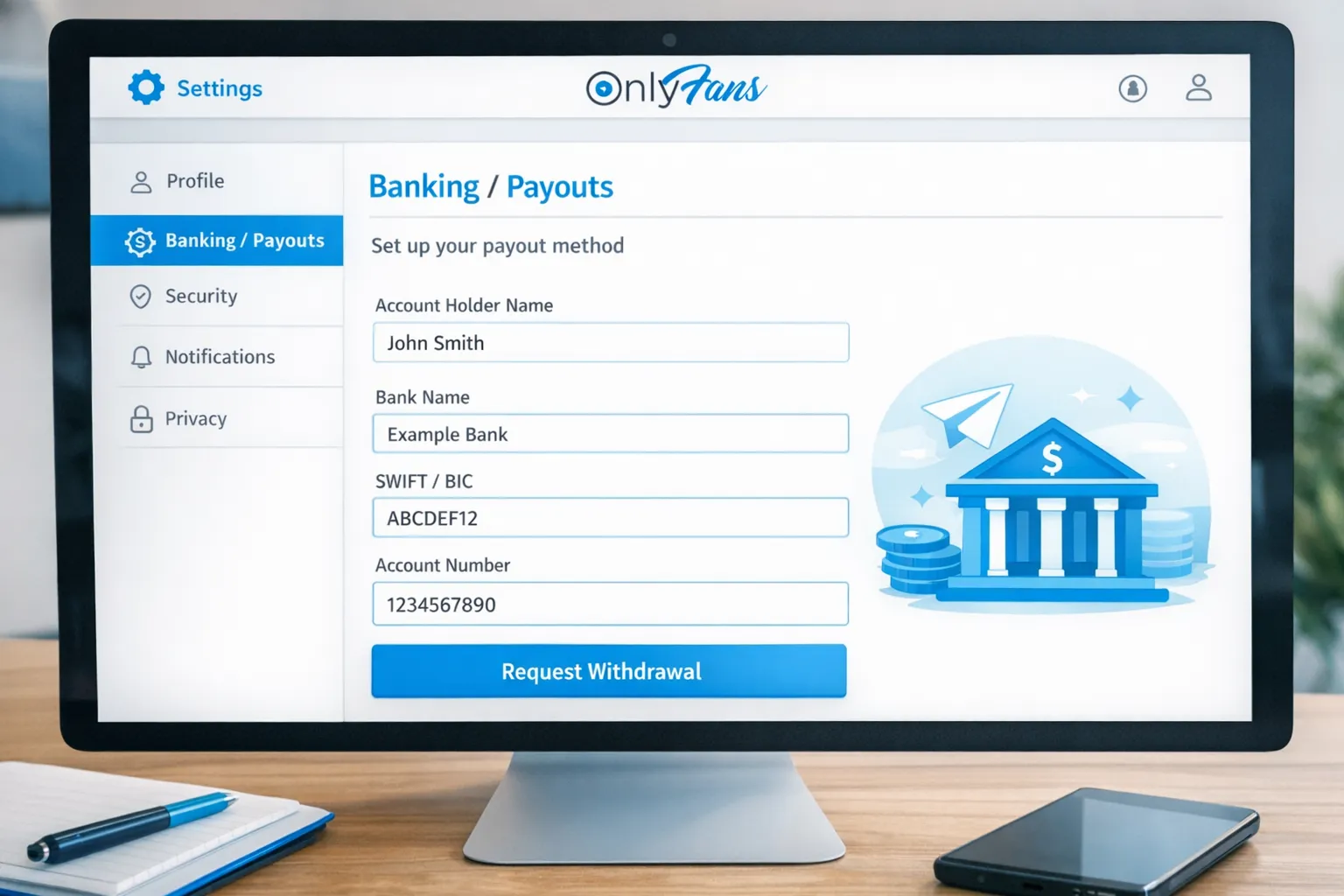
In OnlyFans, look for Banking / Payouts in your settings. Chilean creators typically see one or more payout routes (availability varies):
- Bank transfer (often an international transfer, depending on processor)
- E-wallet options (these are not guaranteed to be available, it depends on region and current provider support)
If you are unsure which method is best for your situation, choose the one that lets you:
- Withdraw reliably to an account you control
- Receive funds with the lowest friction (fewer intermediary steps)
- Keep your paperwork clean for taxes and bookkeeping
Step 3: If you use a bank transfer, collect the right details from your Chilean bank
For international payouts, platforms often ask for banking fields that feel unfamiliar in Chile.
Common details you may need:
- Account holder name (must match your verified name)
- Bank name
- Account number (and sometimes account type)
- SWIFT/BIC code (especially for international wires)
- Bank address (sometimes required)
If your bank’s app does not clearly show SWIFT/BIC and receiving instructions, call or message support and ask:
- “What details do I need to receive an international transfer from a platform?”
- “Do you require any reference text (like my RUT) to credit the transfer?”
- “Do you charge incoming wire fees or intermediary fees?”
Important: OnlyFans may not offer a dedicated field for RUT. If there is a “reference” or “notes” field, you can try adding it, but do not assume it will always be passed through.
Step 4: Request your withdrawal and track status
Once your banking method is saved:
- Go to Statements / Earnings / Payouts (wording varies)
- Select the amount you want to withdraw
- Confirm the payout method
Two notes that save a lot of anxiety:
-
Processing time is not only “OnlyFans time.” There is platform processing time, then bank processing time, then sometimes intermediary bank time.
-
First payouts often take longer. Many payment systems apply extra checks to new payout methods.
Why your payout looks smaller than expected (fees and FX)
Creators often assume the platform “took extra,” when it is usually a combination of fees and currency conversion.
Here is a clear breakdown of where money can be reduced:
| Where the difference happens | What it is | What you can do |
|---|---|---|
| OnlyFans platform fee | OnlyFans keeps a percentage of earnings on the platform | Price and package with that margin in mind (PPV strategy matters) |
| Refunds/chargebacks | Some transactions can be reversed depending on the situation | Keep records, avoid risky “too good to be true” buyers |
| Payout provider fees | Some payout rails charge transfer or processing fees | Compare available payout methods inside your account |
| Currency exchange | Funds may be sent in one currency and converted to CLP by your bank | Ask your bank how FX is calculated and if you can receive in another currency |
| Receiving/intermediary bank fees | International wires can be reduced by bank fees along the way | Ask your bank about incoming wire costs before you choose a method |
If you want a more operational “don’t lose money by being disorganized” system, this helps: OnlyFans Taxes: Weekly Habit to Stay Organized.
The most common payout problems for creators in Chile (and how to fix them)
Problem 1: Name mismatch (very common with two last names)
What it looks like: payout rejected, banking method fails verification, or transfer bounces.
Fix: use the exact name format from your verification, and keep it consistent everywhere (OnlyFans settings, payout profile, bank account holder name).
Problem 2: Wrong SWIFT/BIC, or missing bank address
What it looks like: payout stuck or returned.
Fix: request the bank’s official “international transfer receiving instructions” and copy them carefully.
Problem 3: Your bank needs extra identification to post the funds
Some banks credit incoming international transfers faster when the sender includes a reference. If OnlyFans does not pass the right reference information, the transfer can take longer to allocate.
Fix: ask your bank how they match inbound transfers (name, account number, reference), then choose the payout method that provides the cleanest match.
Problem 4: Delays that are not actually “a problem”
Weekends, holidays, and extra checks can slow down payouts. If you changed banking details recently, that can also trigger extra review.
For a deeper troubleshooting flow, use this guide: International Payouts: How to Avoid Common Delays.
A 10-minute payout safety checklist (do this before every withdrawal)
Use this quick checklist to reduce rejection risk:
- Confirm your legal name matches your verified ID (including both last names if applicable)
- Confirm your bank account holder name matches your OnlyFans payout name
- Double-check SWIFT/BIC and account number digit by digit
- Ask your bank about incoming transfer fees and how FX is applied
- Avoid requesting a payout immediately after changing banking details (if you can wait)
- Screenshot or export payout confirmations for your records
If OnlyFans withdrawals keep failing: practical Plan B options
If you have repeated issues, your goal is not to “fight the system,” it is to reduce single points of failure.
Option A: Use a different payout method (if available in your account)
If OnlyFans shows multiple payout methods, test the most reliable option for Chile by doing a small withdrawal first.
Option B: Reduce dependency on one platform
Many serious creators run a multi-platform setup, so one payout rail does not freeze your cash flow.
- If you are comparing platforms, start here: OnlyFans vs Fanvue
- Or here: OnlyFans vs Fansly
Option C: Get your operations tightened (so you are not troubleshooting alone)
If your income is already meaningful and payout problems are becoming a monthly stress cycle, it might be time to treat your page like a business with systems.
Even if you do not want full management, having a clean ops setup (payout plan, bookkeeping habit, privacy settings, and content calendar) makes everything easier.
Taxes and payouts in Chile (keep it simple)
Chile taxes can be confusing when your income is paid from abroad.
This section is educational, not legal or tax advice. Policies and laws can change. Verify with official sources or a professional.
What you should do at minimum:
- Track gross earnings (before fees) and net payouts (what hits your bank)
- Save receipts for business expenses (equipment, internet, props, editing tools, outsourcing)
- Set aside a portion of your income so you are not surprised later
If you want a simple weekly routine: OnlyFans Taxes: Weekly Habit to Stay Organized.
Privacy note: withdrawing money without exposing your identity publicly
Your legal name is used for verification and payouts, but it should not be your public brand.
If privacy is a major concern for you (very common for Chile creators), these guides help:
- How to Make Money on OnlyFans without Showing Your Face & Stay Anonymous
- How to Secretly Promote Your OnlyFans (Without Friends or Family Finding Out)
Frequently Asked Questions
Can I withdraw money from OnlyFans to a bank account in Chile? Yes in many cases, but the exact payout methods available depend on your OnlyFans account and current provider options in your region. Check your Banking/Payouts settings.
What bank details do I need for an OnlyFans withdrawal in Chile? Often you will need your account holder name, bank name, account number, and for international transfers a SWIFT/BIC code (and sometimes your bank’s address). Your bank can provide official receiving instructions.
How long does an OnlyFans payout take in Chile? It varies. There is platform processing time and then your bank’s processing time. First payouts and payouts after changing banking details can take longer.
Why was my OnlyFans withdrawal rejected? Common reasons include name mismatch (especially with two last names), incorrect SWIFT/BIC, incorrect account number, or bank requirements for incoming transfers. Start by comparing your verified name and your bank account holder name exactly.
Do I need to pay taxes on OnlyFans income in Chile? Possibly, depending on your personal situation. This is educational, not tax advice. Track your income and expenses and speak to a local tax professional for guidance.
How do I keep my real name private if I withdraw money from OnlyFans? Your legal name is used for verification and payouts, but you can still operate under a stage name publicly. Focus on privacy setup, faceless strategy if needed, and secure account practices.
Want help setting up payouts, privacy, and growth (without guessing)?
If you are earning already (or trying to) and you are tired of dealing with payout headaches, DMs 24/7, and platform admin alone, Lookstars can help you build a safer, more professional setup.
Lookstars is an OnlyFans management agency that supports creators with marketing, fan engagement, leak protection, and business operations (with zero upfront costs and flexible cancel-anytime contracts). Learn more about the tradeoffs of getting help here: Working With an Agency vs Running OnlyFans Alone.
If you want to explore working together, you can apply here: Lookstars Agency.



Ready to transform your career?
Join hundreds of creators already earning six figures with Lookstars Agency.
Share this article
Best OnlyFans Agency
Europe's Leading OnlyFans Management Agency.

100% Free Ebook
Get our guide and unlock the secrets to OnlyFans success.
100% Free Ebook
Get our guide and unlock the secrets to OnlyFans success.
Free Revenue Calculator & Profile Analyzer
Try them for freeContinue reading...

Am I Attractive Enough for an OnlyFans Agency? The Answer

Can You Ever Fully Delete Your OnlyFans Content? The Reality
