How to recover your OnlyFans account: A complete step-by-step guide
When your OnlyFans account suddenly won’t let you log in, gets “locked,” or disappears behind a restriction, it’s not just annoying, it’s income, routines, a...
When your OnlyFans account suddenly won’t let you log in, gets “locked,” or disappears behind a restriction, it’s not just annoying, it’s income, routines, and emotional safety on the line.
This guide walks you through recovering your OnlyFans account step-by-step, based on the most common real-world scenarios creators run into: forgotten passwords, lost 2FA, hacked accounts, payout blocks, and disabled accounts.
A quick note before we start: OnlyFans policies and support workflows can change. If anything in the interface looks different, use the same logic and double-check via the official OnlyFans Help Center.
First: identify what “recover” means in your case
Different problems need different fixes. Use this table to pick your path so you don’t waste hours trying the wrong thing.
| What you’re seeing | Most likely cause | What to do first | What to gather before contacting support |
|---|---|---|---|
| “Incorrect password” or endless login loop | Wrong password, cached browser issues | Password reset + try a clean browser | Email/username used, approximate last login date |
| Not receiving reset emails | Wrong inbox, spam filters, email access issues | Check spam + search “OnlyFans” + verify email | Proof you own the email, access to phone number if linked |
| 2FA code won’t work | Time sync, wrong authenticator, lost device | Sync device time + try backup codes | Backup codes, old device if available, screenshots of error |
| Fans say “page not available” | Account restricted, disabled, or link mismatch | Check from incognito + review recent activity | Your profile link, last compliant post date, IDs used for verification |
| Sudden unusual DMs, prices, or content changes | Account takeover | Change password (and email password) ASAP | Last normal login, suspicious IP/device info if you have it |
| Payouts pending for too long | Banking/KYC mismatch, payout method issue | Verify payout details + KYC consistency | Legal name match, bank details, timestamps of payout attempts |
If you suspect hacking or takeover, skip ahead to the “hacked” section. Time matters there.
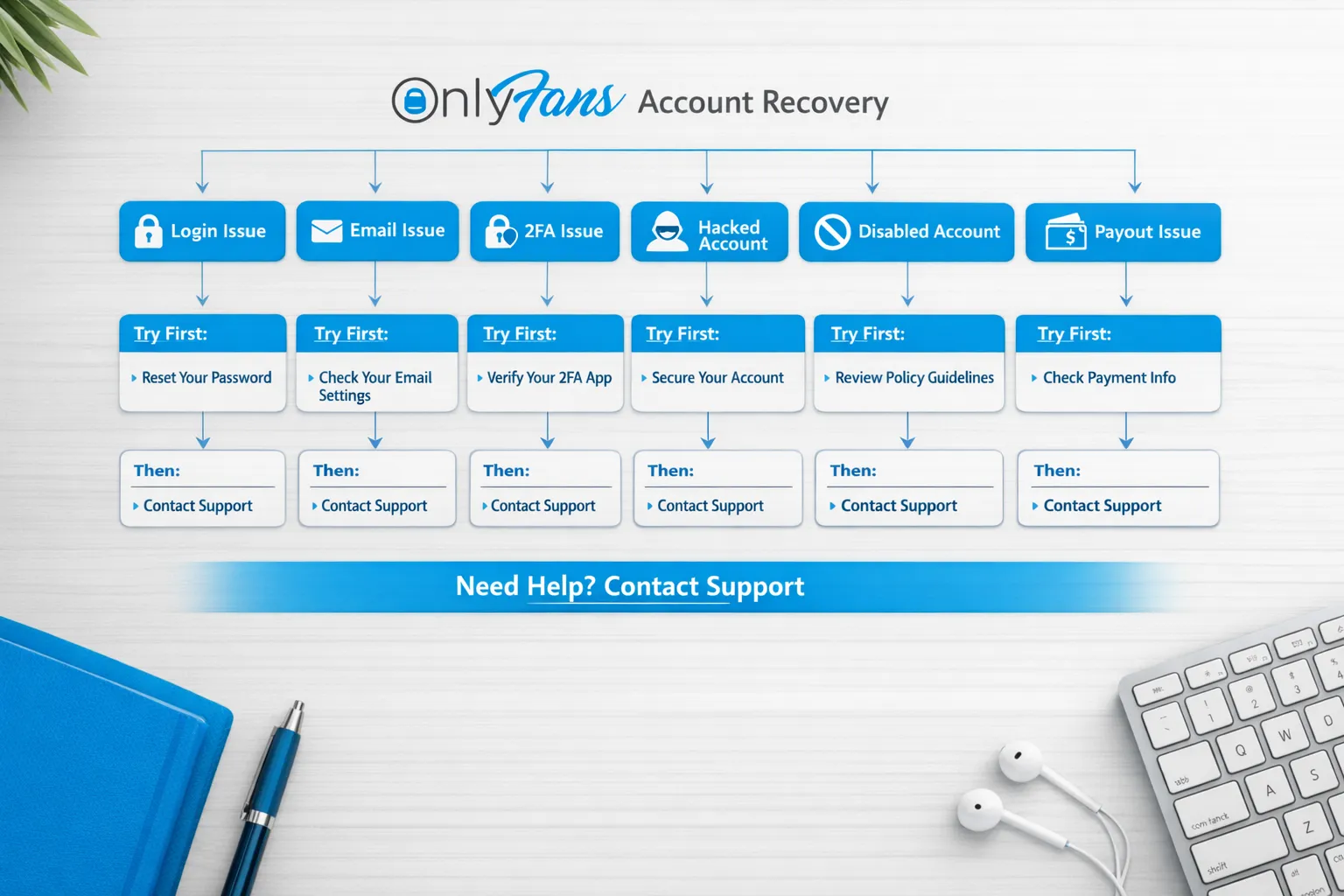
Step 0: stabilize your money and safety (do this before deep troubleshooting)
If your account is currently earning, your goal is to prevent further damage while you recover access.
- Pause risky posting until you understand what’s happening (especially if you suspect compromise).
- Screenshot key info: error messages, login screens, emails from OnlyFans, and any warnings.
- Secure your email first (yes, before OnlyFans): reset your email password, turn on 2FA for your email, and check for unfamiliar forwarding rules.
- Secure your phone number if it’s used for account recovery (SIM swaps happen, even to creators who “aren’t famous”).
- Tell your closest collaborator (if any) to stop logging in or changing settings until you coordinate (multiple “fix attempts” can look suspicious).
If you work with any third party (manager, chatter, VA), review the safety guidance in OnlyFans Scam: How Agencies, Managers and Chatters Rob the Creators. Account takeovers often start with “help” that gets too much access.
Step 1: recover login access the clean way (password + browser)
This sounds basic, but a lot of creators lose hours here.
- Use the official login page (avoid links from DMs or random “support” accounts).
- Try an incognito/private window.
- Try a different browser (or your phone if desktop is glitching).
- If password reset emails are delayed, wait a bit and request once, not 10 times (too many requests can complicate things).
If you do receive a reset email:
- Reset the password to something new and unique.
- Immediately update your password manager.
- Then go to your account security settings and sign out other sessions, if that option is available.
Step 2: if you can’t access the email tied to your OnlyFans
If you can’t get into the email account on file, most account recovery paths break.
Do this in order:
- Recover your email first via your email provider’s recovery flow.
- Check if you still have access to:
- The recovery phone number
- A recovery email
- A logged-in device (old laptop, old phone)
- Look for signs of compromise in your email:
- New forwarding rules
- New “filters” that auto-delete messages from OnlyFans
- “Security alert” emails you didn’t initiate
If you regain email access, reset the email password and enable 2FA, then return to OnlyFans password reset.
Step 3: fix 2FA problems (codes failing, lost phone, new device)
2FA issues usually fall into one of these buckets.
If your 2FA code keeps failing
- Sync your phone’s date and time automatically (wrong time causes valid codes to fail).
- Make sure you’re using the same authenticator app you originally set up.
- Try generating a fresh code (some apps refresh every 30 seconds).
If you lost your phone or changed devices
- Check if you saved backup codes when enabling 2FA.
- Check if you still have access on another device where you are already logged in.
- If neither is true, you will likely need OnlyFans Support to verify identity and help you regain access.
Keep your request simple and factual. Use this copy/paste support message:
Hi OnlyFans Support,

I’m locked out of my creator account because I cannot access my 2FA codes (lost/replaced device). I still control the email/phone associated with the account.

Account details:
- Username:
- Email used on the account:
- Approximate date/time of last successful login:
- Device(s) I used previously:

Please tell me the steps required to verify my identity and restore access.

Thank you.
Avoid sending extra sensitive documents unless the official support workflow explicitly requests them.
Step 4: if you suspect your OnlyFans account was hacked or taken over
This is the “act fast” scenario.
Signs your account may be compromised
- Your password “stopped working” suddenly, and reset emails are missing.
- Subscribers mention weird messages you didn’t send.
- Your pricing, bio, payout method, or content settings changed.
- You see login alerts for devices/locations you don’t recognize.
Immediate actions (in this order)
- Reset your email password first (and enable 2FA on the email).
- Then reset your OnlyFans password.
- Review account settings for:
- Email changes
- Payout method changes
- Linked accounts or sessions
- If you work with anyone, remove access until you’re back in control.
What not to do
- Don’t buy “recovery services” from people in DMs.
- Don’t share verification selfies or ID photos with anyone except official support channels.
If the compromise likely came through a third party, read the red flags list in 6 Red Flags to Watch Out for Before Signing with an OnlyFans Agency. Even legitimate help should be transparent about access, permissions, and security.
Step 5: if your account is disabled, restricted, or you got a violation
This is the most emotionally draining situation, because you may not get a clear answer immediately.
Your goal here
- Understand what changed (content, captions, DMs, tagging, collaborator releases, payment issues, identity/KYC issues).
- Communicate with support calmly and precisely.
- Show that you’re taking compliance seriously.
A practical appeal checklist
- Screenshot the restriction/notice.
- Gather:
- Your username and email
- Date/time you noticed the issue
- Any recent changes you made (new content type, collab, mass DM)
- If you think a specific post triggered it, voluntarily remove or archive anything that could be interpreted as risky (without deleting evidence you might need).
Copy/paste appeal template
Hi OnlyFans Support,

My creator account appears to be restricted/disabled. I want to resolve this and stay compliant.

Account details:
- Username:
- Email:
- Date/time I noticed the restriction:

Context:
- Any recent changes (posting, messaging, verification details):
- I’ve reviewed my recent content and removed/archived anything that may be borderline.

Please confirm:
1) The reason for the restriction (if possible), and
2) The exact steps required to restore my account.

Thank you for your help.
Be careful with long explanations. Support teams usually respond better to clean, structured details.
Step 6: if you can log in but payouts are blocked or delayed
Sometimes “recovery” is not about login, it’s about getting your money moving again.
Common causes include:
- Legal name mismatch between your payout method and verification
- Incorrect bank details
- First payout delays or additional checks
- Bank-side holds (especially for international transfers)
A good next step is to follow a structured troubleshooting flow. This guide is specifically designed for payout delays: International Payouts: How to Avoid Common Delays.
If you are changing payout settings, take screenshots before and after, and avoid making multiple changes back-to-back in one day.
Step 7: after you recover access, lock it down (so this doesn’t happen again)
This is the part most creators skip because they’re exhausted, but it’s how you protect future income.
The “30-minute account hardening” checklist
- Change your OnlyFans password to a unique one.
- Change your email password (unique, strong).
- Enable 2FA on:
- Your email
- Any social accounts you use to promote
- Save backup codes in a secure place.
- Review connected devices/sessions and remove anything unfamiliar.
- Audit your collaborator access (if anyone logs in).
- Create a simple “account recovery vault” note (offline or encrypted) that contains:
- OnlyFans username
- The email used
- The phone number used
- Where backup codes are stored
- The date you enabled 2FA
Privacy bonus (especially if you’re no-face or low-discovery)
If account recovery scared you because you don’t want people in your real life finding you, refresh your privacy setup too. This guide helps: How to Secretly Promote Your OnlyFans (Without Friends or Family Finding Out).
When you should get help (and what “help” should look like)
Recovering access is one thing. Rebuilding after a restriction, leak, or hack is another.
Here’s a simple decision framework:
| Your situation | DIY makes sense if… | Consider support if… |
|---|---|---|
| You’re locked out but email/2FA is intact | You can reset quickly and secure everything | You suspect takeover or repeated lockouts |
| You were hacked | You regained access and can audit settings calmly | Money/settings changed, leaks started, or a third party had access |
| You were restricted/disabled | You understand what likely triggered it and can appeal clearly | You’re overwhelmed, unsure what caused it, or scared to post again |
| Payout delays | You can validate KYC and bank details carefully | You’re stuck repeating changes and losing weeks of income |
If you decide to work with a team going forward, protect yourself by understanding the tradeoffs. This article can help you choose your operating model: Working With an Agency vs Running OnlyFans Alone.
Where Lookstars fits (and where it doesn’t)
Lookstars is an OnlyFans management agency that helps creators with marketing and fan growth, 24/7 fan chatting, strategic posting management, privacy protection, and content leak protection. If your account recovery issue happened because you were juggling everything alone, delegating the right pieces can reduce risk long-term.
What no agency can honestly promise:
- They cannot override OnlyFans decisions.
- They cannot guarantee account reinstatement.
- They cannot remove all leaks from the internet forever.
If you want a team that focuses on growth plus safety, you can explore Lookstars here: Lookstars Agency.
If you want the shortest possible recovery plan
If you’re stressed and just need the “do this now” version:
- Secure your email first.
- Reset OnlyFans password.
- Fix 2FA (time sync, backup codes, then support).
- If hacked, audit payout and account settings immediately.
- If disabled, appeal with calm structure and evidence.
- After recovery, harden everything (passwords, 2FA, backups, access control).
If you’re still stuck after doing the right steps, that’s not you being “bad at tech.” It usually means the problem is identity, security, or policy related, and you need to move through official verification and support channels patiently and cleanly.


Ready to transform your career?
Join hundreds of creators already earning six figures with Lookstars Agency.
Share this article
Best OnlyFans Agency
Europe's Leading OnlyFans Management Agency.
100% Free Ebook
Get our guide and unlock the secrets to OnlyFans success.
100% Free Ebook
Get our guide and unlock the secrets to OnlyFans success.
Free Revenue Calculator & Profile Analyzer
Try them for freeContinue reading...

Am I Attractive Enough for an OnlyFans Agency? The Answer
Can You Ever Fully Delete Your OnlyFans Content? The Reality