How To Promote OnlyFans On Discord: A Complete Step-by-step Guide
Discord can be a surprisingly strong channel for OnlyFans promotion, not because it “goes viral”, but because it builds community, routine, and repeat buying...
Discord can be a surprisingly strong channel for OnlyFans promotion, not because it “goes viral”, but because it builds community, routine, and repeat buying behavior. If you’re tired of chasing new clicks every day, Discord is where you can turn casual lurkers into loyal fans who actually show up for drops.
It’s also easy to mess up. The fastest way to get nowhere is joining random promo servers, spamming your link, and hoping for magic.
This guide gives you a safe, step-by-step Discord plan that works whether you’re brand new or already making money and want a better retention engine.
First: should you even use Discord for OnlyFans promotion?
Discord is best when you want a “home base” where fans can hang out between your posts, feel close to you, and get nudged into PPV, customs, and renew-on.
It is not ideal if you hate chatting, don’t want community energy, or you’re trying to grow using only passive posting.
Quick decision framework (pick your Discord path)
| Path | Best for | Main benefit | Main risk | What you need to succeed |
|---|---|---|---|---|
| Your own Discord server | Creators who want long-term community | Highest retention and repeat sales | Takes time to manage and moderate | Rules, structure, and consistent drops |
| Partner servers (other creators / niche communities) | Creators who network well | Faster exposure without building from zero | Wrong servers = spammy audience | Strong collab etiquette, tracking links |
| Promo servers | Beginners experimenting | Quick reps on promo posts | Low-quality traffic, rule violations | Strict filtering, low expectations |
If you’re unsure, start with partner servers for 2 weeks while you build your own server in the background.
Step 1: Set your safety + compliance foundation (do this before you post anywhere)
Discord and OnlyFans policies can change, and every server has its own rules. Treat this as a “risk-first” setup.
Safety checklist (10 minutes, worth it)
- Create a separate Discord account (new email, stage name). Do not connect it to personal social profiles.
- Turn on 2FA and use a strong password.
- Decide your boundaries now: what you will and won’t respond to, and how fast.
- Adjust privacy settings so random users cannot DM you (or at least cannot DM you without a mutual server).
- Never click random files or “promo opportunities” sent by strangers.
Adult content and age restriction (read this)
If you plan to share adult content on Discord, you need to understand Discord’s rules around age-restricted content and NSFW labeling.
- Review the official Discord Community Guidelines and Discord Terms of Service.
- If you run your own server, set clear rules about age restriction and what content is allowed where.
Also keep your OnlyFans account safe while you promote. If you’re trying to stay anonymous, use a privacy-first plan (separate accounts, country blocking, avoiding identity crossovers). This walkthrough helps: How to secretly promote your OnlyFans.
Step 2: Build the funnel assets (so Discord traffic actually converts)
Discord does not convert well if you just drop a raw OnlyFans link with no context.
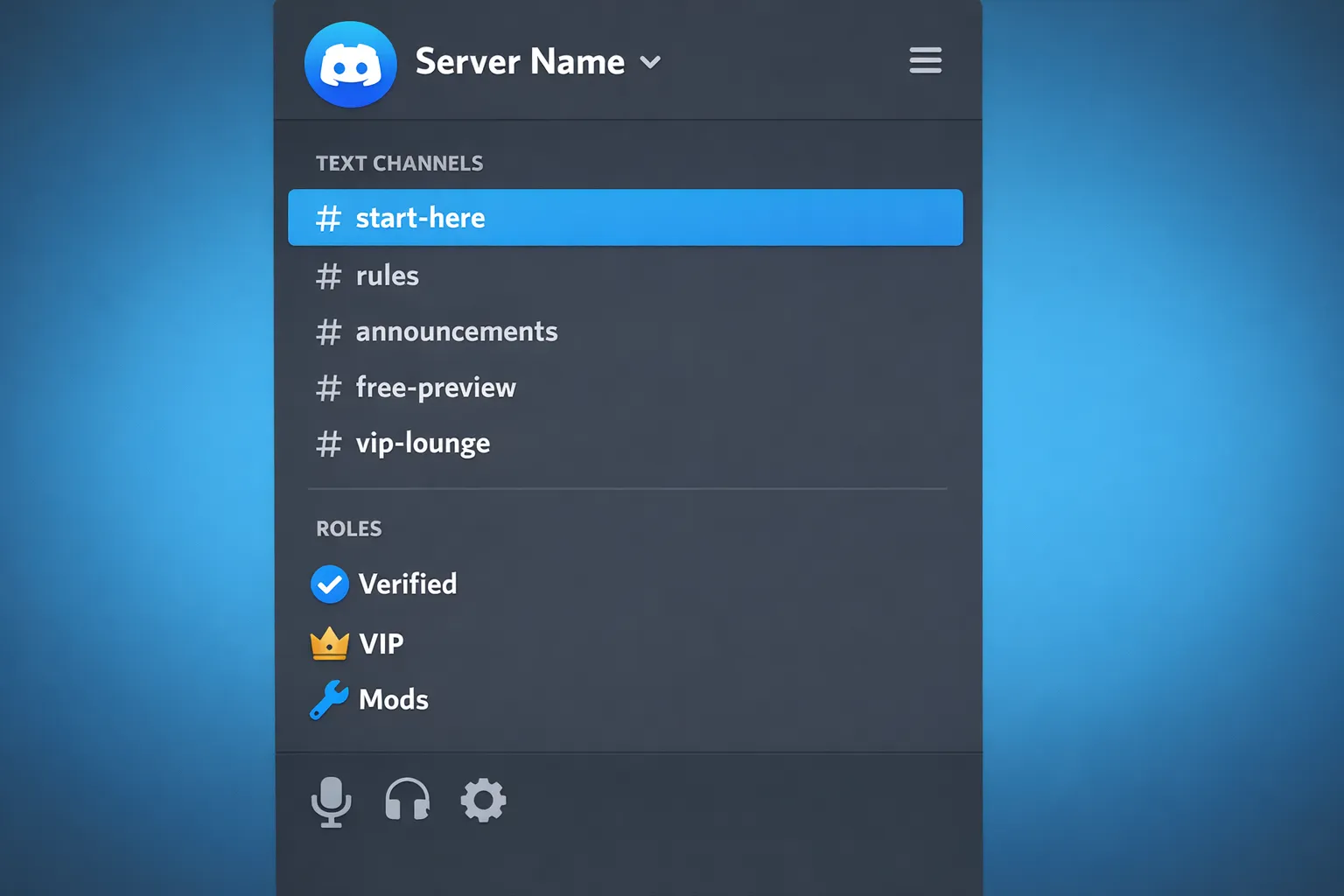
Your goal is a simple funnel:
- Discord post
- Click to your profile or link hub
- Clear offer
- Subscribe
Use tracking links so you don’t guess
OnlyFans has built-in tracking links that help you see what’s working. Set this up before you do any promotion so you can tell whether Discord is bringing real subscribers.
Follow: OnlyFans tracking links guide.
Pro tip: Create separate tracking links for:
- Your own server announcement channel
- Each partner server
- Each promo server
That way, you’ll quickly learn which communities are valuable and which are just noise.
Step 3: Create your Discord server (simple structure that scales)
If you want consistent results, build your own server even if you also post in other servers.
The mistake most creators make is building a messy server with 25 channels that nobody uses. Keep it clean.
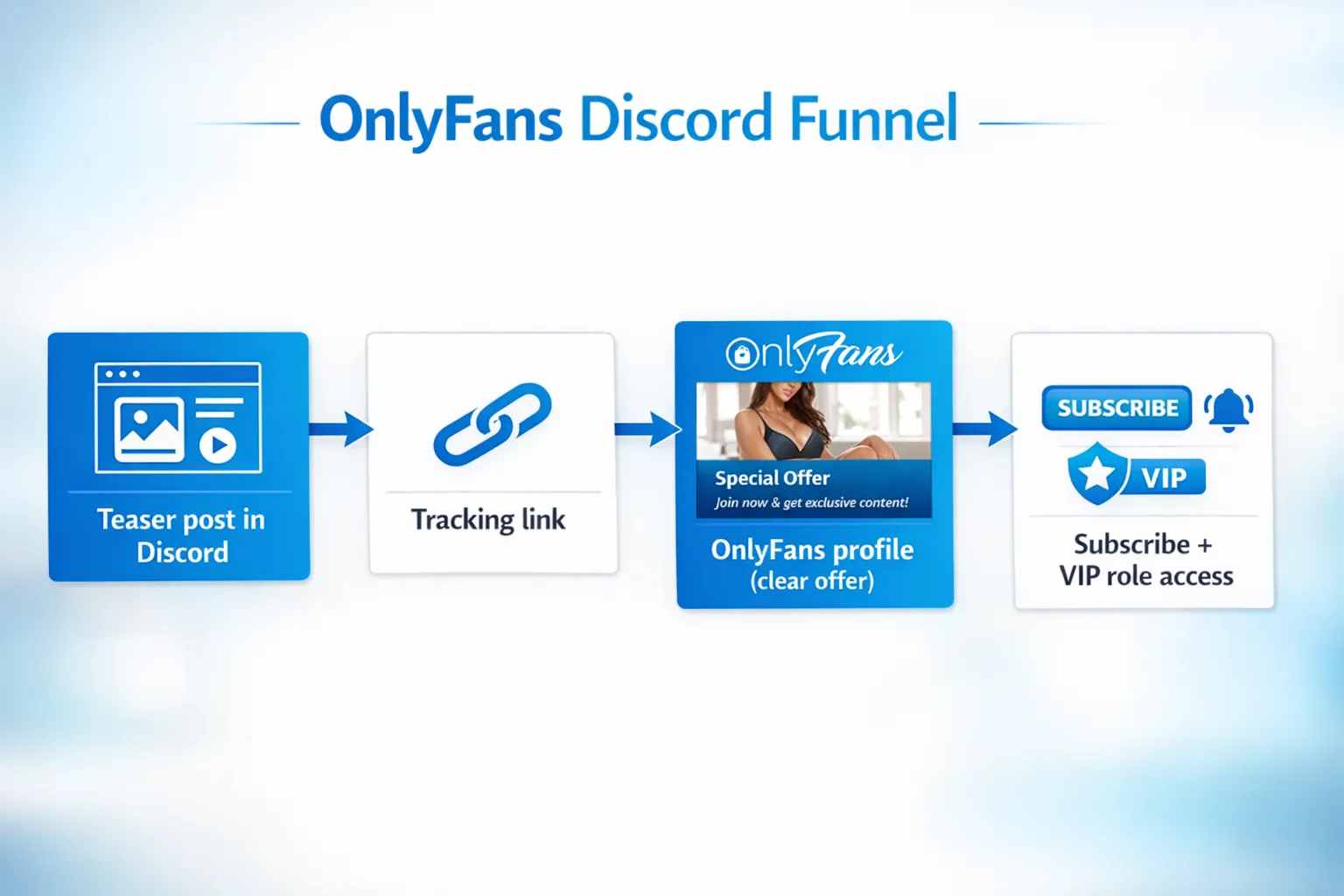
Recommended channel layout (starter-friendly)
- #start-here (what this server is, how to unlock perks)
- #rules (boundaries, age restrictions, no leaks, no harassment)
- #announcements (your main promo channel, locked to you)
- #free-preview (teasers, cropped previews, vibes)
- #vip-lounge (locked channel for paying fans)
- #requests (fans can request themes, poll ideas, customs inquiry)
Roles you actually need
- Verified (basic access)
- VIP (paid supporters)
- Mods (if you have helpers)
If you stay no-face or privacy-focused, keep your server designed around anonymity (no personal photos, no real-life location talk, no accidental face reveals).
Step 4: Add onboarding that converts (without sounding desperate)
Most Discord servers fail at the welcome moment. You need one clear message that tells fans:
- who you are
- what they get
- what to do next
Copy/paste welcome message template
You can paste this into #start-here and pin it:
Welcome babe 💕
This is my private community for people who like my vibe and want first access to new drops.
What you’ll get here:
- sneak peeks + behind-the-scenes
- polls (you help pick what I post next)
- VIP perks for my paid supporters
Start here:
- Say hi in chat (tell me what you’re into)
- Check the pinned post in #announcements for today’s drop
- Want VIP access? Grab it here: (your tracking link)
Quick boundaries: be respectful, no leaks, no creepy personal questions, and no DMs unless I reply first.
Make your #announcements channel do the selling
Your announcements should be:
- short
- specific
- visually consistent
- clear CTA
If you struggle with what to sell once they subscribe, build a real paid-content system (feed vs PPV, bundles, customs). This guide helps: How to sell content on OnlyFans (step-by-step).
Step 5: Grow on Discord without spamming (the only way that works long-term)
Here are the three growth plays that don’t destroy your reputation.
Option A: Become a real member in niche servers (best quality)
Search for servers connected to your niche or aesthetic (cosplay, fitness, gamer girl, goth, MILF, feet, domination, etc.) and show up like a human.
A simple rule:
- Spend a week commenting and participating before you ever post a link.
When you do promote, keep it value-first:
- “I’m doing a poll for my next shoot theme, if you want to vote I posted it in my server.”
Option B: Partner with other creators (best ROI)
Instead of “shoutout spam”, do structured collaboration:
- you share each other’s Discord
- you do a themed week together
- you swap pinned posts for 48 hours
If you want a full collaboration system (SFS that converts, finding partners, avoiding flaky swaps), read: How to collaborate with other OnlyFans creators & use SFS.
Option C: Promo servers (only if you’re strategic)
Promo servers can work for testing your promo copy, but many have:
- low buyer intent
- lots of scammers
- rules that change constantly
If you use them, treat them like an experiment:
- post only with tracking links
- track conversion for 7 days
- drop any server that brings clicks but no subscribers
Step 6: Use a weekly Discord content plan (so people stay active)
Discord dies when it becomes “link drops only.” Your job is to create a rhythm.
A simple weekly plan you can sustain
- Mon: Poll (choose next outfit/theme)
- Tue: Teaser photo + “VIP gets the full set tonight”
- Wed: Chat prompt (“Tell me your favorite fantasy scenario”)
- Thu: Drop day (announce PPV or bundle inside OnlyFans)
- Fri: “After dark” chat window (1 hour where you’re active)
- Weekend: Light check-in + repost your best-performing teaser
Keep it realistic. If you can only show up 3 days a week, design your plan around that.
Step 7: Convert Discord members into subscribers (soft-sell scripts)
You don’t need to be pushy. You need to be clear.
High-converting announcement formula
- one line of context
- one line describing the drop
- one line telling them what to do
Copy/paste example:
Tonight’s drop is for my “sweet but dangerous” girls 😈
I posted a preview here, the full set is on my OnlyFans (and VIPs get a little extra).
Grab it here: (tracking link)
How to do VIP access on Discord
Because Discord is not a payment platform for your OnlyFans, the clean approach is:
- fans subscribe on OnlyFans
- you assign them the VIP role inside Discord based on your process
Be transparent about what VIP includes. Don’t promise daily sexting, customs, or unlimited access unless you truly want that lifestyle.
If you want to improve your DM monetization system on OnlyFans (where most creators actually make the real money), this is a strong companion guide: OnlyFans sexting guide.
Step 8: Protect your content (Discord is not leak-proof)
Any platform can leak. Discord is not immune.
Basic protections that help:
- Avoid posting your highest-value content directly in Discord.
- Use watermarks on previews.
- Keep explicit drops inside OnlyFans whenever possible.
- Remove users who ask for “free” content, reposts, or try to push boundaries.
If privacy and leaks are a major stress point, consider getting help setting up ongoing monitoring and takedowns (this is one of the reasons creators work with a management team).
Step 9: Measure results and optimize (what to track weekly)
Here’s a simple way to review Discord performance without overthinking it.
| Metric | Where to find it | What it tells you | What to do if it’s weak |
|---|---|---|---|
| Clicks | OnlyFans tracking links | Does your promo post create curiosity? | Improve teaser and first line, test new angles |
| Subs from Discord | Tracking link subscribers | Is the traffic buyer-quality? | Change servers, change offer, refine positioning |
| Server activity | Discord message volume | Is your community alive? | Add polls, prompts, scheduled “online hours” |
| PPV replies/purchases | OnlyFans messages | Are Discord fans spending? | Offer VIP-first drops and clearer value |
If you’re getting clicks but not subs, it’s usually one of these:
- your offer is unclear (pricing, what they get)
- your OnlyFans bio/pinned post is not doing its job
- your Discord audience is not aligned with your niche
Step 10: The biggest Discord mistakes (and quick fixes)
Mistake: Posting your link everywhere
Fix: Pick 3 servers. Track results. Commit for 7 days.
Mistake: Letting DMs drain your energy
Fix: Set “office hours” for Discord chat and funnel serious buyers to OnlyFans.
Mistake: No boundaries, then burnout
Fix: Pin rules, enforce them, and stop rewarding boundary-pushers with attention.
Mistake: Getting approached by “Discord growth experts”
Fix: Assume most are scams until proven otherwise. If you’re evaluating help, read: OnlyFans agency scams and how to stay safe.
When it makes sense to get help (and when it doesn’t)
If you’re making content you love but your bottleneck is marketing, consistency, DMs, or privacy protection, getting support can be a smart business decision.
Lookstars is an OnlyFans management agency that helps creators with multi-platform marketing, fan engagement, strategic posting, leak protection, and privacy setup (with no upfront costs and flexible contracts). If you want to focus on content while a team handles growth and operations, you can learn more here: Lookstars Agency.
If you’re still early and experimenting, use this guide for 2 weeks, track everything, then decide whether Discord is worth scaling.
Ready to transform your career?
Join hundreds of creators already earning six figures with Lookstars Agency.
Share this article
Best OnlyFans Agency
Europe's Leading OnlyFans Management Agency.
100% Free Ebook
Get our guide and unlock the secrets to OnlyFans success.
100% Free Ebook
Get our guide and unlock the secrets to OnlyFans success.
Free Revenue Calculator & Profile Analyzer
Try them for freeContinue reading...
Am I Attractive Enough for an OnlyFans Agency? The Answer
Can You Ever Fully Delete Your OnlyFans Content? The Reality