How to Get Unbanned from OnlyFans: Crucial Tips and Tricks
Getting banned on OnlyFans can feel like the floor drops out from under you, especially if it’s your main income stream. The frustrating part is that “banned...
Getting banned on OnlyFans can feel like the floor drops out from under you, especially if it’s your main income stream. The frustrating part is that “banned” can mean a few different things, and the fastest way to get your account back is to respond like a business owner, not like someone panicking in your inbox.
This guide walks you through what to do (and what not to do) to get unbanned from OnlyFans, how to write an appeal that actually helps, and how to reduce the chance it happens again.
Disclaimer: This is educational, not legal advice. Policies can change, verify details in OnlyFans’ official Terms and Support guidance.
First: confirm what “banned” actually means
Creators often use “banned” to describe any of these situations:
- Login/security lock (suspicious activity, too many attempts, unusual location/device)
- Verification problem (identity or banking/KYC flagged)
- Account restricted or suspended (some features disabled, content under review)
- Account permanently disabled (hard ban)
- Payouts delayed/held (not always a ban, sometimes a payment compliance check)
Before you send anything to Support, open the email(s) from OnlyFans and your on-platform notifications and identify:
- The exact wording used (restricted, suspended, disabled, verification failed, etc.)
- The date/time it happened
- Any referenced post/message, if provided
- Whether you can still access your account
If your issue is mainly payouts, start with this guide: International payouts: how to avoid common delays.
The “do not make it worse” rules (seriously)
When creators get stuck in ban-limbo, it’s often because they accidentally trigger more risk flags while trying to fix it.
Avoid these moves:
- Do not create a new account to “replace” the banned one unless Support explicitly tells you to. On many platforms, ban evasion can make reinstatement harder.
- Do not delete evidence (posts, messages, captions) before you’ve documented what happened. If you remove things blindly, you can’t explain or correct them clearly.
- Do not spam Support with five new tickets. It usually slows resolution.
- Do not send emotional threats (chargebacks, lawsuits, public callouts). Keep it calm and cooperative.
- Do not blame a “manager/chatter/friend” in a vague way. Take responsibility and explain exactly what you changed.
If you worked with a third party and you’re unsure if they caused risky behavior, read: OnlyFans scam: how agencies, managers and chatters rob the creators.
Common ban triggers (and the clean way to respond)
OnlyFans does not publish a public “ban checklist,” but most enforcement issues creators report fall into a few buckets. Here’s how to think about each category, without guessing specific rules.
| Potential trigger category | What it can look like | Best response approach |
|---|---|---|
| Identity, age, or verification mismatch | Verification rejected, account disabled after edits, payout setup fails | Provide clear documents if requested, fix name/address consistency, ask what exactly is missing |
| Prohibited content or policy violation | Removal notices, restriction after a post/DM, repeat flags | Acknowledge, remove/stop the behavior, explain your prevention plan |
| Third-party access or suspicious login | Locked out after new device/location, “suspicious activity” email | Secure account, reset passwords, enable security steps, explain changes |
| Chargebacks/refunds and payment risk | Payout hold, sudden restriction after disputes | Document what happened, show you understand refund rules, outline how you’ll reduce disputes |
| Copyright/DMCA issues | Takedown notices, repeat content complaints | Confirm content ownership/permissions, stop using flagged material, show future safeguards |
| Harassment, coercion, or non-consensual content concerns | Reports from users, restricted messaging | Show your moderation plan, confirm consent processes, set clear boundaries |
Important: don’t include graphic content in your appeal. Don’t attach explicit media “as evidence.” Keep it professional.
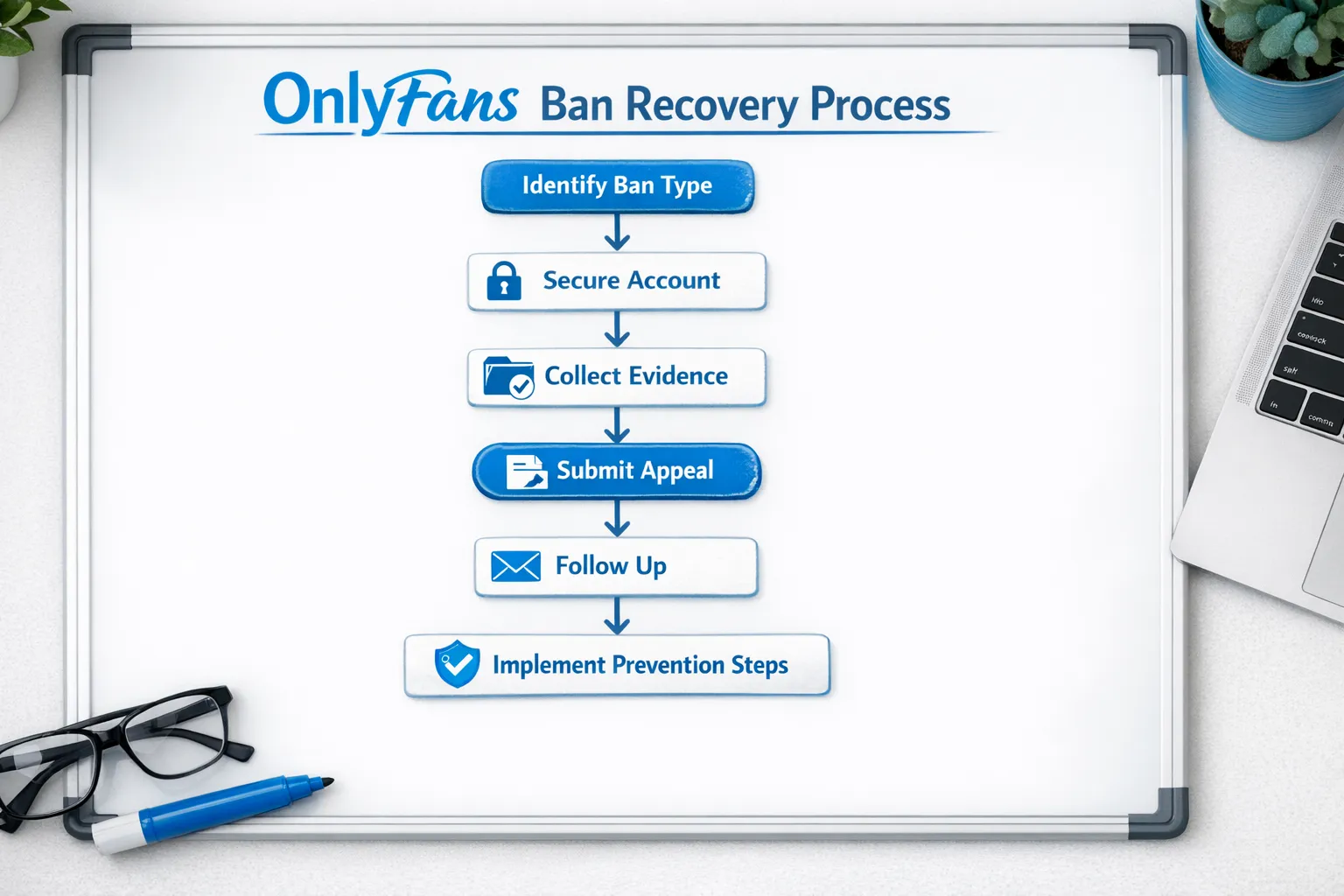
Your 60-minute triage plan (what to do right now)
If you want the highest chance of reinstatement, do this in order.
Lock down security first
Even if you think this is “just a mistake,” treat it like an account security incident.
- Change your OnlyFans password to a unique password
- Change the password on the email connected to your OnlyFans
- Remove access from any third-party tools you no longer trust
- Stop anyone else from logging in while you appeal (including chatters)
If you’re running your account with help, this is the moment to formalize access rules. If you want a realistic breakdown of what to outsource safely, read: Working with an agency vs running OnlyFans alone.
Capture evidence before you edit anything
Make a small “appeal folder” (on your phone or Google Drive) and save:
- Screenshots of the restriction/ban message
- The email(s) from OnlyFans
- The date/time it occurred
- Any relevant usernames, links, or post IDs (if visible)
If you suspect a specific post or DM triggered it, screenshot the caption and context (not explicit content).
Identify your most likely trigger (pick one primary story)
A weak appeal is one where you throw 12 possible reasons at Support.
Pick the most likely trigger and build your appeal around:
- What happened
- What you changed immediately
- What you will do differently going forward
If you truly don’t know, you can say that, but you still need to show you’re proactively fixing risk.
How to write an OnlyFans ban appeal that actually helps
Your goal is not to argue. Your goal is to make it easy for the reviewer to say “yes.”
A good appeal is:
- Specific
- Responsible
- Short enough to read quickly
- Clear about the corrective action
The appeal structure (copy this)
Use this structure in your support ticket or email:
- Account identifier: username and email
- Problem: what message you received and when
- Understanding: what you believe triggered it (one main explanation)
- Corrective actions: what you already changed
- Prevention plan: what you will do to avoid it repeating
- Request: ask for reinstatement or for clarification on required steps
Copy/paste appeal template
You can paste this and customize it.
Subject: Appeal Request, Account Review for @YourUsername
Hello OnlyFans Support,
My account @YourUsername (email: your@email.com) was [restricted/suspended/disabled] on [date/time]. The message I received said: “[paste exact wording]”.
I believe this may have been triggered by [one likely trigger, for example: a post caption, a DM wording, a verification mismatch, suspicious login activity]. I understand the platform’s rules are important, and I want to fully comply.
Actions I have taken immediately:
- [Action 1, for example: removed/edited the flagged post/caption]
- [Action 2, for example: reset password and secured account access]
- [Action 3, for example: reviewed my content workflow to prevent policy issues]
Prevention plan going forward:
- [Prevention step 1, for example: I will not post or message content that violates the Terms]
- [Prevention step 2, for example: I will keep content ownership/consent documentation for collaborations]
If you can share which specific content or issue caused the restriction, I will correct it immediately. Please let me know the steps needed to restore my account.
Thank you for your time, [Your name]
What to include (and what not to include)
Include:
- The exact wording of the enforcement message
- The date/time and any reference numbers
- A calm statement that you want to comply
- Proof of corrective action (screenshots of edits are okay)
Do not include:
- Explicit media
- Angry language or threats
- Long explanations about personal circumstances
- Admissions of intentional wrongdoing if you’re not sure (stick to what you know)
Smart follow-up without spamming Support
Support teams are usually ticket-based. A clean follow-up strategy looks like this:
- Reply to the same ticket thread (don’t open new ones unless instructed)
- Follow up only after a reasonable wait
- Each follow-up should add new information (not just “any update?”)
Example follow-up message:
“I’m following up on ticket [ID]. Since my last message, I have [secured my account / removed the suspected post / updated verification details]. Please confirm if anything else is required for reinstatement.”
If you used an agency, manager, or chatter: handle it carefully
A lot of bans happen when “help” turns into risky behavior:
- aggressive DM upsells that cross a policy line
- spammy promo tactics
- mass messaging patterns that look automated
- unauthorized logins from multiple locations
If someone else had access:
- Remove access during the appeal
- Audit what they posted/sent
- Ask them for a written timeline of what they did (you may need it)
If you’re choosing new help after this, start here: 6 red flags before signing with an OnlyFans agency.
A decision framework: appeal, rebuild, or diversify
Not every case ends with reinstatement. Here’s the business decision side, without panic.
Appeal makes the most sense when
- You have a clear reason and a clean fix
- Your account history is mostly compliant
- The issue is verification or security related
Rebuild makes sense when
- Support confirms the decision is final
- Your brand can restart without relying on the same audience
Important: rebuilding should be done in a compliant way, and only after you understand the platform’s guidance. Avoid “ban evasion” behavior.
Diversify makes sense when
- Your income depends on one platform
- You’ve already had one serious restriction
- You want a backup plan for policy changes
Diversification can mean building other traffic sources, and in some cases expanding platforms. Lookstars mentions platform expansion as an option, but do it strategically, not as a frantic reaction.
Prevention: how to reduce ban risk going forward
If your account comes back, treat this like a “systems upgrade” moment.
Build a simple compliance workflow
- Keep a draft checklist next to your content calendar
- For collabs, keep written permission/model release documentation if applicable
- Avoid recycled captions that could be misread out of context
If you need help structuring your content process, this beginner-friendly setup guide can help you rebuild cleanly: How to start, create and verify your OnlyFans account.
Tighten privacy and access
A surprising number of issues start with privacy mistakes that turn into reports, doxxing attempts, or account compromise.
If privacy is a major concern for you, use this: How to secretly promote your OnlyFans (without friends or family finding out).
Use tracking and analytics to avoid “random” risky marketing
Creators sometimes get restricted after trying a bunch of chaotic promo tactics at once. Clean tracking helps you focus on what works and drop what doesn’t.
Read: OnlyFans tracking links guide.
Frequently Asked Questions
Can you get unbanned from OnlyFans? Yes, some restrictions and suspensions can be resolved through Support, especially if it’s a verification, security, or fixable compliance issue. Some decisions may be final.
How long does an OnlyFans ban appeal take? It varies. Response time depends on Support volume and the complexity of your case. The most helpful thing you can do is submit one clear appeal with evidence and a prevention plan.
Should I delete posts before appealing? Usually no. First screenshot and document what happened. If you know a specific post clearly violates policy, removing it can help, but don’t erase context before you’ve saved evidence.
Will using a chatter or agency get me banned? Not automatically, but third-party access and risky DM or promo tactics can increase risk if the team isn’t compliance-focused. Always vet partners and set strict access and messaging rules.
My payouts are delayed, am I banned? Not necessarily. Payout delays can be caused by banking/KYC checks, name mismatches, or processing issues. Start with payout troubleshooting before assuming enforcement.
Want help protecting your account after reinstatement?
If your account is your income, staying unbanned is just as important as getting unbanned.
Lookstars is an OnlyFans management agency that supports creators with marketing and fan growth, 24/7 fan chatting, posting management, privacy setup (including country blocking), and content leak protection (monitoring and DMCA takedowns). There are no upfront costs and contracts are described as flexible/cancel-anytime, which matters if you’re cautious after a bad experience.
If you want a second set of eyes on your workflow so you can grow without constantly worrying about account risk, you can explore Lookstars here: Lookstars Agency.

Ready to transform your career?
Join hundreds of creators already earning six figures with Lookstars Agency.
Share this article
Best OnlyFans Agency
Europe's Leading OnlyFans Management Agency.
100% Free Ebook
Get our guide and unlock the secrets to OnlyFans success.
100% Free Ebook
Get our guide and unlock the secrets to OnlyFans success.
Free Revenue Calculator & Profile Analyzer
Try them for freeContinue reading...
Am I Attractive Enough for an OnlyFans Agency? The Answer
Can You Ever Fully Delete Your OnlyFans Content? The Reality