How Long Does OnlyFans Verification Take? (The honest answer)
If you’re staring at the “pending verification” screen and refreshing like it’s your full-time job, you’re not being dramatic. Verification is the one step t...
If you’re staring at the “pending verification” screen and refreshing like it’s your full-time job, you’re not being dramatic. Verification is the one step that can feel totally out of your control, and it blocks everything else: posting, getting paid, and promoting confidently.
Here’s the honest answer: OnlyFans verification can be fast (sometimes same-day), but it can also take a few days, and longer if your submission gets flagged or needs manual review. There isn’t a single guaranteed timeframe because it depends on your documents, image quality, region, and the platform’s review queue.
This guide breaks down what actually affects approval speed, how to avoid the most common slowdowns, and what to do if you get rejected.
Note: This is educational information based on common creator experiences and standard identity verification (KYC) patterns across platforms. Platform processes can change, so always follow the latest instructions inside your OnlyFans dashboard.
The honest timeline: what “normal” looks like
Most creators experience one of these lanes:
- Fast approvals: When your ID photos are clear, your selfie matches well, and your information is consistent, approval can happen quickly.
- Average approvals: A clean submission still might sit in a queue, especially during high-volume periods.
- Slow approvals: Rejections, re-submissions, or anything that requires manual review can stretch the process.
The frustrating part is that two people can submit the same day with totally different wait times. That does not necessarily mean you did something wrong.
Verification vs payout setup: don’t confuse the two
Creators often lump everything together as “verification,” but there are usually two separate bottlenecks:
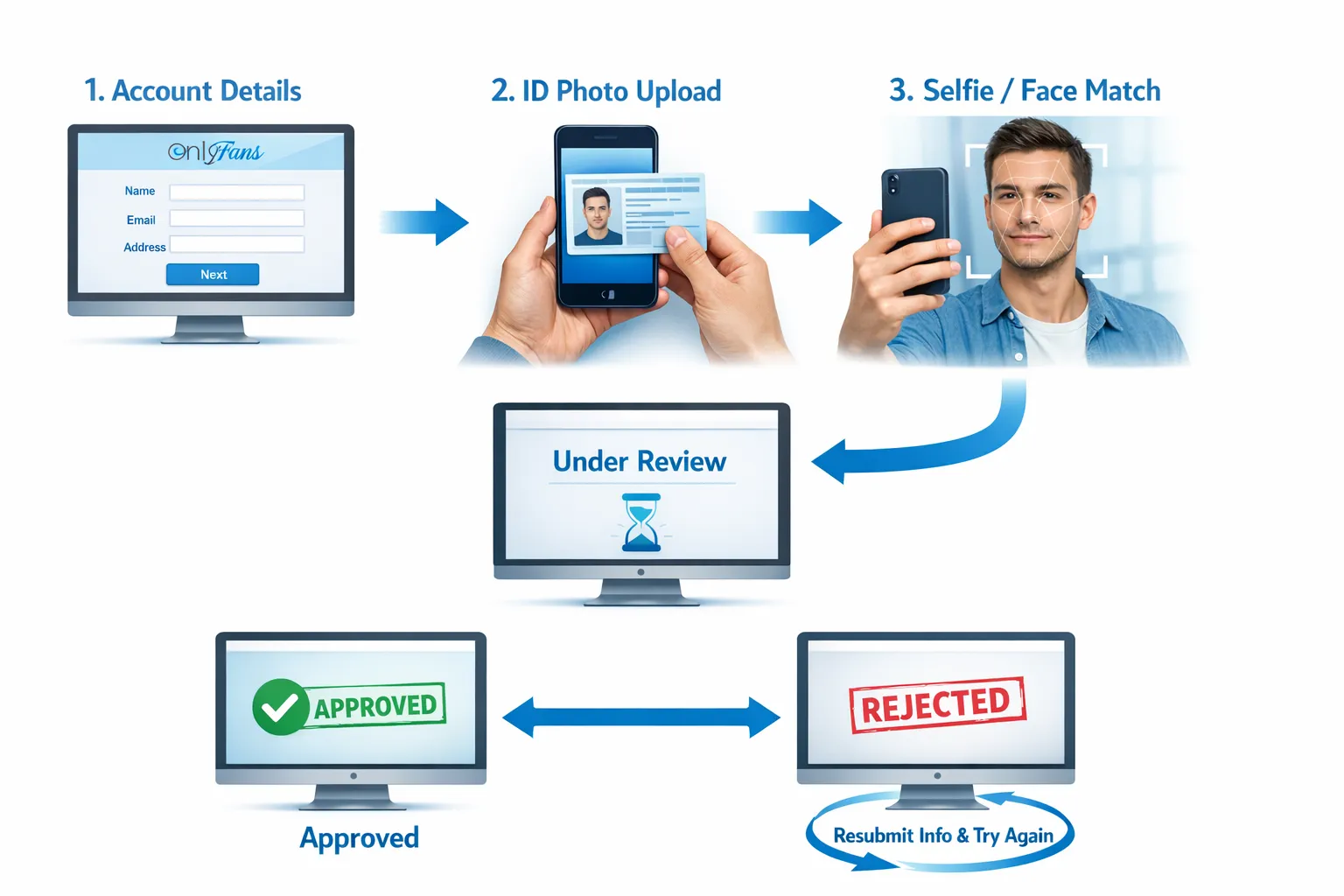
- Identity verification: You proving you are who you say you are (ID + selfie).
- Payout verification: Your banking and payout details being accepted (which can have separate delays).
If you’re already approved but payouts feel stuck, this article will save you time: International payouts: how to avoid common delays.
Why verification time varies (the real factors)
Verification is basically a risk check. The platform wants to confirm:
- You are a real person.
- Your ID is valid.
- Your face matches the selfie.
- Your details are consistent.
Anything that makes that harder tends to slow approval.
| Factor | Why it slows verification | What to do instead |
|---|---|---|
| Blurry or low-light ID photo | The system cannot read text or detect tampering | Use bright natural light and hold the phone still (no flash glare) |
| Glare on ID (lamination shine) | Key details get washed out | Tilt the ID slightly, move light source, re-shoot |
| Cropped corners or cut-off edges | Reviewers often need full document frame | Leave space around the ID, show all edges |
| Name/address mismatches | Looks like identity inconsistency | Match spelling exactly and update details before submitting |
| Old/expired ID | Can fail automated checks | Use a current, valid government ID |
| Heavy filters or altered selfies | Face match fails or looks manipulated | No beauty filters, no smoothing, no extreme angles |
| Backlog periods | Manual review queue gets longer | Submit early in the week and avoid repeated re-uploads |
The “get verified faster” setup checklist
Before you upload anything, run this like a pre-flight check. It prevents 80% of the avoidable delays.
- Use a high-quality camera: If your front camera is fuzzy, use the rear camera and a mirror or ask a friend you trust.
- Good lighting: Window light is usually best. Avoid harsh overhead yellow lighting.
- Plain background: Especially for selfies.
- No filters: Not even “light” ones.
- Match your details: Same spelling, same format, same legal name.
- Stable internet: Uploads that fail or compress badly can create issues.
- Take multiple shots: Pick the sharpest, most readable one.
The most common reasons creators get rejected (and how to fix them)
Rejection is common and usually fixable. The key is not to panic-submit five more times in a row.
| Rejection pattern | What it usually means | Best fix |
|---|---|---|
| “Document not accepted” | Wrong document type, expired ID, or unreadable details | Use a valid government ID and re-shoot in better light |
| “Image quality” issues | Blur, glare, compression, or cropping | Re-take with rear camera, full frame, bright light |
| “Selfie mismatch” | Angle, makeup changes, filters, or partial face | Neutral expression, no filter, face centered, clear |
| “Details don’t match” | Name/DOB formatting mismatch | Align your profile details exactly with your ID |
| Rejected repeatedly with no clarity | Could require manual review | Pause, review carefully, then resubmit once with best-quality files |
What not to do after a rejection
These are the moves that usually make things worse:
- Re-uploading the same photos and hoping it magically works.
- Changing multiple variables at once (new name, new email, new device) and creating more inconsistencies.
- Using editing tools to “sharpen” or “enhance” your ID photo (it can look tampered with).
A calm, step-by-step resubmission process
If you got rejected, use this simple process so you fix the right thing.
Step 1: Identify the failure type
Look for the theme:
- Document readability
- Document validity
- Selfie/face match
- Profile detail mismatch
Step 2: Re-shoot with “verification-grade” standards
- Bright window light.
- No flash glare.
- Full ID visible with all corners.
- No motion blur (rest elbows on a table).
- Selfie facing straight-on, no filter.
Step 3: Resubmit once, then wait
If you keep resubmitting rapidly, you can end up stuck in a loop where nothing gets enough review time.
What to do while verification is pending (so you don’t lose momentum)
This waiting period is actually a perfect time to set yourself up like a business.
Prep your launch content so you can post immediately
When you’re approved, you want to start strong, not scramble.
- Draft a 2-week content plan (teasers, PPV ideas, welcome content).
- Organize your vault: label sets, separate “feed-friendly” vs “PPV.”
- Write your welcome message and a tip menu outline.
If you’re still building your overall setup, this is a solid companion guide: How to start, create & verify your OnlyFans account.
Set up privacy and boundaries early
For a lot of women, the biggest stress is not the review time, it’s “what if someone I know finds me?” If that’s you, handle privacy before you start promoting.
- Choose a stage name and consistent branding.
- Separate emails and social accounts.
- Decide your face policy (face, partial face, no-face).
This walkthrough is helpful if you’re trying to stay discreet: How to secretly promote your OnlyFans (without friends or family finding out).
Build your promo funnel off-platform
OnlyFans growth usually comes from external traffic. While you wait:
- Set up your promo profiles (X, Reddit, TikTok if it fits your comfort and content style).
- Draft 30 caption ideas.
- Prepare a link-in-bio page.
- Create tracking links once your account is live so you know what’s working.
When to worry (and when not to)
It’s normal to feel anxious after 24 hours. But “worry” is usually about patterns, not a single slow day.
You probably don’t need to worry if:
- It’s your first submission and it has been a short time.
- You submitted on a weekend or during a busy period.
- You know your images were clear and your details match.
You should slow down and troubleshoot if:
- You’ve been rejected multiple times.
- You keep getting the same vague error.
- You realize your profile details do not match your ID exactly.
Copy/paste template: what to record before contacting support
If you decide to contact platform support (or you simply want to keep your own notes), having clean details saves time.
Verification support notes (copy/paste):
- Username:
- Email used on account:
- Country/region:
- Date and approximate time submitted:
- Document type used (passport/ID/driver’s license):
- Any error messages shown:
- Number of attempts:
- What changed between attempts (lighting, camera, angles):
Keep it factual and short. Emotional messages are understandable, but they rarely speed up review.
If you’re verifying as a couple or with collaborators
If you plan to create with a partner, verification gets more sensitive because platforms generally require proof that every person shown is verified or properly documented.
Before you film anything together, read: Complete OnlyFans couples guide.
(Also: don’t take shortcuts here. It’s not worth risking your account.)
Where an OnlyFans management agency fits (and where it doesn’t)
An OnlyFans management agency cannot “hack” verification or bypass rules, and anyone promising that is a red flag.
What a legit agency can do is:
- Help you submit correctly the first time (clean setup, matching details, privacy settings).
- Build your launch plan while you wait, so approval turns into income faster.
- Handle the operations after approval (posting strategy, marketing, fan engagement, leak protection).
If you’re weighing support vs doing everything solo, this breakdown helps: Working with an agency vs running OnlyFans alone.
And if you’re talking to agencies, protect yourself first: OnlyFans agency red flags.
The bottom line
OnlyFans verification can be quick, but it’s not predictable. If your submission is clean, you’re usually waiting on queue time. If it’s getting rejected, it’s almost always one of a few fixable issues: readability, mismatch, or selfie validation.
If you want a team to help you set everything up correctly and build a real growth plan after you’re approved, you can explore what Lookstars does here: Lookstars Agency.


Ready to transform your career?
Join hundreds of creators already earning six figures with Lookstars Agency.
Share this article
Best OnlyFans Agency
Europe's Leading OnlyFans Management Agency.
100% Free Ebook
Get our guide and unlock the secrets to OnlyFans success.
100% Free Ebook
Get our guide and unlock the secrets to OnlyFans success.
Free Revenue Calculator & Profile Analyzer
Try them for freeContinue reading...
Am I Attractive Enough for an OnlyFans Agency? The Answer
Can You Ever Fully Delete Your OnlyFans Content? The Reality