Top Tax Deductions OnlyFans reators Often Miss
If taxes feel like the least sexy part of being an OnlyFans creator, you’re not alone. But in real life, the money you keep often comes down to two boring th...

If taxes feel like the least sexy part of being an OnlyFans creator, you’re not alone. But in real life, the money you keep often comes down to two boring things: clean bookkeeping and knowing what you can legitimately deduct.
A lot of creators don’t “lose money” because they’re not earning, they lose money because they’re paying tax on income that should have been reduced by legitimate business expenses (or because they don’t have documentation when it matters).
Disclaimer: This is educational, not legal or tax advice. Rules vary by country and state, and policies can change. Verify details in official guidance or with a qualified tax pro.
The quick test: Is it a real business deduction?
Before you claim anything, run every expense through this simple 3-part filter:
1) Is it ordinary and necessary for your content business?
In the U.S., the IRS uses the concept of “ordinary and necessary” business expenses (see IRS Publication 535). In creator terms, that means:
- Ordinary: it makes sense for someone in your line of work.
- Necessary: it helps you run or grow the business.
2) Is it primarily for business, or mixed personal and business?
Mixed-use is where creators accidentally over-claim.
Examples of mixed-use expenses:
- Phone used for both family and content
- Internet used by your whole household
- A laptop you also use for Netflix
Mixed-use is not “bad”, it just means you should allocate a reasonable percentage and keep notes on how you calculated it.
3) Can you prove it?
If you can’t document it, it’s basically a vibes-based deduction.
Good proof:
- Receipt or invoice (PDF is fine)
- Bank/credit card statement (backup, not ideal alone)
- A short note tying it to business use (especially for mixed-use)
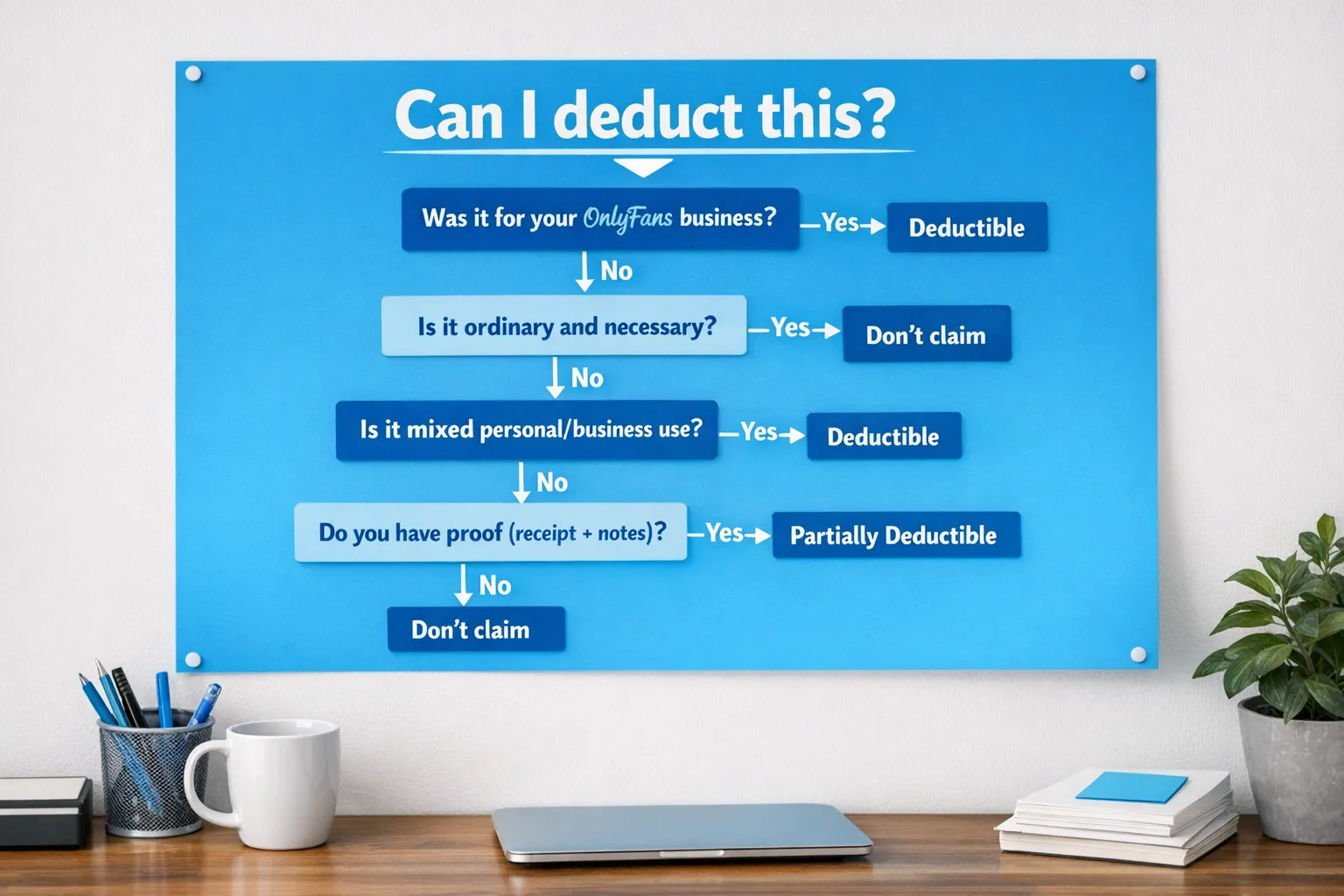
Top tax deductions OnlyFans creators often miss (or track poorly)
Below are the big categories where creators either forget deductions entirely or claim them in a risky way.
1) Platform fees and payment processing costs (easy win)
Creators often track only payouts and forget the costs that came out before the money hit their account.
Common items to track:
- OnlyFans platform commission (OnlyFans is widely known to take a percentage of earnings)
- Payment processing or payout fees (if applicable)
- Chargebacks, refunds, disputed transactions (if they happen)
Why it’s missed: It doesn’t “feel” like an expense because you never see the money in your bank.
How to fix it: Save monthly statements or export earnings reports regularly, then categorize the fees clearly.
2) Content production equipment (and the hidden “small stuff”)
Most creators remember the big purchases (camera, lighting), but forget the tiny things that add up all year.
Examples:
- Camera, phone used for shooting, lenses
- Tripods, ring lights, softboxes
- Microphones, audio recorders
- Backdrops, stands, basic set decor
- Memory cards, external hard drives
- Batteries, chargers, cords, adapters
Important: Some equipment may be treated differently for tax purposes depending on cost and how it’s used (expense vs depreciation). A tax pro can help you choose the cleanest approach.
3) Editing and business software subscriptions
Subscriptions are one of the most consistently deductible categories for creators, and also one of the easiest to track.
Examples:
- Video editing apps
- Photo editing apps
- Captioning tools
- Cloud storage
- Scheduling tools
- Design tools (thumbnails, menus, banners)
- Password managers and 2FA-related security tools
If you use AI tools for workflow (editing, captions, drafting messages), treat them like software subscriptions and track them the same way.
Related read: if you’re tightening your systems this year, you’ll like the practical workflow ideas in How to use AI to make more money on OnlyFans.
4) Home office or home studio (powerful, but needs care)
A dedicated workspace can unlock real deductions, but it’s also the category creators tend to do sloppily.
In the U.S., home office rules typically require the space to be used regularly and exclusively for business. The IRS explains the basics in Publication 587.
What creators often miss:
- A separate “admin corner” for editing, posting, bookkeeping, planning
- A dedicated studio area used only for shooting
- Allocating a reasonable percentage of utilities and internet when eligible
What not to do: Claim your entire bedroom because you sometimes take selfies there.
Good approach: If you have a clearly defined area used only for your business, document it (photos, measurements, notes) and keep your math consistent.
5) Internet and phone (especially the business-use percentage)
If your phone is your camera, your marketing department, your editor, and your client support inbox, it’s part of the business.
Creators often miss this because it feels like a personal bill.
Best practice:
- Track the bill monthly
- Note your estimated business-use percentage
- Be consistent, and keep a short explanation (example: “Used daily for filming, posting, DMs, and promotion”)
6) Marketing, promotion, and growth tools
This category is bigger than “paid ads.”
Examples:
- Link-in-bio tools
- Domain names and hosting for a landing page
- Branding (logo, banners, menus)
- Paid shoutouts/collabs (if you do them)
- Analytics tools
If you’re building traffic on social platforms, track the tools you use for that.
Related reads for your marketing side:
- OnlyFans Tracking Links Guide: How to Track Clicks, Subs & Traffic Sources
- Marketing OnlyFans on Twitter (X): What actually works in 2025)
7) Outsourcing and professional services (agency fees count too)
If you pay people to help you run your creator business, that cost is usually business-related.
Common examples:
- Editor, photographer, videographer
- Virtual assistant
- Chatting support (if you outsource)
- Accountant, tax prep
- Attorney (contracts, privacy issues, business setup)
- Agency/management fees
This matters because creators sometimes think, “It’s a revenue split, not an expense.” From a bookkeeping perspective, it’s still part of what it costs to generate revenue.
If you’re evaluating whether outsourcing makes sense financially, this can help: Are OnlyFans Agencies Worth It? A Detailed Review.
8) Content protection and privacy expenses
This is one of the most missed categories, and it’s especially relevant in adult content.
Examples:
- DMCA takedown services
- Leak monitoring
- Watermarking tools
- Security tools (account protection)
- P.O. box or mail handling services (if used for business and safety)
Creators who take privacy seriously often spend real money here, but forget to categorize it.
If privacy is a big concern for you, you might also want: How to Secretly Promote Your OnlyFans (Without Friends or Family Finding Out).
9) Travel, mileage, and shoot-related transportation
This is another category that’s legitimate, but only if you document it properly.
Examples:
- Mileage or rideshares to a shoot location
- Parking and tolls
- Travel costs for a business-purpose trip (like a planned collab weekend)
The U.S. IRS details substantiation expectations in Publication 463.
Creator reality check: “I went to Miami and shot content once” is not a clean travel deduction by itself. The trip needs a real business purpose, and you need records.
10) Wardrobe, costumes, props, and “beauty” expenses (high value, but gray)
This is where creators either:
- Miss deductions they could claim, or
- Claim aggressively and increase audit risk
General practical guidance:
- Costumes and niche-specific outfits that aren’t suitable for everyday wear are usually easier to justify than regular clothing.
- Props and set items used for content are often straightforward if you keep receipts.
- Hair, makeup, nails, tanning, skincare can be tricky because they can be considered personal grooming. Some creators try to claim them because they’re “for shoots,” but rules can be strict depending on your jurisdiction.
If you’re spending heavily here, it’s worth asking a tax pro how to handle it safely.
A creator-friendly deduction tracker (use this table)
Use this as a checklist for what to track, and what proof to save.
| Deduction category | Examples (creator-specific) | What to save | Common mistake |
|---|---|---|---|
| Platform and payout fees | Platform commission, payout fees, refunds | Monthly statements, exports | Tracking only bank deposits |
| Equipment | Lighting, mic, tripod, hard drives | Receipts, serial numbers (optional) | Forgetting “small gear” purchases |
| Software | Editing apps, cloud storage, design tools | Invoices, subscription emails | Not categorizing recurring subscriptions |
| Home office/studio | Dedicated editing space, studio area | Measurements, photos, utility bills | Claiming non-exclusive spaces |
| Phone/internet | Monthly plan, extra line for business | Bills + business-use note | Claiming 100% with no support |
| Marketing | Link-in-bio, branding, promo tools | Invoices, campaign receipts | Mixing personal social tools with business |
| Outsourcing | Editor, VA, agency fees | Contracts, invoices, payment records | Paying via cash apps with no invoice |
| Protection/privacy | DMCA services, watermark tools | Receipts, service agreements | Forgetting to track safety tools |
| Travel/transport | Mileage, rideshares, parking | Mileage log, receipts | No log, no business purpose notes |
| Wardrobe/props | Costumes, set props, niche items | Receipts + brief content-use note | Claiming everyday clothing or grooming |
How to set up your bookkeeping in 30 minutes (so deductions don’t get missed)
You do not need to become an accounting girlie. You just need a system that’s hard to break.
Step 1: Separate your money
- Open a separate bank account (and ideally a separate card) for creator income and expenses.
- Pay business expenses from that account only.
This one change makes your deductions easier to defend and your stress lower.
Step 2: Create 10 simple categories (and stick to them)
Pick categories that match how you actually spend:
- Platform fees
- Gear and equipment
- Software and subscriptions
- Props/wardrobe
- Marketing
- Outsourcing
- Travel/transport
- Home office/studio
- Phone/internet
- Privacy/security
Step 3: Save receipts as you go (not at tax time)
Best habit:
- Upload receipts weekly
- Rename them clearly (date_vendor_amount)
- Add a 1-line note for anything mixed-use
Step 4: Do a monthly “mini close”
Once a month:
- Reconcile your transactions
- Check for missing receipts
- Review your top 3 spending categories
It takes 20 to 40 minutes and saves you hours later.
Red flags that cause problems (and how to avoid them)
You can have legitimate deductions and still create trouble if your records are messy.
Watch-outs:
- Big home office claim with no exclusive space: Document the workspace clearly.
- Claiming personal grooming as business: Ask a pro if you’re unsure.
- No receipts, only bank statements: Better than nothing, but not ideal.
- Mixing personal and business spending: Separate accounts fix most of this.
- Over-claiming travel: Keep a mileage log and write down the business purpose.
If you’ve ever worried about “doing something wrong,” you’ll appreciate this safety-first read too: OnlyFans Scam: How Agencies, Managers and Chatters Rob the Creators (And How to Stay Safe).
Who this is for (and who should get help sooner)
This guide is for you if:
- You’re earning consistently and want to keep more of it
- You’re buying gear, paying for tools, or outsourcing
- You’re tired of feeling behind every tax season
You should seriously consider professional tax help if:
- Your income jumped quickly this year
- You’re operating across multiple platforms
- You’re unsure about mixed-use deductions (home office, travel, grooming)
- You want to set up a business entity or plan for quarterly taxes
Where Lookstars fits (and where it doesn’t)
Lookstars is an OnlyFans management agency focused on growth, operations, and protection, things like marketing, fan engagement, content planning, and leak protection. That can reduce chaos, and it can make your business expenses easier to track because your operations become more structured.
What an agency cannot do is replace a qualified tax professional for your specific situation.
If you want support on the business side so you can focus on content (and stop juggling everything alone), you can apply to work with Lookstars.



Ready to transform your career?
Join hundreds of creators already earning six figures with Lookstars Agency.
Share this article
Best OnlyFans Agency
Europe's Leading OnlyFans Management Agency.

100% Free Ebook
Get our guide and unlock the secrets to OnlyFans success.
100% Free Ebook
Get our guide and unlock the secrets to OnlyFans success.
Free Revenue Calculator & Profile Analyzer
Try them for freeContinue reading...

Am I Attractive Enough for an OnlyFans Agency? The Answer

Can You Ever Fully Delete Your OnlyFans Content? The Reality
