OnlyFans Taxes Explained for Beginners: Full Guide
Taxes are not the “boring admin part” of OnlyFans. They are the part that can quietly wreck your peace if you ignore them, then hit you all at once during ta...

Taxes are not the “boring admin part” of OnlyFans. They are the part that can quietly wreck your peace if you ignore them, then hit you all at once during tax season.
If you’re a beginner creator, this guide will walk you through how OnlyFans income is taxed (in plain English), what to track from day one, which expenses usually matter, and when it’s worth getting professional help.
This is educational, not legal or tax advice. Policies and laws can change. Verify with official sources (like the IRS) or a qualified tax professional.
The big mindset shift: you’re not “just posting”, you’re running a business
Most creators start with content first, then money comes in, then taxes become scary.
A calmer way to think about it is this:
- OnlyFans money is business income.
- Your taxable profit is usually income minus business expenses.
- “I didn’t withdraw it to my bank yet” usually does not mean “it doesn’t count.”
If you do one thing after reading this article, do this: start tracking income and expenses weekly. It reduces tax stress more than any hack.
If you want a simple weekly routine, Lookstars has a step-by-step workflow here: OnlyFans Taxes: Weekly Habit to Stay Organized.
What counts as “income” on OnlyFans (and what beginners often miss)
On OnlyFans, your income usually includes more than subscriptions.
Common creator revenue types include:
- Subscriptions
- Tips
- PPV messages (mass PPV and 1:1 “conversational” PPV)
- Custom content
- Referral/creator programs (if applicable)
Two concepts matter a lot for taxes:
Gross income vs. payout deposits
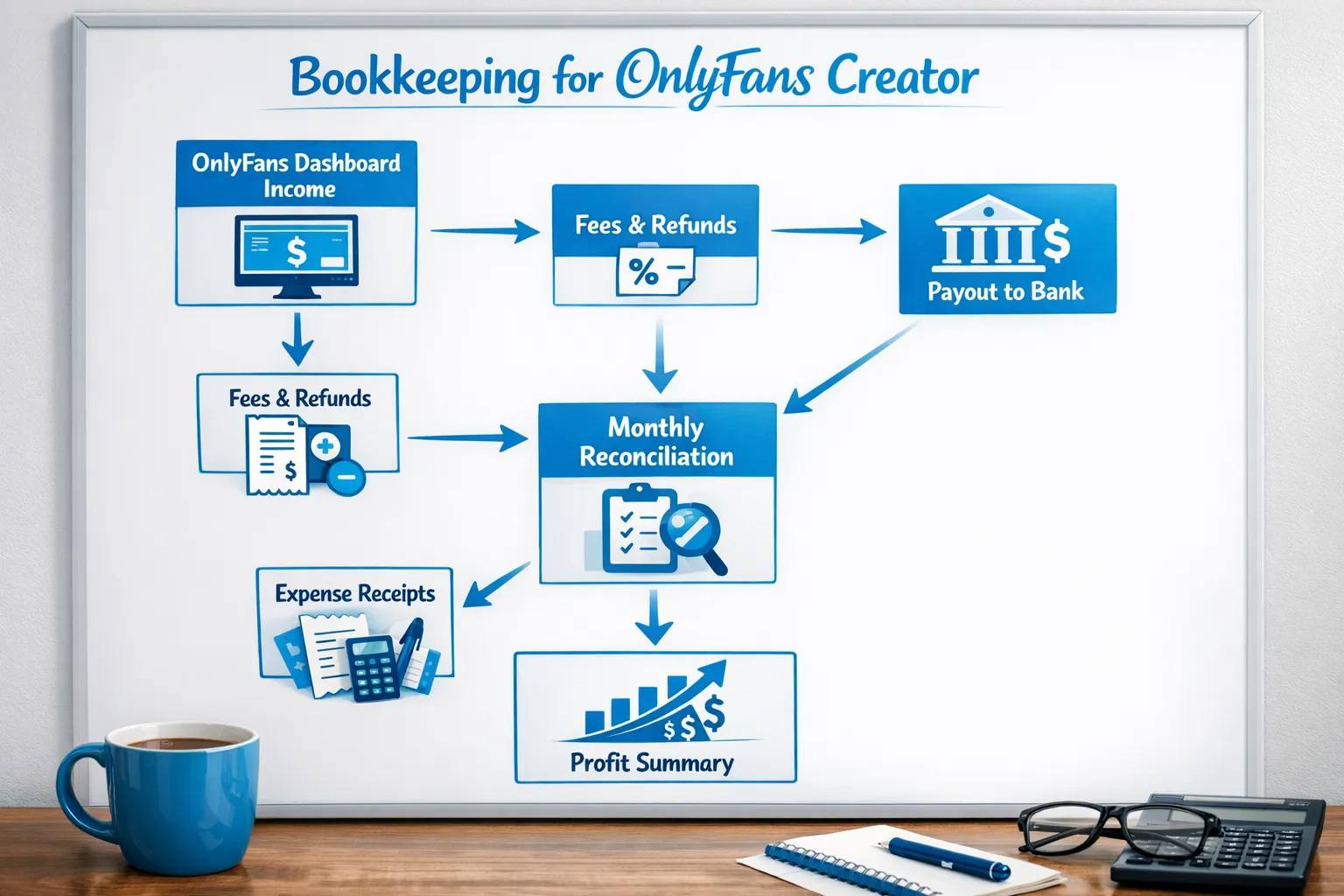
Many platforms report gross amounts (before fees), while what hits your bank is net after platform fees and other adjustments.
OnlyFans takes a platform fee (commonly discussed as 20%), and payment processing, refunds, and chargebacks can affect what you actually receive. The important part for your bookkeeping is that you should be able to explain:
- How much you earned
- What fees were withheld
- What was refunded/charged back
- What was actually paid out to you
That’s why reconciling your dashboard numbers to your deposits is so helpful.
If you want a deeper breakdown of what to track (especially around gross vs net), use this guide: OnlyFans 1099 Taxes: What Creators Should Track.
“Cash basis” vs “earned” tracking (keep it simple at first)
You’ll hear people debate whether to track money when it’s earned vs when it’s paid out.
For beginners, the practical approach is:
- Track every payout that lands in your bank.
- Also track monthly platform statements so you can reconcile totals later.
A tax professional can tell you the best method for your exact situation, but for staying organized, a consistent system matters more than perfection.
How OnlyFans taxes generally work in the US (beginner-friendly)
In the US, many creators are treated like self-employed workers (similar to freelancers).
That usually means:
- You report business income and expenses (often on Schedule C).
- You pay income tax based on profit, plus additional taxes that commonly apply to self-employed people.
Two official starting points (easy to skim, not creator-specific) are:
The “profit” formula you need to understand
Here’s the core math creators should know:
Taxable business profit (simplified) = business income − allowed business expenses
If you only remember one line, remember that.
It’s why tracking expenses is not optional if you want to avoid overpaying.
Your beginner setup (do this once, thank yourself all year)
This is the setup that keeps creators out of panic mode in March and April.
Step 1: Separate your money (even if you’re not “big” yet)
You don’t need an LLC to separate finances.
A beginner-friendly approach is:
- One bank account used primarily for creator income and creator expenses
- One card (or virtual card) used for business purchases
This makes tax time cleaner and helps protect your boundaries (your “personal life” money stays separate from business chaos).
Step 2: Use a simple spreadsheet with the right columns
You can use Google Sheets. You do not need fancy software to start.
Use columns like:
- Date
- Vendor / platform
- Category
- Amount
- Payment method
- Notes
- Receipt link (or file name)
If you want a ready-to-copy structure and weekly flow, follow: OnlyFans Taxes: Weekly Habit to Stay Organized.
Step 3: Save receipts like you actually want to defend the deduction
This is where beginners mess up. It’s not about “what you can deduct” in theory, it’s about what you can document.
A good rule:
- If you can’t prove what it was and why it was business-related, treat it as personal.
Common OnlyFans deductions (and what proof to keep)
Deductions reduce taxable profit, but you should be careful, aggressive write-offs without documentation are how creators get headaches later.
For a full list with examples (and common mistakes), read: Top Tax Deductions OnlyFans Creators Often Miss.
Here’s a practical quick table for beginners.
| Deduction category (common) | Creator example | Proof you should keep |
|---|---|---|
| Platform fees | OnlyFans fee withheld from earnings | Platform statements, payout reports |
| Equipment | Phone, camera, tripod, lighting | Receipt, order confirmation, business-use notes |
| Software | Editing apps, scheduling tools, storage | Invoice, subscription confirmation |
| Marketing | Promo pages, shoutouts, ads (where allowed) | Receipts, screenshots of campaigns |
| Outsourcing | Editor, chatter, assistant, designer | Contract/invoice, payment record |
| Internet/phone (partial) | Business-use portion | Bills plus a simple usage method |
| Content protection | Monitoring services, DMCA takedowns | Receipts, service agreement |
Important: Some categories (like wardrobe, beauty, travel, home office) can be legitimate in certain scenarios, but are also common audit traps when they’re really personal. If you’re unsure, ask a tax pro before claiming it.
Estimated taxes (quarterly payments): how to avoid getting surprised
Many US self-employed people need to pay taxes during the year (not just in April). This often shows up as estimated tax payments.
A beginner-friendly way to handle this is not to obsess over perfect math at first, but to build a system:
The “set-aside” system (simple and realistic)
Each time you get paid, move a portion of that money into a separate “tax” bucket (savings account).
- Choose a conservative percentage that fits your situation
- Update it as your profit changes
Because rates vary by income, state, filing status, and deductions, it’s smart to confirm your set-aside rate with a professional once you’re earning consistently.
For official background on estimated taxes, start here: IRS, Estimated Taxes.
1099 forms (and why they can look “wrong”)
Creators often panic when they receive a 1099 because:
- The amount looks higher than what they remember
- It doesn’t match their bank deposits
That can happen because reporting often uses gross amounts, and because your deposits are affected by fees, timing, refunds, and chargebacks.
Your job is to have records that explain the difference.
If you want a creator-specific walkthrough (and an income tracking template), use: OnlyFans 1099 Taxes: What Creators Should Track.
For official definitions of 1099 forms, see: IRS, Information returns.
Should you start an LLC for OnlyFans? (A simple decision framework)
An LLC can be helpful, but it’s not a magic shield and it’s not a guaranteed tax reduction.
A clean beginner framework is:
An LLC might make sense if:
- Your income is consistent (not just one good month)
- You’re hiring help or signing contracts
- You want clearer separation between you and the business
It might be premature if:
- You’re still testing whether you even like doing OnlyFans
- You’re not tracking income and expenses yet (fix the basics first)
- Your income is very small or inconsistent
For a full breakdown (including what LLCs do and don’t do for privacy and taxes), read: LLC for OnlyFans: When It Makes Sense.
Privacy notes: how to stay safer while doing taxes correctly
You cannot “privacy hack” your way out of legal tax obligations, and you should not try.
But you can reduce exposure and chaos with legit steps like:
- Keeping business finances separate from personal finances
- Using strong password hygiene and 2FA everywhere
- Storing receipts and tax documents in a secure folder (not your camera roll)
- Being careful about who has access to your payout accounts
If you struggle with payout delays or banking friction (which can also complicate tax records), this guide can help: International Payouts: How to Avoid Common Delays.
DIY vs hiring a pro: what’s worth paying for (and when)
A lot of creators wait until they’re overwhelmed, then pay more to fix a mess.
Here’s a cleaner approach.
DIY can be fine when:
- You have low volume (few transactions)
- Your expenses are straightforward
- You are consistently tracking weekly
Consider a tax professional when:
- You’re earning consistently and taxes are no longer “small”
- You have multiple platforms (OnlyFans plus Fansly, Fanvue, clip sites)
- You’re doing lots of customs, refunds, or international payouts
- You want help with estimated taxes, entity decisions, or audits
If you’re hiring help, send this copy/paste message so you don’t waste your consult:
Copy/paste message to a tax pro (creator-friendly)
Hi! I’m an online content creator earning income through subscription and digital content sales (OnlyFans-style). I want to set up clean bookkeeping and estimated tax payments. Can you help me confirm:
- What records I should track monthly (income, fees, refunds/chargebacks, payouts)
- Which expenses are reasonable in my situation and what documentation you need
- Whether estimated quarterly payments apply to me and how to calculate them
- Whether staying a sole proprietor or forming an LLC makes sense right now
If possible, I can share my monthly totals and expense categories.
End-of-year checklist (so tax season is just paperwork, not panic)
Do these before your tax documents arrive:
- Export or screenshot year-to-date income summaries from your platforms
- Confirm your spreadsheet totals match bank deposits (monthly reconciliation)
- Organize receipts by category
- List contractors you paid (and gather invoices)
- Save your year-end bank statements
- Make a note of anything unusual (big equipment purchase, travel, large refunds)
If you want the weekly version of this (the easiest way to stay on track), use: OnlyFans Taxes: Weekly Habit to Stay Organized.
Where Lookstars can help (and where we can’t)
Lookstars is an OnlyFans management agency focused on growth, fan engagement, leak protection, and operations. We can help creators build more consistent systems, including better tracking habits and cleaner operations, but we’re not a substitute for a tax professional.
If your business is growing and you’re overwhelmed by the workload (content planning, promotion, DMs, admin), you may also like: Working With an Agency vs Running OnlyFans Alone.
When you’re ready, you can apply here: Lookstars Agency.



Ready to transform your career?
Join hundreds of creators already earning six figures with Lookstars Agency.
Share this article
Best OnlyFans Agency
Europe's Leading OnlyFans Management Agency.

100% Free Ebook
Get our guide and unlock the secrets to OnlyFans success.
100% Free Ebook
Get our guide and unlock the secrets to OnlyFans success.
Free Revenue Calculator & Profile Analyzer
Try them for freeContinue reading...

Am I Attractive Enough for an OnlyFans Agency? The Answer

Can You Ever Fully Delete Your OnlyFans Content? The Reality
