OnlyFans Scams in DMs: How to Spot and Block Fast
DM scams are one of those “hidden taxes” of being an OnlyFans creator: they waste your time, stress you out, and in the worst cases, they cost you money, con...
DM scams are one of those “hidden taxes” of being an OnlyFans creator: they waste your time, stress you out, and in the worst cases, they cost you money, content, or your account.
The good news is that most OnlyFans scams in DMs are predictable. Once you learn the patterns, you can spot them in seconds and block fast, without second-guessing yourself.
The DM reality: why creators get targeted so hard
Scammers love DMs because they’re private, emotional, and fast. They rely on three things:
- Urgency (“Last chance”, “Account will be deleted”, “I’m buying right now”)
- Authority (pretending to be OnlyFans support, a “promo page”, a “manager”, a “lawyer”)
- Confusion (getting you to click a link, send a code, or deliver content before payment)
If you’re a newer creator, they’ll try to overwhelm you. If you’re established, they’ll try to impersonate brands, agencies, or “whales”. Either way, the goal is the same: get access, get free content, or get you off-platform.
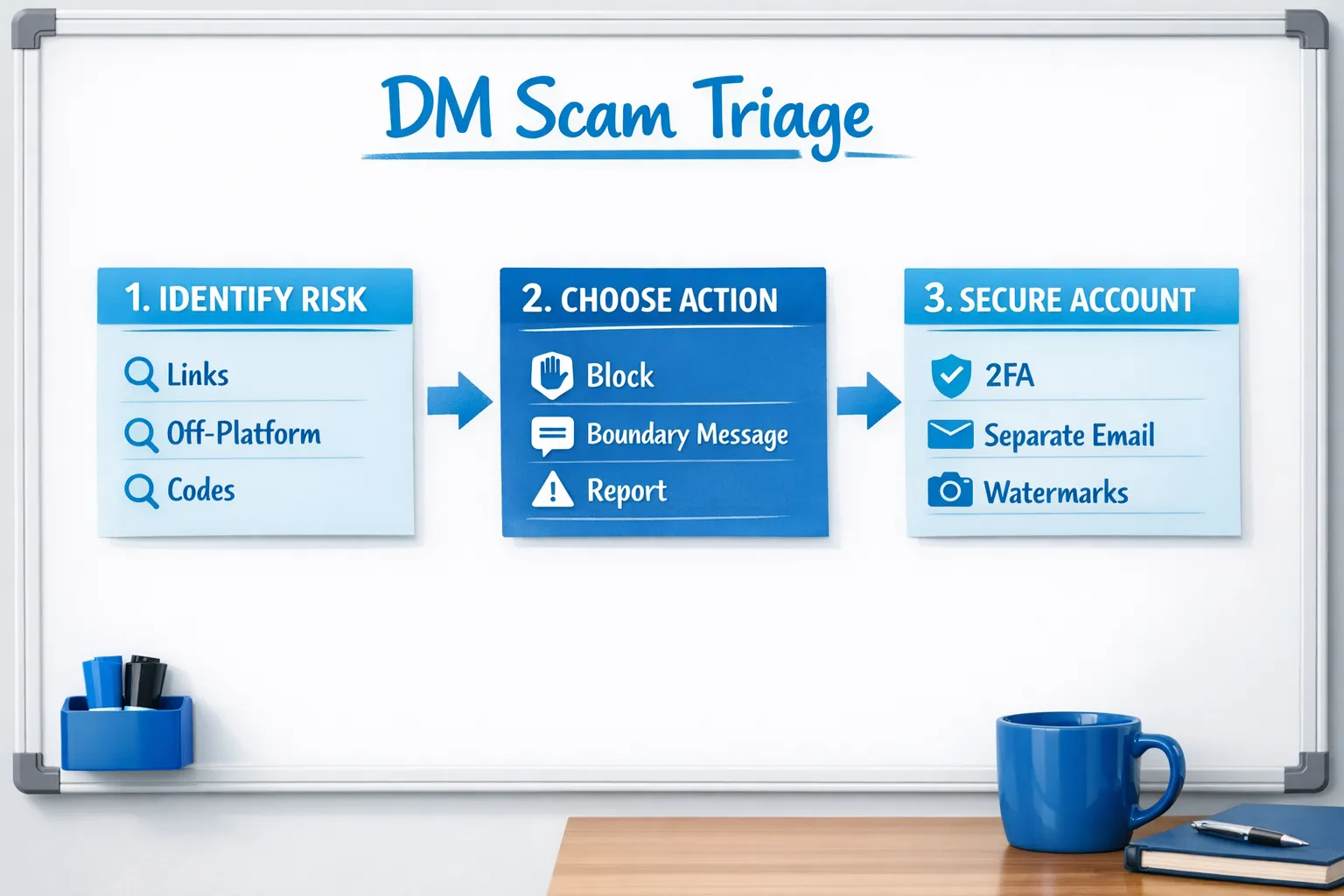
The “10-second triage” framework: decide what to do immediately
When a DM feels even slightly off, run this quick check. It’s designed to help you act fast.
Step 1: Identify the DM category
Ask yourself: is this message trying to make me do any of these?
- Click a link
- Leave the platform (Telegram, WhatsApp, Google Drive, “text me”)
- Share a code, email, or login detail
- Send content before payment
- Accept a “promotion” or “agency help” instantly
If yes, assume it’s high-risk until proven otherwise.
Step 2: Choose the correct action
Use this decision rule:
- High-risk request + low trust: block immediately.
- Medium-risk request + possible real fan: send one boundary message, then mute/block if they push.
- Low-risk but annoying: restrict/mute (if the platform allows) and move on.
Step 3: Never “debate” scammers
Scammers want your attention more than your content. A clean block is a business decision.
The most common OnlyFans scams in DMs (and the exact tells)
Here are the scam patterns creators report constantly, plus the quickest giveaways.
| DM scam type | What they say | The tell (spot it fast) | What to do |
|---|---|---|---|
| Fake OnlyFans support | “Verify your account here”, “Your payout is on hold” | Support rarely contacts you like a random user, and links look unofficial | Do not click. Go to official support through the site/app, block sender |
| Phishing links | “Is this you?”, “Your leaked video”, “Collab doc”, “Brand contract” | Shortened links, weird domains, pressure to click | Don’t click. Screenshot, report, block |
| Chargeback / “pay later” tricks | “Send first, I’ll tip after”, “I’ll pay double next time” | They avoid paying upfront, lots of love-bombing | Require payment first, then block if they argue |
| Fake promo pages | “Pay $50 and we’ll shout you out” | No real proof, stolen screenshots, instant payment demands | Ask for verifiable proof, otherwise ignore/block |
| Fake agency/manager outreach | “We guarantee 10k”, “We manage top girls, send login” | Guarantees, no call, wants credentials, rushes you | Don’t share access. Vet properly (see below) |
| “Whale” manipulation | “I’ll spend $5k tonight, but prove you’re real” | Big promises, asks for free custom preview | Offer paid menu, require payment, block if they push |
| Crypto / “investment” | “Let me invest in you”, “I’ll pay in crypto” | Off-platform payment + complex story + urgency | Decline. Keep payments on-platform |
| Blackmail / extortion | “Pay or I’ll leak”, “I found your family” | Threats, screenshots, demand money fast | Do not pay. Preserve evidence, report, escalate |
A note on “real fans” vs scammers
Some real fans are awkward, pushy, or bad at boundaries. The difference is simple:
- Real fans respect your rules once you set them.
- Scammers punish your boundaries (guilt trips, threats, urgency, insults, constant negotiation).
Copy-paste scripts: shut it down without emotional labor
Use these when you’re not 100 percent sure yet, but you want to stay safe.
Script 1: The link shutdown
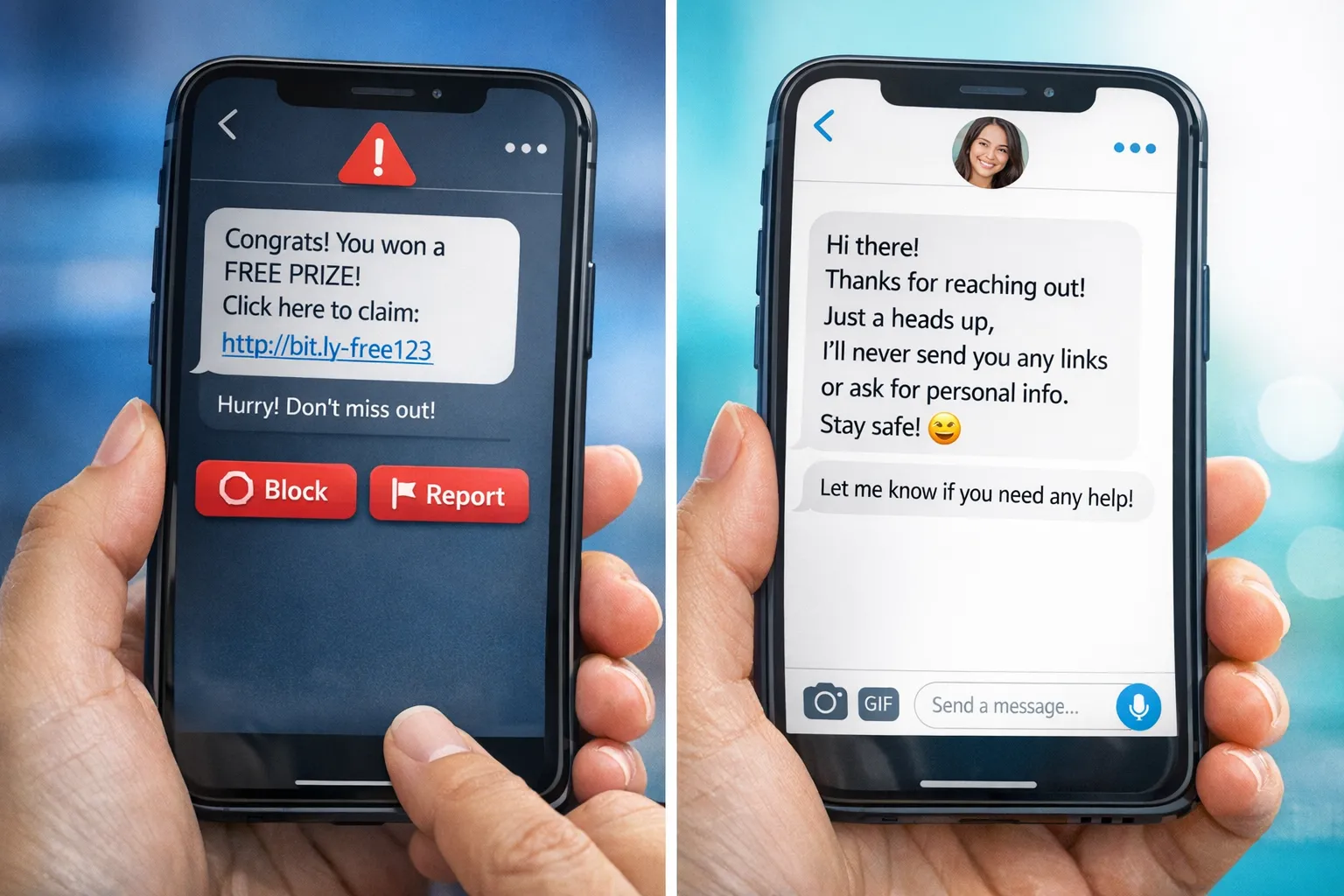
“Hey love, I don’t click links in DMs for safety. If you want something from me, tell me here and I’ll help 💕”
If they send another link: block.
Script 2: The off-platform shutdown
“I keep everything on OnlyFans for privacy and safety. If you’d like a custom or PPV, I can send options here.”
If they insist on Telegram/WhatsApp: block.
Script 3: The ‘send first’ shutdown
“I don’t send content before payment. If you want it, I can send it as PPV right here.”
If they argue: block.
Script 4: The fake promo / management pitch filter
“Thanks! I only consider promo/management after a quick call and proof of recent results (not screenshots). If you’re legit, send your website + a time to call.”
If they dodge the call: block.
How to block and report fast (OnlyFans + social platforms)
Exact buttons and labels can change, so treat this as general navigation and verify inside the app.
On OnlyFans
Most creators can do these quickly from the conversation or the user profile:
- Block user: open the user profile from the chat, look for the three dots (or menu), choose block.
- Restrict/limit (if available): use this for persistent time-wasters you don’t want to fully block yet.
- Report user/message: use report when there’s impersonation, threats, blackmail, or obvious fraud.
Best practice: screenshot the message first, especially if it includes threats, payment manipulation, or impersonation.
On Instagram / X (Twitter) / TikTok / Reddit
The principles are the same:
- Block immediately for link scams, impersonation, or sexual extortion.
- Report if the account is impersonating you, selling your leaks, or sending threats.
- Avoid replying after you set one boundary. More replies equals more targeting.
If you promote anonymously, your privacy setup matters just as much as blocking. This guide can help you tighten your exposure: How to secretly promote your OnlyFans (without friends or family finding out).
The scams that look “professional” (and how to verify safely)
Some scams are convincing because they mimic real business outreach: agencies, promoters, editors, “brand deals”. You don’t need to say yes or no immediately. You need a verification process.
A safe verification checklist (no credentials shared)
Before you take anyone seriously, require:
- A real website and real identity (not just a Telegram handle)
- A video call (camera on)
- Clear explanation of what they do, and what they need from you
- A contract you can review (no pressure, no “sign today”)
- Proof that doesn’t rely on screenshots (screenshots are easy to fake)
If someone wants your OnlyFans login, your 2FA code, or asks you to “add them as owner” without a formal process, that’s not professional management. That’s an account takeover attempt.
If you want a deeper breakdown of agency-related scams specifically, read: OnlyFans scam: how agencies, managers and chatters rob creators (and how to stay safe) and 6 red flags to watch out for before signing with an OnlyFans agency.
DM scam prevention: make yourself a harder target
Blocking fast helps, but prevention is what saves you hours every week.
1) Keep payments and delivery on-platform
A huge percentage of scams start with “Let’s do it on Telegram” or “I’ll pay you on Cash App”. Even if the person is real, off-platform deals increase:
- non-payment risk
- doxxing risk
- screenshot and redistribution risk
2) Separate your creator identity from your personal identity
Basics that reduce scam leverage:
- a dedicated creator email
- unique passwords (never reused)
- two-factor authentication where available
- no reused usernames across personal accounts
3) Watermark and package previews intentionally
Watermarks won’t stop all theft, but they reduce “easy repost” value and help prove ownership.
4) Track what traffic is real so you’re less tempted by “promo” DMs
When you understand where your paying subs come from, you stop falling for random “growth offers”. Use OnlyFans tracking links (official feature) to measure performance: OnlyFans tracking links guide.
If you already clicked, sent something, or got threatened: what to do next
This part is about damage control, not shame. Scams work because they’re designed to work.
If you clicked a suspicious link
- Change your OnlyFans password (and any email password tied to it).
- Enable 2FA where possible.
- Review active sessions/devices if the platform provides it.
- Watch for new payout changes or profile edits you didn’t make.
If you sent content for free and they’re dangling payment
- Stop negotiating.
- Save screenshots.
- Block.
- Consider sending future customs only as paid messages with clear terms.
If you’re being extorted (“pay or I leak”)
- Don’t pay. Paying often increases demands.
- Preserve evidence (screenshots, usernames, timestamps).
- Report on the platform.
- If your content is being posted publicly, consider takedown support.
Lookstars includes content leak protection (monitoring + DMCA takedowns) for creators who want help handling this at scale, along with privacy controls like country blocking and security setup. You can learn more about the agency here: Lookstars OnlyFans management agency.
Important: This section is educational, not legal advice. Laws and platform policies can change. If you feel unsafe, consider speaking to a qualified professional or local authorities.
“Who this is for” (and who it’s not)
If you’re getting hit with scams daily, you’re not doing anything wrong. It usually means you’re visible.
This guide is especially for you if:
- you’re promoting on Reddit/X and getting flooded with “buyers”
- you’re scaling and DMs are stealing your time
- you’ve had leaks, impersonators, or aggressive boundary pushers
You might not need a full management team if:
- you’re still experimenting casually and prefer to keep everything small
- you’re not ready to share any business operations with a partner (even a legitimate one)
But if DMs are overwhelming you, leaks are recurring, or you’re tired of playing defense, it can make sense to get professional support.
If you’re considering that route, start with a realistic decision read: When to hire an OnlyFans management agency: 5 brutal truths. And if you want to explore working with Lookstars specifically (no upfront costs, flexible cancel-anytime contracts), you can apply here: Apply to Lookstars Agency.
The bottom line
You don’t need to become a cyber-security expert to stay safe. You need a repeatable system:
- recognize scam patterns fast
- refuse links, codes, and off-platform pressure
- require payment first
- block ruthlessly when boundaries aren’t respected
The more consistently you do this, the fewer scammers stick around, and the more energy you keep for real fans who actually pay.



Ready to transform your career?
Join hundreds of creators already earning six figures with Lookstars Agency.
Share this article
Best OnlyFans Agency
Europe's Leading OnlyFans Management Agency.

100% Free Ebook
Get our guide and unlock the secrets to OnlyFans success.
100% Free Ebook
Get our guide and unlock the secrets to OnlyFans success.
Free Revenue Calculator & Profile Analyzer
Try them for freeContinue reading...

Am I Attractive Enough for an OnlyFans Agency? The Answer

Can You Ever Fully Delete Your OnlyFans Content? The Reality
