Link-in-Bio Page: Best Setup for OnlyFans Conversion
Most OnlyFans creators don’t have a traffic problem, they have a link problem. . . If you’re getting views on TikTok/IG, clicks from Reddit, or DMs popping o...
Most OnlyFans creators don’t have a traffic problem, they have a link problem.
If you’re getting views on TikTok/IG, clicks from Reddit, or DMs popping on X, but subscriptions are inconsistent, your link-in-bio page is usually where the money leaks.
Think of your link-in-bio as a mini landing page with one job: turn a curious stranger into a subscriber (or at least a warm lead) with minimal friction.
Below is the best setup we recommend when the goal is OnlyFans conversion, plus the exact layout, button strategy, tracking, and privacy considerations that protect you long-term.
What a link-in-bio page needs to do (for real conversion)
A high-converting link-in-bio page does three things well:
1) Reduce “panic” and doubt in the first 3 seconds
People click your link while they’re distracted. If your page looks messy or unclear, they bounce.
Your page should instantly answer:
- Who is this?
- What do I get if I subscribe?
- Is it safe and legit?
2) Route different viewers to the right next step
Not everyone who clicks is ready to pay today.
You need a setup that works for:
- Hot traffic (Reddit/X) that can convert straight to paid
- Warm traffic (IG/TikTok) that often needs a softer step first
- Existing fans who just want “custom menu” or “DM me”
3) Track what’s working so you stop guessing
If you don’t track, you’ll keep “posting more” without knowing which platform is actually paying you.
OnlyFans has its own tracking links feature. Use it.
If you haven’t set this up yet, start here: OnlyFans Tracking Links Guide: How to Track Clicks, Subs & Traffic Sources.
The 4 link-in-bio options (and when each one makes sense)
Creators usually pick one of these:
| Option | Best for | Pros | Cons | Recommended? |
|---|---|---|---|---|
| Direct link to OnlyFans | Hot traffic only | Fastest path to subscribe | No segmentation, harder to pre-sell, less control | Sometimes |
| Link hub tool (Linktree-style) | Most creators | Easy, quick, mobile-friendly | Can be generic, too many links hurts conversion | Yes, if optimized |
| Custom landing page on your domain | Scaling and testing | Highest control, better branding | More setup, needs basic web help | Yes, if you can |
| Multiple pages (one per traffic source) | Creators who test | Matches intent per platform | More upkeep, needs tracking discipline | Yes, for growth phases |
My honest recommendation: start with a link hub that is designed like a landing page (not a list of random links). Then graduate to a custom page when you’re testing offers heavily.
The best link-in-bio setup for OnlyFans conversion (the “2-path” structure)
Here’s the simplest structure that converts without feeling pushy:
Above the fold (what they see without scrolling)
- Your name + niche hook (one sentence)
- 2 main buttons only
- One trust line (short)
Below the fold (optional, but powerful)
- One “proof” block (what they get, how often you post, vibe)
- One “soft” option (free preview, DM keyword, or socials)
- One safety boundary line (optional but helps serious buyers)
The core idea is two paths:
- Path A: Subscribe now (for people already sold)
- Path B: Warm-up first (for people curious but hesitant)
If you only give one path, you lose money either way:
- Too aggressive: warm traffic bounces
- Too soft: hot traffic gets distracted
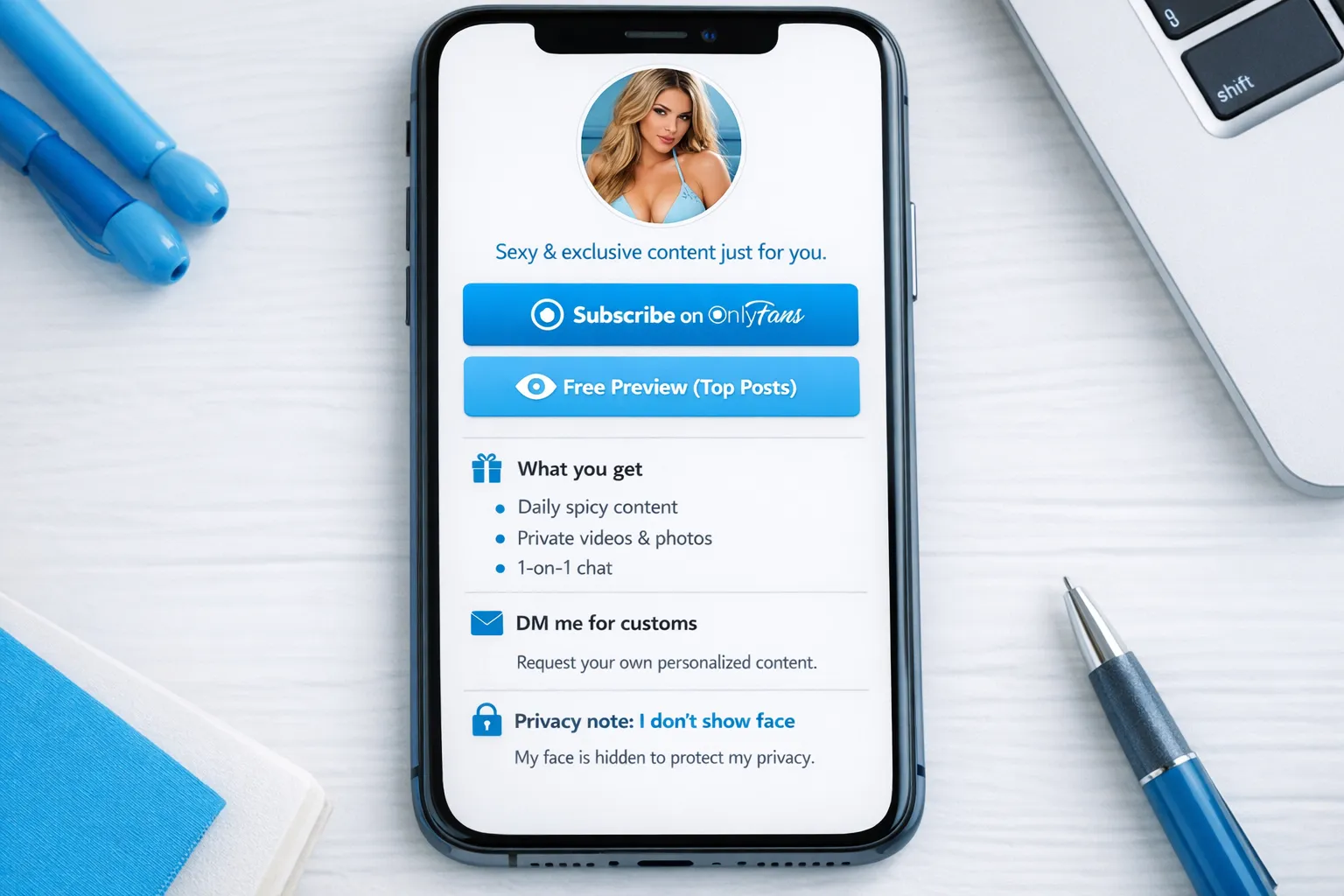
The exact layout (copy-and-paste structure)
1) Your headline (one sentence)
Keep it specific. You’re not writing poetry, you’re reducing uncertainty.
Examples you can adapt:
- “Your flirty girlfriend experience, daily posts + spicy DMs.”
- “Cosplay, teasing sets, and custom videos (requests open).”
- “Faceless, discreet, and very interactive. New drops every week.”
If you need help tightening your positioning, these templates help a lot: 21 Best OnlyFans Bio Ideas (That Actually Get Subs).
2) Button 1 (primary): Paid subscription
Make it explicit and simple:
- “Subscribe on OnlyFans”
- “Join VIP (OnlyFans)”
Avoid clever labels like “Enter” or “My secret”. Clarity beats mystery here.
3) Button 2 (secondary): Warm-up option
This depends on your strategy:
Good “warm-up” buttons:
- “Free Preview (Best Posts)” (if you run free trials or a free page funnel)
- “Start Here (What you get)” (if your page includes a short offer breakdown)
- “DM me ‘VIP’ for my menu 💌” (if your DMs convert well)
Pick one. Not three.
4) Trust line (one short sentence)
This is where you reduce fear without overexplaining.
Examples:
- “Real creator, real replies (no spam).”
- “Discreet. Boundaries respected.”
- “New content every week, chat-friendly.”
If you work with a team (agency/chatters), don’t lie. Trust matters. If you’re solo, that can be a selling point.
Button strategy by traffic source (this is where conversions jump)
A link-in-bio that converts on TikTok is not always the same one that converts on Reddit.
Use this decision framework:
If your traffic is mostly TikTok or Instagram
People are often colder and platforms can be stricter about adult content.
Your link-in-bio should prioritize:
- A neutral-looking page (clean branding, not explicit language)
- A warm-up button (preview or “start here”)
- One clear path to OnlyFans
If your traffic is mostly X (Twitter) or Reddit
Traffic tends to be hotter and more intent-driven.
Your link-in-bio should prioritize:
- “Subscribe” as the dominant button
- A secondary button for “customs” or “menu”
- Fewer words, faster path
For X-specific traffic, this guide can help you align your profile, pinned tweet, and link hub: Marketing OnlyFans on Twitter (X): What actually works in 2025).
Quick example (so you can self-diagnose)
- If you get 200 clicks/day and only 1 to 3 subs, your conversion might be weak (offer clarity, button strategy, page speed, trust).
- If you get 20 clicks/day but 3 subs, your page is converting, you need more traffic.
That’s why tracking matters.
Tracking setup (so you know what makes you money)
Your tracking system should answer two questions:
- Which platform sends clicks?
- Which platform sends subscribers?
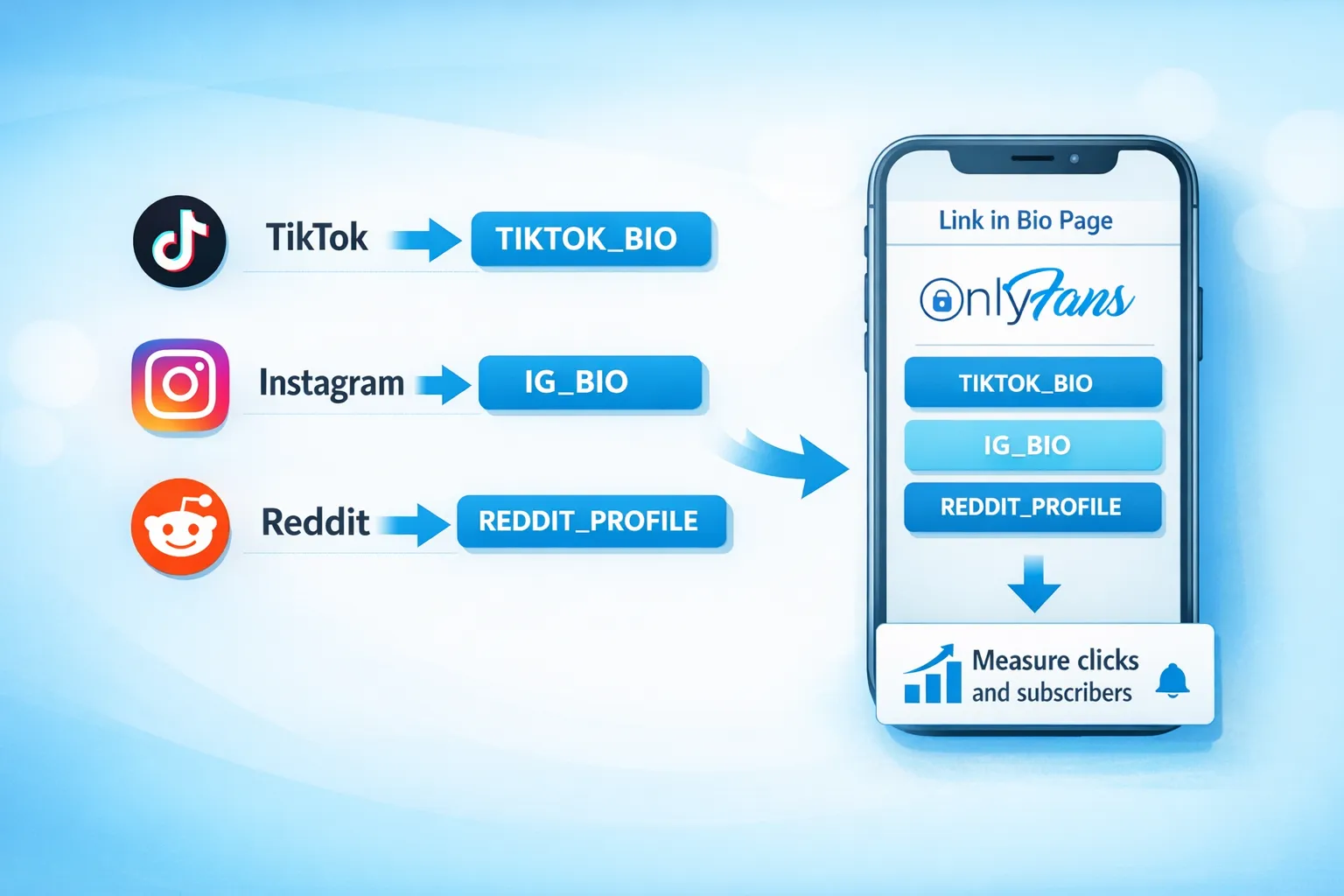
The best practice: one tracking link per traffic source
OnlyFans tracking links are designed for this. Set them up and use them consistently.
A simple naming system:
- IG_BIO
- TIKTOK_BIO
- X_PINNED
- REDDIT_PROFILE
- COLLAB_SFS_MIA
Then put those tracking links behind the buttons on your link-in-bio page.
If you want the step-by-step (and common mistakes to avoid), use: OnlyFans Tracking Links Guide: How to Track Clicks, Subs & Traffic Sources.
The “too many links” problem (and the fix)
The biggest conversion killer is turning your page into a chaotic menu:
- “My OnlyFans”
- “My Fansly”
- “My wishlist”
- “My Telegram”
- “My Snapchat”
- “My 4 backup Instagrams”
It feels like effort. Buyers don’t want effort.
The fix: keep your page to 2 to 4 actions max
A clean setup that converts:
- Subscribe (OnlyFans)
- Free preview or “Start here”
- Customs/menu (optional)
- Backup platform (optional, only if you actively use it)
If you’re expanding platforms, build it intentionally, not as a panic reaction. Lookstars supports platform expansion, but even if you’re solo, the principle is the same: one primary conversion goal at a time.
Privacy and safety notes (especially if you’re no-face or discreet)
A link-in-bio page can accidentally reveal more than you think.
Practical privacy rules:
- Don’t use a link hub account tied to your personal email or real name if discretion matters.
- Avoid linking to personal socials (your old Facebook, personal IG, family TikTok).
- Don’t post your city, gym name, workplace, or “where to run into me” details.
- Be careful with “contact me” buttons that expose your real phone number.
If you’re promoting discreetly, this guide is worth reading: How to Secretly Promote Your OnlyFans (Without Friends or Family Finding Out).
If you’re faceless, your link-in-bio should match that promise, not fight it. Related: How to Make Money on OnlyFans without Showing Your Face & Stay Anonymous.
30-minute setup checklist (do this today)
Use this as your “done is better than perfect” checklist.
- Choose one link-in-bio method (optimized link hub is fine)
- Write a one-sentence niche hook (clear, not vague)
- Add exactly 2 main buttons (Subscribe + Warm-up)
- Add one trust line (short)
- Create OnlyFans tracking links for each traffic source
- Put tracking links behind your buttons
- Remove extra links that don’t lead to money (or warm leads)
- Test on your phone (tap speed, readability, no broken links)
- Screenshot your page and ask: “Would I trust this in 3 seconds?”
Common mistakes that quietly tank OnlyFans conversion
Your link-in-bio is trying to be “everything”
A link-in-bio page is not a content library. It’s a conversion step.
Your buttons are vague
If a button label doesn’t say what happens next, people hesitate.
You’re sending cold traffic straight to a paid wall with no context
Sometimes that works (hot traffic), often it doesn’t (short-form platforms). Give them a warm-up option.
You track nothing
If you’re serious about growth, tracking is not optional. It’s how you avoid burnout and focus on what actually pays.
FAQ
What is the best link-in-bio page for OnlyFans creators? An optimized link hub or simple landing page that acts like a mini sales page, with 2 main buttons (Subscribe + Warm-up) and OnlyFans tracking links behind each button.
Should I link directly to OnlyFans or use a link hub? If most of your traffic is hot (Reddit/X), direct linking can work. If you’re using TikTok/IG or you want better segmentation and tracking, a link hub usually converts better.
How many links should I put in my bio? Aim for 2 to 4 actions max. Too many links increases decision fatigue and lowers conversion.
How do I track which platform brings me subscribers? Use OnlyFans tracking links (the ?c= links generated in your settings) and create one per traffic source. Then review clicks and subscriber data regularly. See: OnlyFans Tracking Links Guide.
Can I have different link-in-bio pages for TikTok vs Reddit? Yes. It’s often smart because the audience intent is different. Just keep naming consistent so you can track results cleanly.
Want this set up (and optimized) without doing it all alone?
A high-converting link-in-bio page is only one piece of the funnel. The bigger win comes from connecting it to a full system: multi-platform traffic, fast DM response, PPV upsells, content scheduling, and leak protection.
Lookstars is an OnlyFans management agency that helps creators scale with marketing and fan growth, 24/7 chatting, strategic posting management, and privacy protection tools like leak monitoring and takedowns, with no upfront costs and flexible, cancel-anytime contracts.
If you want support building a conversion-focused funnel end-to-end, you can apply here: Lookstars Agency.
If you’re still deciding whether management is right for you, read: Working With an Agency vs Running OnlyFans Alone.



Ready to transform your career?
Join hundreds of creators already earning six figures with Lookstars Agency.
Share this article
Best OnlyFans Agency
Europe's Leading OnlyFans Management Agency.

100% Free Ebook
Get our guide and unlock the secrets to OnlyFans success.
100% Free Ebook
Get our guide and unlock the secrets to OnlyFans success.
Free Revenue Calculator & Profile Analyzer
Try them for freeContinue reading...

Am I Attractive Enough for an OnlyFans Agency? The Answer

Can You Ever Fully Delete Your OnlyFans Content? The Reality
