How to Start an OnlyFans Account (Step-by-Step Guide 2026)
Most “how to start OnlyFans” advice skips the parts that actually decide whether you feel safe, stay consistent, and make it past the first month: privacy se...
Most “how to start OnlyFans” advice skips the parts that actually decide whether you feel safe, stay consistent, and make it past the first month: privacy setup, a real launch plan, and a simple system for posting and DMs.
This 2026 guide walks you through creating your account step-by-step, then shows you exactly what to do in your first 14 days so you’re not just “verified” but also set up to grow.
Before you create your OnlyFans: make 4 decisions that save you weeks
If you do these upfront, you avoid the most common beginner spiral: changing your name, rebranding, panicking about privacy, and restarting.
1) Decide: free page, paid page, or paid + promos?
A simple decision framework:
- Paid page makes sense if you can bring traffic (from X, Reddit, Instagram, TikTok-safe funneling, etc.) and you’re comfortable selling via DMs (PPV, customs, tips).
- Free page can work as a top-of-funnel “preview,” but it often requires more time because you’ll rely on PPV and constant messaging to monetize.
- Paid page + occasional promos is a common middle ground: keep your brand premium, use limited-time discounts for acquisition, and monetize heavier inside.
If you’re unsure, start paid and keep it simple. You can run promos later once you understand your conversion.
2) Decide your boundaries (this is business, not a “vibe”)
Write down three lines you will not cross. This prevents burnout and helps you respond calmly when a subscriber pushes.
Examples:
- No real name, no location, no personal phone.
- No meetups.
- No content involving anything you’re not fully comfortable with.
You can be sexy and still be firm. Boundaries are a growth tool.
3) Choose a stage identity (and keep it consistent)
Your name is not just branding, it’s also privacy.
If you want help choosing a name that’s memorable and safe, read: Best OnlyFans Name Ideas.
4) Set up a “separation stack” (privacy basics)
If anonymity matters to you, do this before you upload anything:
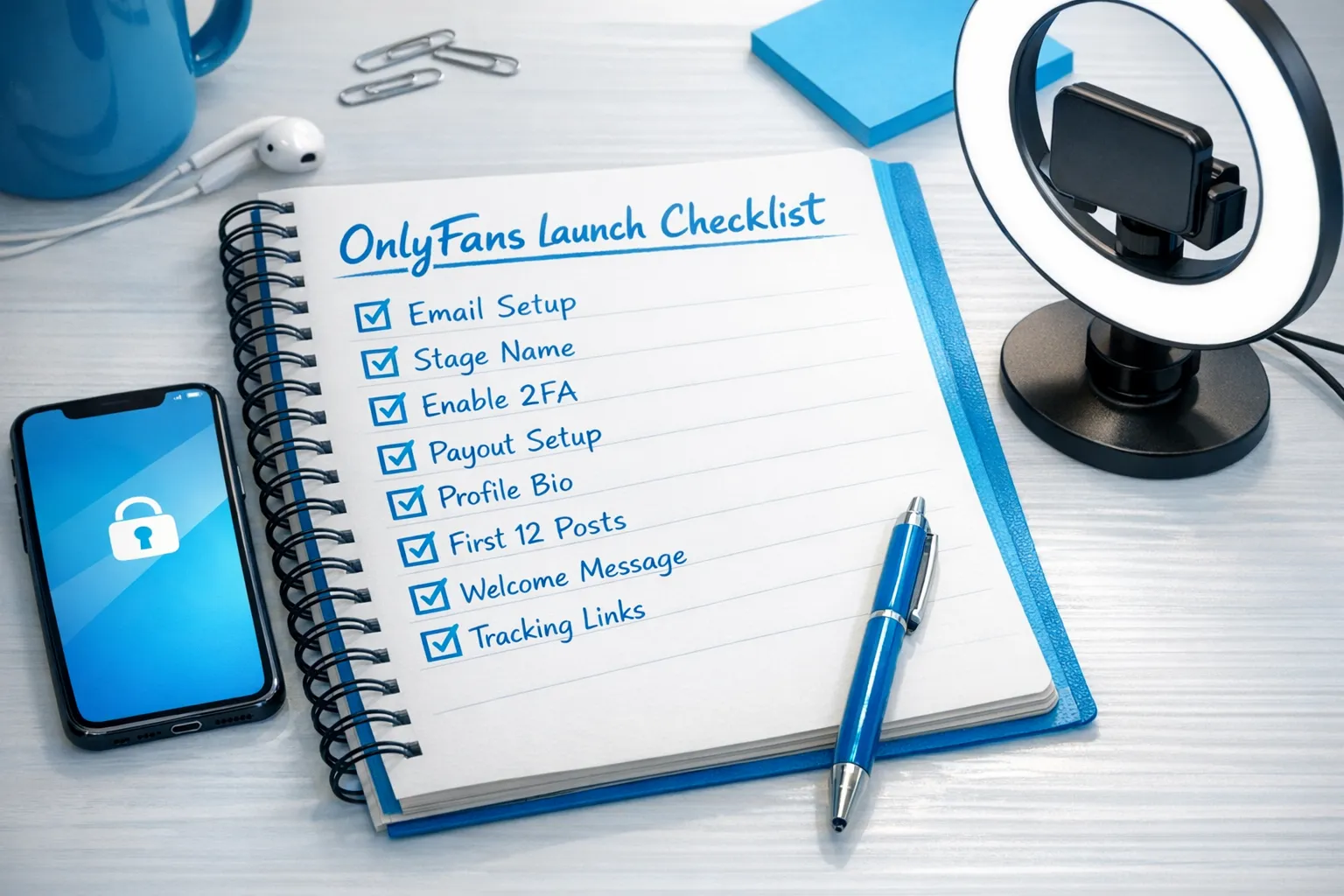
- A new email used only for creator work
- Separate social accounts (do not reuse usernames)
- Strong unique password + authenticator app (2FA)
- Remove metadata (EXIF) from photos you post publicly
For a deeper, privacy-first playbook, use: How to promote your OnlyFans secretly and How to make money without showing your face.
Step-by-step: how to start an OnlyFans account in 2026
The mechanics are straightforward. The key is doing them in the right order.
1) Create your account
- Sign up using your creator email
- Choose your display name and username (stage name)
- Enable 2FA immediately
Tip: treat this like opening a bank account. Do not “just see what happens” on a casual login.
2) Complete creator verification
OnlyFans requires identity verification for creators (and policies can change), typically including:
- Government-issued ID
- A selfie or face scan style verification
- Basic personal details
If your verification is rejected, it’s usually something simple (blurry photo, mismatch, glare, cropped ID). Re-submit carefully.
For official guidance, check the OnlyFans Help Center (policies and requirements can change).
3) Set up payouts (do this early)
Payout setup is where many creators lose time later due to mismatched names, missing details, or bank-side compliance holds.
If you’re outside the US or you’ve had payout delays before, this guide helps you avoid the most common friction points: International payouts: how to avoid common delays.
Educational note (not tax advice): you’re running a business. Start basic bookkeeping from day one so tax season doesn’t become scary. A simple weekly habit is enough: OnlyFans taxes: weekly habit to stay organized.
4) Build a profile that converts (your “sales page”)
Your profile’s job is not to explain your life story. It’s to answer a buyer’s silent questions:
- What do I get here?
- Is she consistent?
- Is it worth it for my taste?
- What should I do next?
Non-negotiables for conversion:
- A clear profile photo (on-brand, not necessarily your face)
- Banner image that matches your vibe
- Bio that states your niche, posting rhythm, and what’s exclusive
- A pinned post that welcomes and directs people
If you want plug-and-play bios that don’t sound generic, use: OnlyFans bio ideas that actually get subs.
5) Set your price (keep it simple at first)
Avoid the two extremes:
- Pricing too high with no social proof yet
- Pricing too low and feeling resentful when you’re working a lot
Many creators choose a reasonable monthly price and plan to monetize inside via PPV and customs once they understand what their audience buys.
If you want a structured approach to paid messages, start here: How to sell content on OnlyFans (step-by-step) and How much to charge for PPV on OnlyFans.
6) Turn on core privacy and safety settings
Settings differ by account and can change, but these are common priorities:
- Country blocking / region blocking if you’re worried about local discovery
- Watermarking on content (and consider watermarking off-platform teasers too)
- DM boundaries (what you will and won’t do in chat)
If anonymity is central to your plan, consider reading the faceless strategy guide linked earlier before you start promotion.
7) Create tracking links (so you don’t market blindly)
OnlyFans provides tracking links so you can see which platform and which post is actually converting.
Use this guide to set them up correctly (and avoid the common mistakes): OnlyFans tracking links guide.
Your “minimum viable launch”: what to post before you promote
Promoting an empty page is like inviting someone to a party with no music.
A strong beginner baseline is:
- 10 to 20 feed posts (mix of teasers, personality, and “why sub” value)
- A filled-out vault (content you can sell later via PPV)
- A welcome message that starts your DM funnel
To help you plan content without burning out, browse: Best OnlyFans content ideas.
A simple content mix that works for beginners
| Content type | Where it goes | Purpose | Beginner-friendly? |
|---|---|---|---|
| Teasers (safe previews) | Feed | Retention + trust | Yes |
| “Personality posts” (daily life, vibe) | Feed | Connection + differentiation | Yes |
| Premium sets / explicit videos | PPV in DMs | Revenue | Yes (with boundaries) |
| Polls / Q&A | Feed + Stories | Engagement ideas + market research | Yes |
| Customs | DMs | High-ticket revenue | Later (once you’re comfortable) |
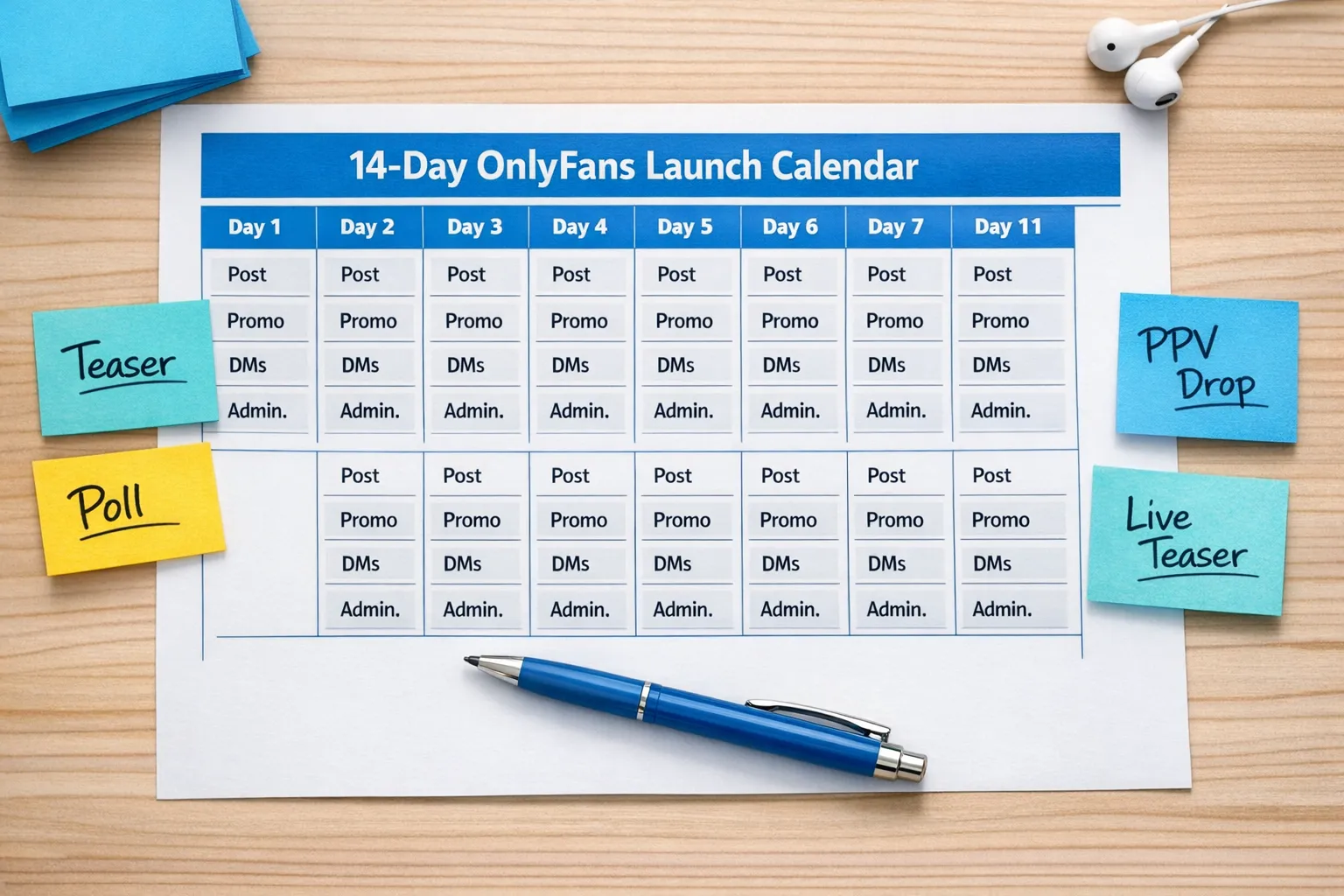
Your first 14 days: a realistic launch plan (that won’t fry you)
This is where most beginners fail: they post for three days, get quiet, then assume they’re “not the type that sells.”
You don’t need perfection. You need a repeatable rhythm.
Days 1 to 3: soft launch and set expectations
Focus: credibility and routine.
- Post 1 to 2 times per day on OnlyFans
- Create a pinned “Start here” post
- Start DMs with new subscribers (even if it’s just a warm hello)
Welcome message template (friendly, not desperate):
“Hey love, welcome in 😘 Tell me what you’re into so I can send you the best stuff. Do you prefer cute and flirty, or more spicy?”
Keep it simple. The goal is to start a conversation, not to sell immediately.
Days 4 to 7: start your DM sales system
Focus: turning attention into revenue without being pushy.
- Send 2 to 3 value DMs per week (not daily spam)
- Offer one paid message that matches what subscribers asked for
- Track what sells (don’t guess)
If you want a deeper chat framework, this helps: OnlyFans sexting guide.
Days 8 to 14: scale what’s working, drop what isn’t
Focus: data-driven tweaks.
- Double down on the platform that brings subs (not just likes)
- Improve your bio and pinned post based on questions you keep getting
- Build 1 to 2 weekly “signature series” (a repeatable theme)
If you’re marketing on X, this guide can help you avoid the common traps: Marketing OnlyFans on Twitter (X)).
Promotion basics in 2026: where beginners should start (and what to avoid)
OnlyFans still doesn’t “discover” you the way TikTok does. Most growth comes from external traffic.
A safe, realistic approach:
- Pick one main traffic platform (often X or Reddit for adult-friendly promo)
- Pick one secondary platform for backup and brand depth
- Use a link hub if needed (especially on platforms with restrictions)
What to avoid early:
- Posting everywhere with no consistency
- Buying shoutouts from random accounts (high scam risk)
- Copy-pasting the same caption and expecting different results
If you want to grow through creator collaborations instead of random promos, this is a solid framework: How to collaborate with other OnlyFans creators & use SFS.
Protecting your content from leaks (what’s realistic)
No one can promise “no leaks ever.” But you can reduce risk and respond fast.
Practical steps that help:
- Watermark content (especially off-platform teasers)
- Avoid identifiable backgrounds and metadata
- Monitor regularly for reposts
- Use takedown processes when you find stolen content
If leak anxiety is one of the main reasons you’re hesitating, it’s a valid concern. Build protection into your workflow from day one.
Common beginner mistakes (and the fix)
Mistake 1: waiting to “get confident” before promoting
Confidence usually comes after reps, not before.
Fix: commit to a 14-day plan and measure progress by execution (posts sent, DMs sent, promos posted), not just revenue.
Mistake 2: posting everything in the feed
If your best content is always free inside the subscription, you limit your upside.
Fix: use the feed for retention and teasing, and sell premium via PPV in DMs. Start here: How to sell content on OnlyFans.
Mistake 3: ignoring tracking
If you don’t track, you’ll keep feeding platforms that give you attention but not buyers.
Fix: set up tracking links and review them weekly: OnlyFans tracking links guide.
Mistake 4: outsourcing too early, to the wrong people
A bad manager or chatter can damage your brand voice and your account safety.
Fix: if you want help, vet properly. Read: OnlyFans agency red flags and Working with an agency vs running OnlyFans alone.
When it makes sense to get help (and when it doesn’t)
Support is not a magic switch. It’s a tradeoff.
It might be time for help if:
- You’re getting traffic but not converting (bio, funnel, pricing, DMs)
- DMs are consuming your day and you can’t keep up
- You’re scared about privacy and leaks and need a system
- You want multi-platform growth without doing everything alone
It’s probably not time yet if:
- You haven’t posted consistently for even two weeks
- You’re still unclear on your boundaries and niche
- You’re looking for guaranteed income (no one ethical can promise that)
If you’re curious what professional management can realistically handle (marketing, 24/7 chat, posting strategy, leak protection, privacy setup), you can also read: What can an OnlyFans manager really do for you?.
If you want to scale faster without doing everything yourself
Lookstars is an OnlyFans management agency that supports creators with marketing and fan growth, 24/7 chatting, posting strategy, privacy setup, and content leak protection. There are no upfront costs and flexible, cancel-anytime contracts, so you can test whether outsourcing actually improves your results without feeling trapped.
If your goal is to build a real monthly income while protecting your privacy and sanity, you can apply here: Lookstars Agency.
This article is educational, not legal or tax advice. Platform policies and laws can change, verify in official docs or with a qualified professional.


Ready to transform your career?
Join hundreds of creators already earning six figures with Lookstars Agency.
Share this article
Best OnlyFans Agency
Europe's Leading OnlyFans Management Agency.
100% Free Ebook
Get our guide and unlock the secrets to OnlyFans success.
100% Free Ebook
Get our guide and unlock the secrets to OnlyFans success.
Free Revenue Calculator & Profile Analyzer
Try them for freeContinue reading...

Am I Attractive Enough for an OnlyFans Agency? The Answer

Can You Ever Fully Delete Your OnlyFans Content? The Reality
