How to Withdraw Money from OnlyFans in the United States
Getting paid should feel simple. But when you’re a creator, payouts can turn stressful fast, especially if you’re relying on that money for rent, bills, or r...
Getting paid should feel simple. But when you’re a creator, payouts can turn stressful fast, especially if you’re relying on that money for rent, bills, or reinvesting into content.
This guide walks you through how to withdraw money from OnlyFans in the United States, what to set up first, and what to do if a payout gets delayed or fails.
Before you withdraw: 5 things to check (so your payout doesn’t fail)
Most payout problems come from small setup mismatches. Before you request anything, do a quick “payout safety check.”
1) Your account is fully verified
OnlyFans requires creator verification to earn and withdraw. If anything is incomplete, your withdrawal options may be restricted.
If you’re still setting up your account, use this step-by-step guide: How to Start, Create & Verify Your OnlyFans Account.
2) Your legal name matches your payout details
In the US, withdrawals typically need to match your identity details.
Common mistakes:
- Typing a nickname instead of your legal name
- Using a business name when the payout profile is personal
- Using a bank account that is not in your name
If you want privacy from your audience, that’s totally valid. Just know that privacy for fans is different than identity for payouts. Payout identity is tied to compliance and banking.
3) You have a withdrawal method added (and it’s supported in the US)
OnlyFans payout methods can change over time and can vary by country, so always confirm inside your dashboard and in OnlyFans’ official help docs.
In the United States, creators typically withdraw to a bank account (for example, via direct deposit/transfer). Some alternative payout options may appear depending on your account and location.
4) You’re past any minimum payout threshold
Platforms often require a minimum balance before you can withdraw. If the Withdraw button is greyed out or you can’t request the amount you want, check if you are under the minimum.
Because thresholds can change, verify the current minimum inside your payout page.
5) You understand what “available balance” actually means
OnlyFans usually separates:
- Current balance (what you’ve earned)
- Pending (not cleared yet)
- Available (eligible to withdraw)
If you just made sales, part of that money may sit in pending for a period of time before it becomes withdrawable.
Step-by-step: How to withdraw money from OnlyFans (US creators)
The exact labels can change slightly as OnlyFans updates the interface, but the flow is usually consistent.
Step 1: Go to your payout/banking settings
Log in to OnlyFans.
Go to your settings area, then look for a section like:
- Banking
- Payouts
- Withdraw
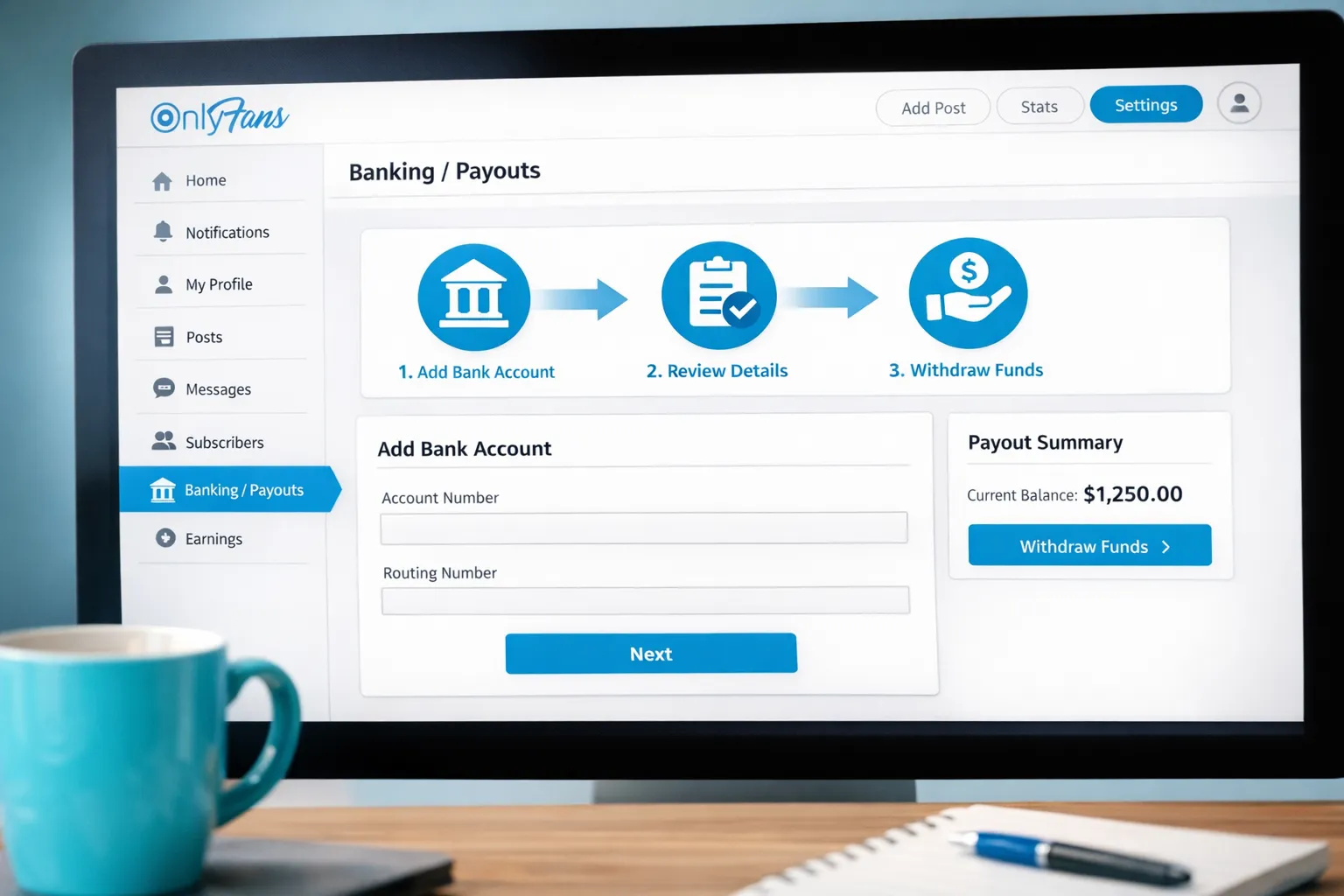
Step 2: Add your bank details
Add the required banking information (for US creators this is typically your bank account details).
Double-check:
- Routing number and account number
- Account type (checking vs savings)
- Name on account matches your verification
If you’re unsure, copy directly from your banking app or ask your bank for the exact ACH details.
Step 3: Choose withdrawal amount
Once your funds are available, enter the amount you want to withdraw.
If you’re running your page like a business (which you should), consider using a simple system:
- Withdraw a “salary” amount weekly or biweekly
- Keep a buffer for taxes
- Keep a buffer for production costs (lingerie, lighting, editing tools)
Step 4: Confirm and request withdrawal
Confirm the withdrawal request.
After that, your payout usually moves through statuses like processing, approved, sent, or paid (wording varies).
Step 5: Track the payout status
If it’s taking longer than expected, check your payout page for:
- Status updates
- Any error messages
- Whether your banking details were flagged
Which withdrawal method should you use in the US?
Since payout options can vary by account and change over time, the smartest approach is to choose based on reliability, fees, and how clean you want your bookkeeping to be.
Here’s a practical comparison table focused on what to evaluate (without assuming specific fees or delivery times).
| Option you may see in the US | What it usually is | Pros | Cons | Best for |
|---|---|---|---|---|
| Bank transfer / direct deposit | Payout to your US bank | Familiar, good for records, stable | Can fail if details don’t match | Most US creators who want simplicity |
| Alternative payout options (if offered) | May include third-party payout providers | Sometimes faster or more flexible | May add extra verification or fees | Creators needing flexibility or backup |
If you’re seeing multiple options and you’re not sure which is safest, pick the method that:
- Requires the least “middle-man” handling
- Keeps your accounting clean
- You can easily prove is yours (name match)
Why withdrawals fail (and how to fix them fast)
If your withdrawal fails, do not panic. Most failures are fixable in under an hour once you know what to look for.
Name mismatch (the #1 issue)
If your payout name and verification name don’t match exactly, the system may reject it.
Fix:
- Update payout details to match your verification
- Or re-check your verification profile details for typos
Wrong routing/account numbers
One digit off can send you into a delay loop.
Fix:
- Re-enter details carefully
- Use your bank’s official ACH info
Bank rejects the transfer
Some banks are more sensitive about incoming payments from certain merchant categories.
Fix:
- Contact your bank and ask if they can accept the transfer
- Consider using a different bank account if you repeatedly have issues
You withdrew too soon (funds still pending)
If earnings are still clearing, you might not be able to withdraw them.
Fix:
- Wait until the balance becomes available
- Plan your cash flow assuming a clearing delay
Account security flags
If you changed passwords, devices, or payout details, platforms sometimes trigger a safety hold.
Fix:
- Secure your account (unique password, 2FA if available)
- Avoid changing payout details repeatedly
If you want a broader safety guide (especially if you’ve ever worked with a “manager” or outsourced help), read: OnlyFans Scam: How Agencies, Managers and Chatters Rob the Creators.
A simple “payout routine” that reduces stress
Creators who feel calm about money usually follow a routine, not vibes.
Weekly routine (15 minutes)
- Check pending vs available balance
- Save screenshots/exports for bookkeeping
- Move a tax percentage into a separate savings account
- Withdraw consistently (instead of random amounts)
Monthly routine (30 minutes)
- Reconcile payouts against your content calendar and promotions
- Identify your best traffic sources and double down
If you’re actively promoting, tracking matters more than most creators realize. Set up proper links using: OnlyFans Tracking Links Guide.
US taxes and withdrawals: what to keep in mind
This is educational, not legal or tax advice. Tax rules can change, and your situation matters. Verify with the IRS or a qualified tax professional.
In the US, OnlyFans earnings are generally treated like self-employment income for many creators.
Practical tips that help most creators:
- Keep a simple income spreadsheet: date, payout amount, platform fees, notes
- Save receipts for business expenses (props, wardrobe, phone, editing software)
- Expect you may need to pay quarterly estimated taxes depending on income
- Do not wait until April to “figure it out” if your income is growing
If you’re scaling and want fewer surprises, it’s worth getting a basic bookkeeping flow in place early.
Frequently Asked Questions
How long do OnlyFans withdrawals take in the United States? Payout timing depends on your withdrawal method, your bank, weekends/holidays, and whether your funds are fully available. Check your payout status inside OnlyFans for the most accurate timeline.
Why is my OnlyFans balance not available to withdraw? Often, recent earnings sit in a pending state before they clear. If your available balance is lower than expected, wait for funds to become available and confirm you meet any minimum payout threshold.
What should I do if my withdrawal failed? First, check name match, routing/account numbers, and whether your bank can accept the transfer. Then review your payout page for any warnings. If it still fails, contact OnlyFans support with the exact error message.
Can I withdraw OnlyFans earnings to a different bank account? Usually yes, but changing payout details can trigger extra review or delays. If you switch accounts, triple-check name matching and avoid repeated changes.
Do I need to pay taxes on OnlyFans income in the US? In many cases, yes. This is educational, not tax advice. Keep records, save for taxes, and consider speaking with a tax professional if your income is growing.
Want your payouts to feel predictable (not stressful)?
Withdrawals get easier when your account runs on systems: consistent promotions, steady DM sales, clean tracking, and fewer emergencies.
Lookstars helps creators scale while staying protected, with marketing and fan growth, 24/7 chatting for DM and PPV sales, posting strategy, and privacy and leak protection. There are no upfront costs and flexible cancel-anytime contracts, so you can stay in control.
If you want a team behind you so your income is more stable month to month, apply here: Lookstars OnlyFans management agency.



Gata să-ți transformi cariera?
Alătură-te sute de creatori care câștigă deja șase cifre cu Lookstars Agency.
Distribuie acest articol
Cea Mai Bună Agenție OnlyFans
Agenția de Management OnlyFans Lider în Europa.

100% Ebook gratuit
Obține ghidul nostru și deblochează secretele succesului pe OnlyFans.
100% Ebook gratuit
Obține ghidul nostru și deblochează secretele succesului pe OnlyFans.