How to Withdraw Money from OnlyFans in Canada
If you’re an OnlyFans creator in Canada, “withdrawing” sounds simple until you hit the details: pending balances, payout methods, bank info, currency convers...
If you’re an OnlyFans creator in Canada, “withdrawing” sounds simple until you hit the details: pending balances, payout methods, bank info, currency conversion, and that one payout that randomly gets rejected.
This guide walks you through how to withdraw money from OnlyFans in Canada safely, what to set up first, what to expect with fees and timing, and what to do if something goes wrong. (Payout options and requirements can change, always double-check your account’s payout page and the official OnlyFans Help Center for the latest.)
What you need before you can withdraw (Canada)
Before you try to cash out, make sure you’re not blocked by one of the common “invisible” requirements:
- Your creator account is fully verified (ID checks and any required approval steps).
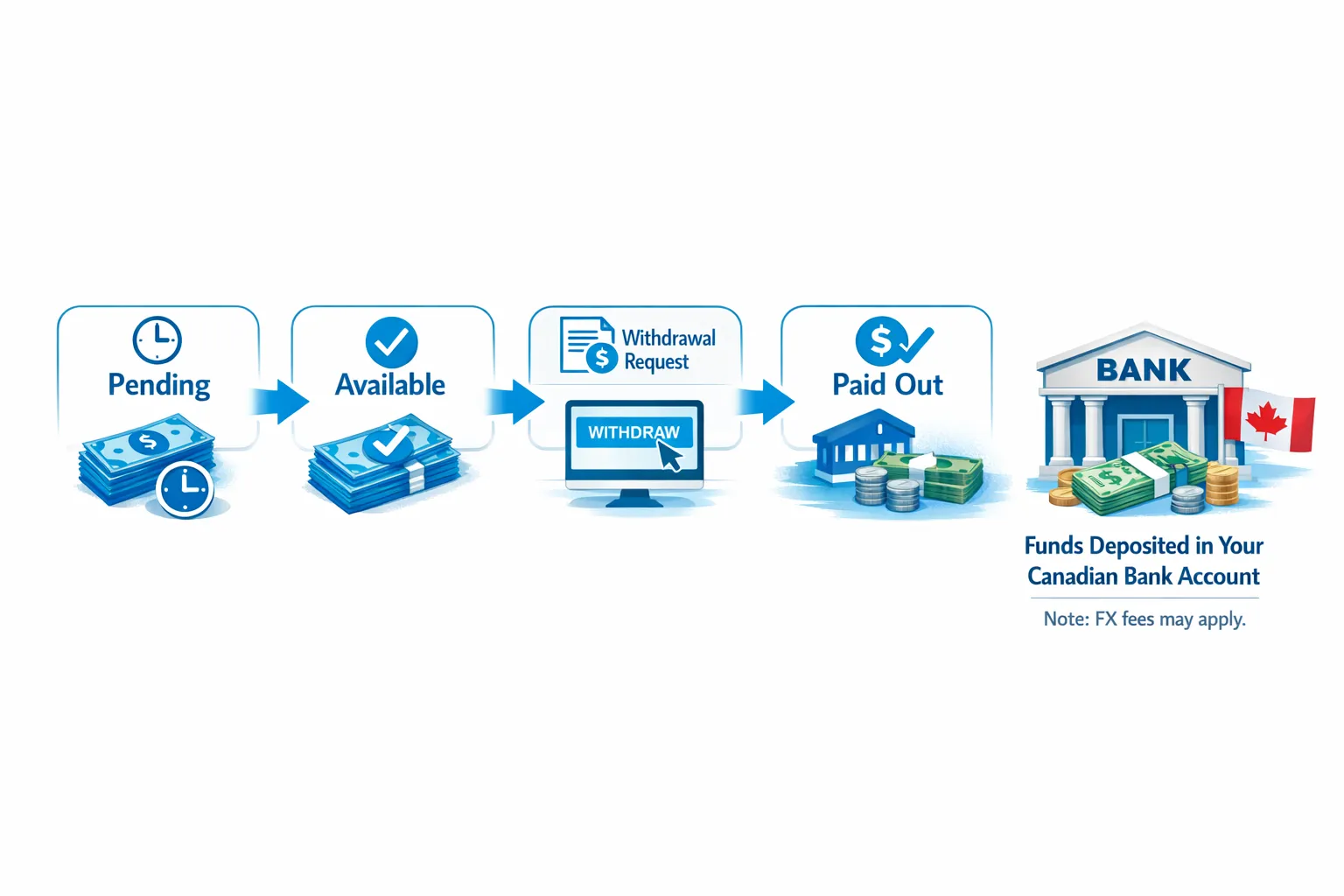
- Your earnings are in an “available” balance (not pending). Pending funds can be held until the platform considers them cleared.
- You’ve added a payout method and it matches your legal identity details.
- Your profile and payout info are consistent (name mismatches are one of the most common reasons for payout rejections).
If you’re still early in setup, it can help to review a full start-to-finish checklist like How to Start, Create & Verify Your OnlyFans Account.
Step-by-step: how to withdraw money from OnlyFans in Canada
OnlyFans changes its UI occasionally, but the flow is usually similar.
1) Open your payout or banking settings
Go to your account settings and look for Banking, Payouts, or Payment settings (wording varies).
2) Add or confirm your payout method
You’ll be asked to choose from the payout methods available to your region and account type.
To avoid delays:
- Enter your information exactly as your bank has it.
- Use the correct account identifiers for your bank and country.
- If the page requests an address, use the same format you use with your bank.
If you use a joint account or a bank account under a different name, expect problems. Most payout systems want the payout recipient to match the verified creator.
3) Confirm your payout details (and watch for name mismatches)
Before you hit save, check:
- Spelling of your legal name
- Middle initials (if your bank has them, match them)
- Address formatting
- Account numbers (one digit off can cause a rejection or a “lost” payment investigation)
4) Request a withdrawal
Once your payout method is saved, go to the withdrawal section and choose the amount you want to withdraw from your available balance.
Some creators prefer to do a small test withdrawal first (if the platform allows it and if your balance supports it), especially when switching banks or payout methods.
5) Track the status until it’s completed
Most platforms show a payout status like processing, paid, or rejected. If it’s “processing” longer than you expect, don’t spam multiple new withdrawals right away. That can complicate support tickets.
Choosing a payout method in Canada (and what each one means)
What you see on your account depends on your location, verification status, and OnlyFans’ current payout partners. In general, Canadian creators typically choose between a direct bank payout or a supported payout provider.
Here’s a practical comparison to help you decide.
| Payout route (availability varies) | What it is | Pros | Tradeoffs to consider | Best for |
|---|---|---|---|---|
| Bank transfer to a Canadian bank | Money goes to your Canadian bank account | Simple, familiar, easier bookkeeping | Possible conversion into CAD, bank receiving fees, occasional intermediary fees | Most creators who want simplicity |
| Payout provider (if offered in your account) | A third-party payout partner connected to your creator earnings | Sometimes smoother international handling | Provider fees, extra verification, another account to secure | Creators who prefer a payout dashboard or multi-currency tools |
| USD account (if you have one and it’s supported) | Receive in USD instead of CAD (depends on what OnlyFans supports for your profile) | Can reduce forced FX at your bank | Extra banking setup, still may have fees, must be supported by platform | Creators paid mostly by US fans who want more FX control |
If your main goal is “get paid with the least drama,” most creators stick to whatever OnlyFans clearly supports for Canadian accounts inside the payout settings.
Why your payout amount might be lower than you expected (fees + FX)
If you withdraw $X and receive less in your Canadian bank, it’s usually one or more of these:
Platform fees vs. payout fees
OnlyFans takes a platform commission (commonly cited as 20%, and referenced in creator guides), and then there can be payout-related costs depending on the method.
Currency conversion spread
If your earnings are processed in USD and your bank account is CAD, someone converts it. The conversion rate you get may include a spread.
Bank receiving fees and intermediary fees
International transfers sometimes pass through intermediary banks. Your bank may also charge incoming wire or receiving fees.
Practical tip: after your first successful payout, note the exact fees and net amount. That becomes your “real” baseline for planning.
A simple withdrawal checklist (so you don’t get stuck)
Use this before every withdrawal, especially if you have not cashed out in a while:
- Your legal name in OnlyFans matches your bank account holder name.
- Your payout method is still active (some banks or providers require periodic reconfirmation).
- Your balance is available (not pending).
- Your bank details are correct and current.
- You have 2FA enabled and your email is secure.
- You screenshot or record the payout ID/status for your records.
Troubleshooting: payouts pending, rejected, or missing
Payout problems are stressful, but most issues fall into a few categories.
If your payout is “pending” inside OnlyFans
Common causes:
- Earnings not fully cleared yet (pending vs. available).
- Identity or banking verification needs an update.
- A recent change to your payout method triggers additional review.
What to do:
- Verify your payout method details and any alerts in your settings.
- Wait a reasonable period shown by the platform.
- If it exceeds what the platform suggests, contact OnlyFans support with the payout ID.
If your payout is “rejected”
Most often it’s one of these:
- Name mismatch
- Incorrect bank numbers
- Unsupported account type for the chosen method
- Bank declined the transfer
What to do:
- Correct the details and re-submit.
- Avoid repeatedly submitting new withdrawals until you understand the rejection reason.
If it says “paid” but you don’t see it in your bank
A “paid” status can mean it left OnlyFans, not that your bank posted it instantly.
What to do:
- Check if your bank has processing delays on incoming transfers.
- Give it a little time (especially around weekends and holidays).
- If it’s still missing, contact your bank with whatever reference details you have, and contact OnlyFans support with the payout ID.
Privacy and safety tips for Canadian creators withdrawing earnings
Money is part of your privacy plan, not just your business plan.
Use a separate bank account if privacy matters
A dedicated account makes it easier to:
- Track income and expenses
- Share statements with an accountant without exposing personal spending
- Reduce the chance of awkward questions if someone sees your main account activity
Lock down your account before you scale
- Enable 2FA.
- Use a password manager.
- Be careful with “helpers” who ask for login access.
If staying discreet is a priority, you’ll also want a full privacy setup beyond payouts, including country blocking and promotion choices. This guide can help: How to Secretly Promote Your OnlyFans (Without Friends or Family Finding Out).
Canada taxes and record-keeping (keep it simple, keep it clean)
This is educational, not legal or tax advice. Laws and platform policies can change. Verify with official resources or a qualified professional.
At minimum, treat your OnlyFans like a business from day one:
- Track gross earnings, OnlyFans fees, and your net payouts.
- Keep receipts for business expenses (props, outfits, editing tools, subscriptions, home office items if applicable).
- Set aside money for taxes so you are not stressed at tax time.
If you want to get more serious about optimization (and not just “getting paid”), tracking your traffic sources can also help you predict income. See: OnlyFans Tracking Links Guide.
When withdrawals are working, the next bottleneck is usually time
Once payouts are set up, most creators hit a different problem: you can withdraw money, but you are doing everything yourself.
If you’re spending hours in DMs, missing peak selling windows, or dealing with leaks, it can directly impact how much you have available to withdraw in the first place.
If you’re considering getting help, read these first:
- When to Hire an OnlyFans Management Agency: 5 Brutal Truths Every Creator Needs to Hear
- 6 Red Flags to Watch Out for Before Signing with an OnlyFans Agency
Lookstars is an OnlyFans management agency built around marketing, fan engagement, privacy, and business management, with no upfront costs and flexible cancel-anytime contracts. If you want support that helps you grow consistently (and not just “cash out”), you can explore the program at Lookstars Agency.



Gata să-ți transformi cariera?
Alătură-te sute de creatori care câștigă deja șase cifre cu Lookstars Agency.
Distribuie acest articol
Cea Mai Bună Agenție OnlyFans
Agenția de Management OnlyFans Lider în Europa.

100% Ebook gratuit
Obține ghidul nostru și deblochează secretele succesului pe OnlyFans.
100% Ebook gratuit
Obține ghidul nostru și deblochează secretele succesului pe OnlyFans.