How to Withdraw Money from OnlyFans in Ukraine
Getting paid is the least “glamorous” part of OnlyFans, but it’s the part that keeps your business real. . . If you’re a creator in Ukraine, withdrawals can ...
Getting paid is the least “glamorous” part of OnlyFans, but it’s the part that keeps your business real.
If you’re a creator in Ukraine, withdrawals can feel stressful for a simple reason: international payouts depend on (1) what OnlyFans currently supports in your region, and (2) what your bank will actually accept and process without delays.
This guide walks you through how to withdraw money from OnlyFans in Ukraine, the common mistakes that cause payout holds, and what to do if your payment is stuck.
First, check what payout methods OnlyFans shows in your account
OnlyFans’ available payout methods vary by country and can change. Instead of relying on screenshots from other creators (even from Ukraine), make your account the source of truth.
Go to your OnlyFans settings and open the banking / payouts section. You’ll typically see one or more withdrawal options available for your location.
If a payout option is not visible for your account, don’t assume you’re doing something wrong. It often means:
- That method is not currently supported in your region.
- The method is temporarily unavailable.
- Your account needs additional verification before options appear.
For official updates and current requirements, start with the OnlyFans Help Center (policies and payout flows can change).
The “clean” withdrawal setup (what to prepare before you touch payout settings)
For creators in Ukraine, the fastest path to fewer payout headaches is making sure your details are consistent across:
- Your OnlyFans verification details
- Your payout profile
- Your bank account (or payout account) ownership details
What you need ready
- A payout account in your legal name (the same name you verified on OnlyFans)
- Your bank details exactly as your bank provides them (not copied from a random template)
- A way to receive international transfers if required (your bank can tell you what they accept)
- 2FA enabled on your OnlyFans account (security issues can trigger reviews or delays)
If you want a deeper troubleshooting flow for international withdrawals (not Ukraine-specific, but very applicable), read: International payouts: how to avoid common delays.
Step-by-step: how to withdraw money from OnlyFans in Ukraine
Below is the process that applies in most cases, even though the exact menu wording may differ slightly.
1) Confirm your account is fully verified and payout-ready
Before you request your first withdrawal, confirm:
- Your creator account verification is approved
- Your identity details match your payout details
- Your account has no outstanding requests for additional info
If this is your first payout, expect extra scrutiny sometimes. Many platforms apply additional checks for first-time withdrawals.
2) Add your payout details carefully (name matching matters)
When entering payout details:
- Use your legal name exactly as verified
- Avoid extra spaces, missing middle names, or different transliterations
- Copy bank details from your bank app or a bank-issued document when possible
Most payout failures are boring: a name mismatch, a wrong digit, or a bank code that doesn’t match the receiving route.
3) Choose a payout schedule you can actually manage
OnlyFans accounts usually let you request withdrawals based on your available balance, with a minimum and timing rules shown inside your account.
Practical advice for Ukraine-based creators:
- Start with smaller, test withdrawals if you’re unsure your bank will accept the incoming payment type.
- Keep a buffer so you’re not left panicking if a payout takes longer than expected.
4) Request a withdrawal and save proof
When you request the withdrawal:
- Screenshot or export the withdrawal confirmation page if possible
- Note the date and the amount
- Track whether your bank charges incoming fees or converts currency at a different rate than you expected
This becomes important for reconciling your income later.
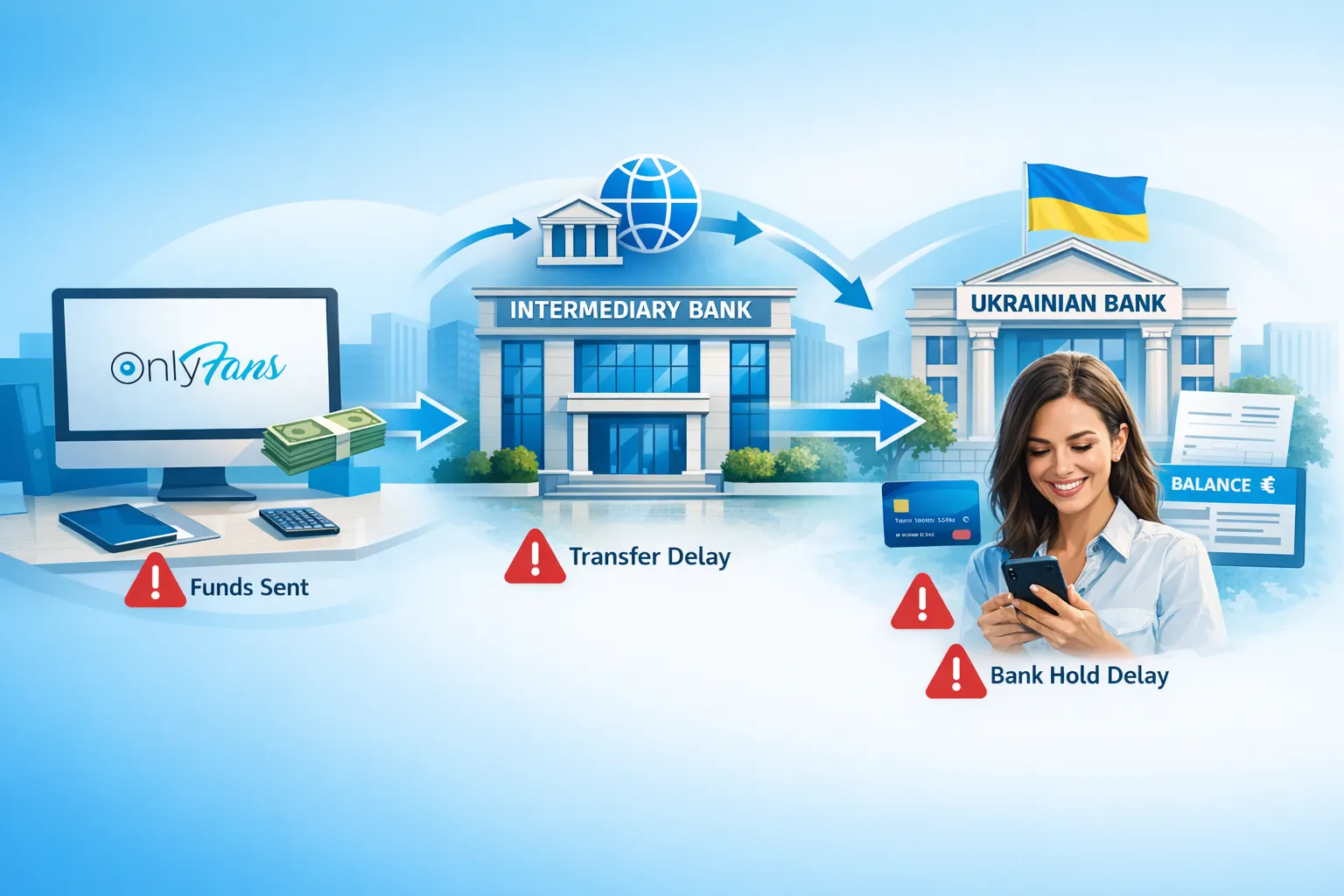
5) Track payout status, then track bank arrival separately
A common mental trap is treating “processed” as “arrived.”
Think of payouts as two stages:
- Platform stage: OnlyFans approves and sends
- Bank stage: your bank (and sometimes intermediary banks) credits your account
If your payout is delayed, you need to identify which stage is the bottleneck. The guide above on international delays explains this clearly: International payouts: how to avoid common delays.
Ukraine-specific reality checks (so you don’t blame yourself for normal banking friction)
Ukraine-based creators often run into issues that are not about OnlyFans at all, but about cross-border banking.
Ask your bank these questions (copy/paste script)
You can message support in your banking app or call your branch. Here’s a script that keeps it simple:
Message template (to your bank):
“Hi! I receive international payments for online services. Can you confirm what information you need for an incoming transfer (currency options, SWIFT details, recipient details) and any common reasons you reject or delay these payments?”
If your bank replies with requirements (for example, a specific format for address fields or beneficiary info), follow their wording exactly.
Keep an eye on conversion and fees
Even when everything works, payout amounts can look “off” due to:
- Exchange rate differences
- Incoming transfer fees
- Intermediary bank fees (if applicable)
This is not “OnlyFans stealing money.” It’s usually how international transfers work.
Common payout problems (and the fastest fixes)
Here’s a practical table you can use to diagnose issues without spiraling.
| Problem you see | Most likely cause | What to do first |
|---|---|---|
| Withdrawal rejected or returned | Name mismatch, wrong account details, unsupported receiving route | Re-check legal name spelling and bank details, ask your bank what exact fields they require |
| Status shows processed but money not in bank | Delay at bank stage, weekends/holidays, intermediary bank step | Wait a few business days, then ask your bank if they see a pending incoming transfer |
| First payout takes much longer | Extra verification or risk checks | Ensure your profile and payout info are complete and consistent, avoid frequent changes |
| You changed payout details and now things are stuck | Security review, verification triggered by changes | Avoid repeated edits, confirm details once, then contact support if it doesn’t move |
| You receive less than expected | FX conversion, bank fees, intermediary fees | Compare withdrawal amount vs. credited amount, ask bank for a fee breakdown |
If you’re in a “processed but not received” situation, the step-by-step troubleshooting flow here is worth following: International payouts: how to avoid common delays.
A safety checklist before every withdrawal (especially if you’re privacy-focused)
Creators in Ukraine often care deeply about privacy, especially if they’re faceless, have a separate career, or simply want tighter boundaries.
Before you withdraw:
- Confirm 2FA is on and your email password is strong
- Do not share payout screenshots that reveal sensitive banking details
- Avoid logging into OnlyFans on shared devices
- Keep your creator identity separate from personal social profiles
If your privacy concerns go beyond payouts (for example, you’re worried family or coworkers could find you), this guide is helpful: How to secretly promote your OnlyFans (without friends or family finding out).
Recordkeeping: the unsexy habit that protects you later
Even if you’re not thinking about taxes yet, you should treat withdrawals like business bookkeeping.
Track:
- Gross earnings (before any fees)
- Withdrawals requested
- Withdrawals received
- Bank and conversion fees
- Net amount credited
If you want a simple system you can do weekly, use this guide: OnlyFans taxes: weekly habit to stay organized.
This is educational, not legal or tax advice. Laws and rules can change, verify with official sources or a professional.
When you should consider getting help (instead of “just trying harder”)
If you’re only withdrawing once in a while, DIY is totally fine.
But if you’re earning consistently and you’re scaling, payout problems often happen at the same time as other stressors:
- DMs you can’t keep up with
- Promo workload and inconsistent traffic
- Content leaks and reposting
- Burnout from doing everything alone
That’s usually the moment creators benefit from a real operating system and support.
If you’re weighing whether to keep running everything solo or delegate parts of the business, read: Working with an agency vs running OnlyFans alone.
How Lookstars can support Ukraine-based creators (without upfront costs)
Lookstars is an OnlyFans management agency that helps creators scale safely with:
- Multi-platform marketing and fan growth
- 24/7 fan chatting (DM sales, PPV and custom upsells)
- Strategic posting management
- Content leak protection and DMCA takedowns
- Country blocking and privacy-focused setup
- Flexible, cancel-anytime contracts with no upfront fees
If payouts are part of your bigger “I need this to run smoother” problem, you can apply and discuss your current setup and goals: Lookstars Agency.
Quick 30-minute action plan (do this today)
If you want the fastest progress without overthinking:
- Check which payout methods are currently available inside your OnlyFans account
- Confirm your payout name matches your verified identity exactly
- Ask your bank what they require for incoming international payments (use the template above)
- Enable 2FA and stop making repeated payout-setting changes
- Do one small test withdrawal and document every step
Once your payout pipeline is stable, you can focus on what actually grows income: traffic, conversion, retention, and smart upsells, not constant payout anxiety.


Prêt à transformer votre carrière?
Rejoignez des centaines de créateurs qui gagnent déjà six chiffres avec Lookstars Agency.
Partager cet article
Meilleure Agence OnlyFans
Principale agence de gestion OnlyFans en Europe.

100% Ebook gratuit
Obtenez notre guide et débloquez les secrets du succès sur OnlyFans.
100% Ebook gratuit
Obtenez notre guide et débloquez les secrets du succès sur OnlyFans.