How to Withdraw Money from OnlyFans in Colombia
Withdrawing your earnings is one of those “unsexy” parts of OnlyFans that can still make or break your month, especially if you’re in Colombia and your bank ...
Withdrawing your earnings is one of those “unsexy” parts of OnlyFans that can still make or break your month, especially if you’re in Colombia and your bank is extra strict about incoming international payments.
This guide walks you through how to withdraw money from OnlyFans in Colombia step by step, what to prepare before you hit “Withdraw,” and how to troubleshoot the most common payout issues without panicking.
First: know what you’re actually withdrawing (and when)
Inside OnlyFans, your money typically moves through a few stages (wording can vary inside the dashboard):
- Current balance: what you can request to withdraw.
- Pending balance: earnings that are not withdrawable yet.
- Processing / paid: status after you request a payout.
Two important notes:
- OnlyFans keeps a platform fee (commonly known as 20%). Your withdrawable balance is what remains after the platform’s fees and any applicable adjustments.
- Timelines are not identical for everyone. Payout speed depends on your payout method, bank processing, weekends/holidays, verification status, and occasional compliance checks.
If your payout timing suddenly changes, don’t assume it’s “just you.” Banks and platforms both run periodic risk reviews.
Step-by-step: how to withdraw money from OnlyFans in Colombia
OnlyFans can change payout options by country and over time, so the safest approach is: check what payout methods are available in your account first, then set up the one that best matches your banking reality.
1) Confirm your account and identity details match your payout details
Before touching payout settings, verify these are consistent:
- Your legal name on OnlyFans matches your bank account name.
- Your date of birth and address are accurate.
- You’ve completed creator verification (if anything is incomplete, payouts can stall).
Name mismatches are one of the most common payout issues, and they can be surprisingly small, like missing a second last name or using a nickname.
2) Open your payout settings and check what methods exist for Colombia
In your OnlyFans menu:
- Go to Settings
- Find Payouts / Banking / Withdrawals (labeling can vary)
- View the available payout methods for your location
OnlyFans sometimes offers different rails depending on your country and compliance requirements, so avoid assuming a method is available just because someone on Twitter said it is.
3) Choose the payout option that fits how your bank receives international funds
For many Colombian creators, the real question is not “How do I withdraw?” but:
- “Will my bank accept this incoming payment smoothly?”
- “Will I get hit with intermediary fees or documentation requests?”
- “Will it arrive as COP or as a foreign currency conversion?”
That’s why it’s worth asking your bank directly what they prefer for incoming transfers.
Here’s a quick “translation” table of the banking details you might be asked for.
| Field you may see in OnlyFans | What it means | Why it matters in Colombia |
|---|---|---|
| Account holder name | The legal owner of the bank account | Must match your verified identity to reduce rejections and holds |
| Bank name | Your bank’s official name | Some banks have multiple entity names, use the one they provide |
| Account number | Your account number | Double-check digits, even one error can bounce the payout |
| SWIFT/BIC | International bank identifier | Often required for international transfers |
| Routing/ABA/IBAN (varies) | Network-specific identifiers | Some fields appear depending on the payout rail, don’t guess, ask your bank |
If you’re unsure what to enter, ask your bank for “instructions to receive an international transfer” and copy exactly what they provide.
4) Request your withdrawal and track the status
Once your payout method is saved:
- Go to Withdraw / Request payout
- Enter the amount (if there’s a minimum, the dashboard will enforce it)
- Confirm and submit
- Take a screenshot of the confirmation or payout ID for your records
After that, you’re waiting on two separate systems:
- OnlyFans processing
- Your bank (and potentially intermediary banks)
5) Reconcile the deposit on arrival (and save proof)
When the payout lands, immediately record:
- The date received
- The net amount that arrived
- Any bank fees deducted
- The exchange rate impact (if applicable)
This protects you if you ever need to dispute a missing transfer, and it makes taxes and bookkeeping much less stressful.
If you want a simple habit for staying organized, use Lookstars’ weekly tracking routine: OnlyFans Taxes: Weekly Habit to Stay Organized.
Disclaimer: This is educational, not legal or tax advice. Policies and laws can change. Verify with official sources or a qualified professional.
Colombia-specific payout friction: what usually causes delays
Colombia is not “hard mode,” but it can be extra paperwork mode, depending on your bank and the payment route.
Common issues creators run into:
Currency conversion surprises
Even when OnlyFans sends in one currency, your bank may:
- Convert automatically to COP
- Apply their own exchange spread
- Route the transfer through an intermediary
This is normal behavior for international payments. The key is to plan for variability so you’re not budgeting your rent down to the last peso.
Intermediary bank fees (the hidden haircut)
International transfers can involve correspondent banks that take fees along the way. Sometimes the payout arrives smaller than expected even when nothing is “wrong.”
The fix is not guessing. It’s asking your bank:
- Whether incoming international transfers use intermediary banks
- What fee types you might see
- What documentation they may request
Bank compliance requests (AML questions)
Some creators get asked for “proof of income source” or payment purpose. That does not automatically mean you’re in trouble. Banks often do this for international transactions.
What helps:
- Keep your payout receipts and dashboard screenshots
- Maintain consistent payout patterns (avoid constant method changes)
- Use matching legal details everywhere
A “call your bank” checklist (copy/paste before your first withdrawal)
If you’ve had payout headaches before, this 10-minute call can save you days.
Ask your bank:
- What exact details they require to receive an international payout (account name format, SWIFT/BIC, bank address if needed)
- Whether they accept incoming payments from adult-content platforms (some banks are more sensitive than others)
- Typical processing time once the transfer reaches them
- Whether they charge incoming transfer fees and how they appear
- Whether they will request supporting documents, and what they prefer (statements, invoices, platform screenshots)
If the agent sounds unsure, ask to speak to someone in international transfers. Front-line support often guesses.
Troubleshooting: payout says “paid” but nothing arrived
If it’s been longer than you expected, don’t spam support immediately. Use a calm, structured check.
For a full deep-dive flow, see: International Payouts: How to Avoid Common Delays.
Here’s the quick version:
1) Check whether the delay is “platform side” or “bank side”
- If the payout is still processing inside OnlyFans, it’s platform side.
- If it shows paid, it’s usually bank side (including intermediaries).
2) Confirm you didn’t trigger an avoidable hold
The most common self-inflicted issues:
- Name mismatch (including accents, double last names, initials)
- Incorrect bank identifiers
- First payout to a new method (often slower)
- Changing payout details repeatedly
3) Use this symptom table to decide your next move
| What you see | Likely cause | What to do first |
|---|---|---|
| “Processing” longer than usual | Platform review, verification, payout queue | Re-check verification and payout details, then contact support if it exceeds normal expectations |
| “Paid” but not received | Bank or intermediary delay | Call your bank’s international transfer team and ask if they see an incoming transfer |
| Received, but smaller amount | Bank fees and conversion spreads | Ask for a fee breakdown and keep it in your bookkeeping |
| Multiple failed payouts | Wrong details or restricted bank handling | Use bank-provided receiving instructions, consider another bank account if needed |
How to reduce payout risk long-term (especially if you’re scaling)
If your OnlyFans income is becoming serious money, treat payouts like operations, not vibes.
Keep your payout setup stable
Frequent changes can trigger reviews. Pick a method that works, then keep it consistent unless you have a clear reason to switch.
Build a “payout buffer” in your personal budget
Even if payouts are usually fast, delays happen. A simple buffer (even 1 to 2 weeks of expenses) protects your mental health and decision-making.
Separate “business tracking” from “personal spending”
You don’t need a company to be organized. You do need clean records.
If you want to run your creator work like a real business, this guide helps: OnlyFans 1099 Taxes: What Creators Should Track (US-focused concepts, but the tracking logic is still useful).
If you’re overwhelmed: you can outsource the operations without losing control
A lot of creators think help is only for marketing. In reality, the biggest “silent” stressors are:
- DMs at all hours
- Posting consistency
- Content leaks
- Payout admin and documentation
If you’re deciding whether to keep running everything solo or get support, read: Working With an Agency vs Running OnlyFans Alone.
Lookstars is an OnlyFans management agency that helps creators focus on content while a team handles growth, fan engagement, privacy protection, and day-to-day business management. They also emphasize no upfront costs and flexible, cancel-anytime contracts (always confirm terms during your call).
If you’re specifically based in Colombia and comparing support options, you may also find this helpful (Spanish): Las 7 mejores agencias de OnlyFans en Colombia.
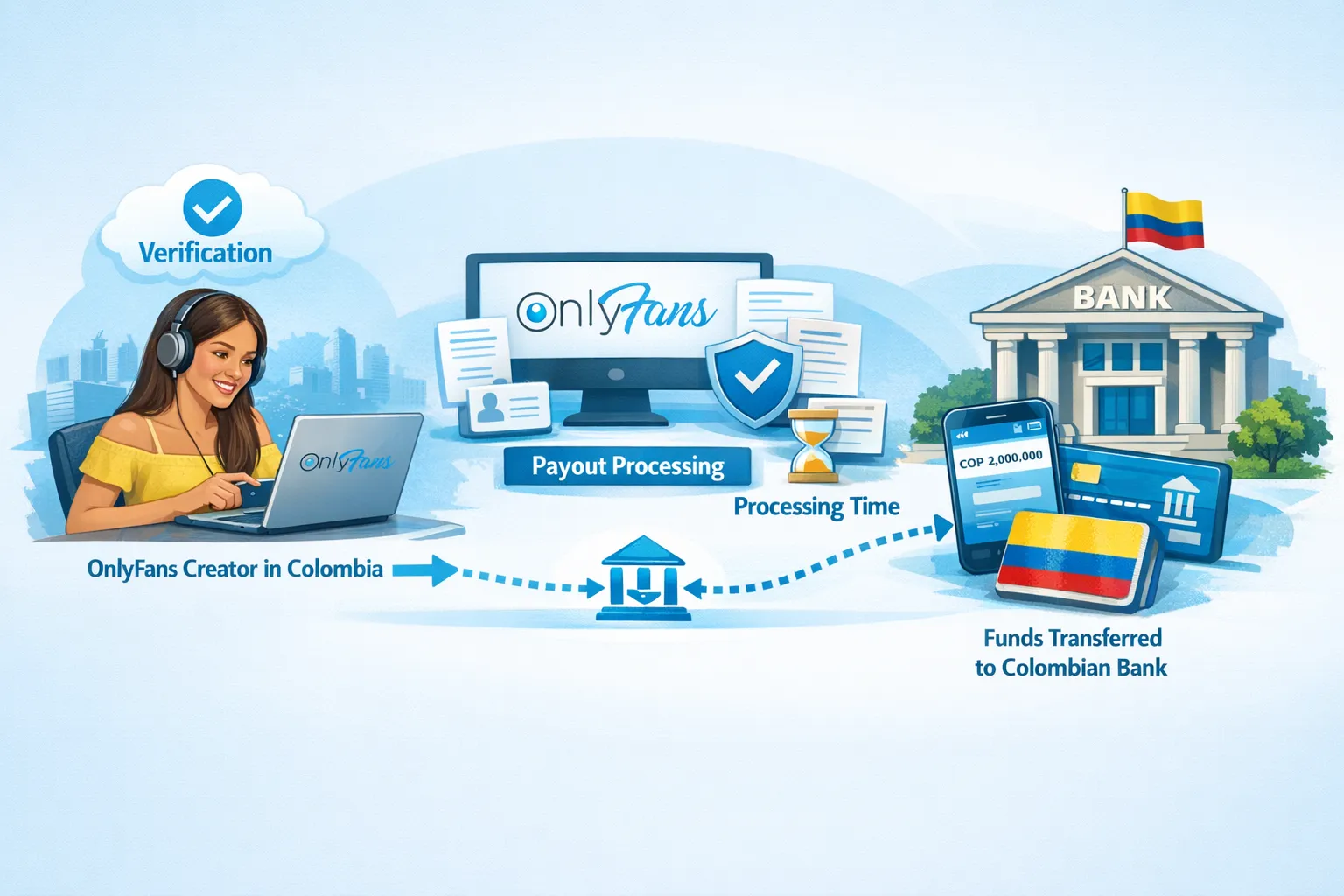
The safest way to withdraw from OnlyFans in Colombia (summary)
If you want the most reliable outcome, do this in order:
- Make sure your identity and bank details match perfectly.
- Check your OnlyFans dashboard for the payout methods actually available in Colombia.
- Ask your bank for their exact instructions to receive international transfers.
- Withdraw, screenshot the payout confirmation, and track status.
- If it shows “paid” but hasn’t landed, escalate to your bank’s international transfer team first.
That combination solves the majority of payout problems creators face, without drama and without guessing.


Bereit, deine Karriere zu transformieren?
Schließe dich Hunderten von Creators an, die bereits sechsstellige Beträge verdienen.
Diesen Artikel teilen
Beste OnlyFans Agentur
Europas führende OnlyFans Management Agentur.

100% Kostenloses Ebook
Hol dir unseren Leitfaden und entdecke die Geheimnisse des OnlyFans-Erfolgs.
100% Kostenloses Ebook
Hol dir unseren Leitfaden und entdecke die Geheimnisse des OnlyFans-Erfolgs.